Brizy Cloud: Blog post article not showing

To date 3 blog posts have been published fine, but my latest post I've created & published today appears blank when you read it (just header & footer). NOTE its appears in the archive as an article to read with headline/image/excerpt - but blank when your read?? Any help appreciated, Gary.
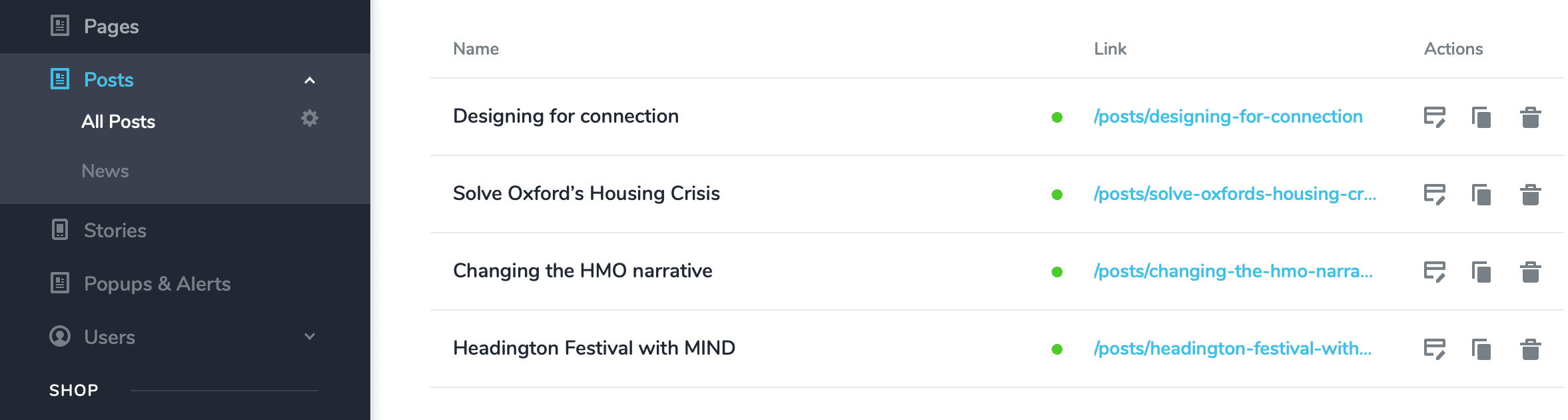
BLOG archive
POST thats blank
-

Hello Gary,
Content for your blog post "Designing for connection" is missing in the Brizy Cloud editor as well. Could it be possible that after adding the content, you did not save your work?
0 -
Yep, I definitely saved it.
I've tested this by logging out / back in again and if I then edit the post all the content is visible??0 -
Hello Gary,
Since the content is missing from the editor, I guess you will need to add it again.
0 -
OK, I've tried adding a new post, no luck. Have duplicated a previous post which partly works - it shows the content but not of the new post, of the post I duplicate from!!! Even more weird is that the archive page shows the preview headline feature image / excerpt correctly but when you read article is displays the post I duplicated from!?!?!
Any clues / help appreciated. 0
0 -
Hello Gary,
You are following one approach for adding blog post content to the first three blog posts and another approach for the fourth blog post. Kindly watch https://jmp.sh/4fG9juj7 where I explain how you can display the content correctly for the fourth blog post.
0 -
OK, thanks for explaining - would you recommend option 1 or 2 method - or does the way I've built the 1st three allow for more flexibility in content layout ?
Also, can I check - do you have full access / editor rights to all Brizy Cloud sites as I don't recall sharing any a/c or p/w details?0 -
Hello Gary,
The Rich Text editor restricts your ability to stylize blog post content. Developing the fourth blog post following the approach used in the first three, will give you flexibility to stylize your blog post content using all the Brizy elements.
Yes; Brizy Support team has administrative access to Brizy Cloud projects.
0 -
Thanks.
Some of the sites I am developing for my clients I have signed an NDA for - can you remove your admin access please as I will be in breach of my contractual agreement. Thanks for your understanding.0 -
Hello Gary,
A SAAS business require admin access to client accounts to manage the service, perform maintenance, and provide support. However, this access is usually limited to what's strictly necessary and is used only for those purposes. Administrative access is used only when necessary for providing the service and the data accessed is treated with the utmost confidentiality.
Other SAAS businesses including web hosting services, email hosting services, appointment booking services, billing solutions, help desk software also have admin access to customer accounts. They fix account specific issues using this access.
Have you made a similar request to another SAAS provider? What was their response?
0 -
Hi,
I wasn't aware of this requirement when I signed up, I figured it was like the Brizy WordPress solution. No doubt in the T&Cs.
For some of my clients I won't able to use your service (as some are start ups / new product launches etc) or for that matter other SAAS providers, if this is indeed the standard across the industry.
I will check with them / take advice anyhow. I can see how full access support and maintenance makes total sense for the average user / general commercial situations.
Maybe, as a workaround, could I send you / Dimi an NDA to sign for my company then this will cover my client NDAs? Just a thought.
Regards, Gary0 -
Hello Gary,
Please send us the draft NDA document. We will look at it and get back to you with our feedback.
Even for WordPress websites hosted on a shared or a managed cloud server, your hosting provider has administrative access to your websites. In case of Self Managed VPS or a dedicated server, the hosting company does not have admin access.
0
Please sign in to leave a comment.
Comments
11 comments