Brizy Cloud popup used in wordpress (display condition)

I set 1 display condition (on click), but why does it say 2 display conditions under the popup setting? And, it does seem that the form pops up on page load.
I don't want the form to popup upon page load. How can I do that?
Thanks!
-

Hello Makiko,
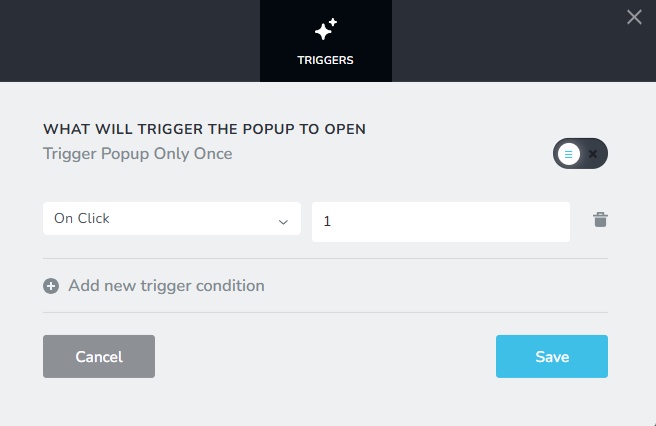
Kindly ignore the notification about two Display Conditions. You have added a single Trigger Condition. This condition will trigger your popup 1 second after the user clicks somewhere on your website for the first time. Ideally the pops should not trigger on page load until the user clicks somewhere.
 0
0 -
Oh... I want to make the form to pop up when a visitor clicks a button, not just click somewhere... Is there a video how to link Brizy Cloud popup to a button in wordpress page?
Thanks.
0 -
Hello Makiko,
With the Brizy Popup builder, you can setup two types of popups.
-
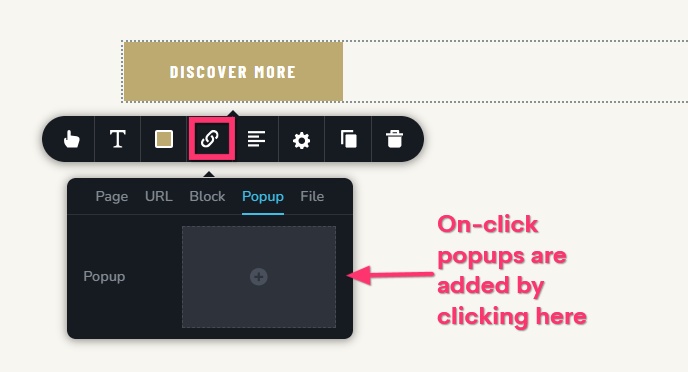
On-click popups. These popups are triggered when a visitor clicks a button, icon, text or an image. You design an on-click popup by selecting the popup tab under the link toolbar. On-click popups do not have Display and Trigger conditions.
- Conditional Popups. These popups are triggered automatically when a condition is fulfilled. You design conditional popups under CMS > Popups or in a separate Popup project. These popups have trigger and display conditions.
Setting up an on-click popup in WordPress is possible only if you install Brizy and Brizy Pro plugins. You have designed a conditional popup in Brizy Cloud and when you embed it to a WordPress project, your popup will get triggered when the user clicks anywhere on the browser and not specifically on a button.
0 -
On-click popups. These popups are triggered when a visitor clicks a button, icon, text or an image. You design an on-click popup by selecting the popup tab under the link toolbar. On-click popups do not have Display and Trigger conditions.
Please sign in to leave a comment.
Comments
3 comments