How to collaborate?

Hello, I'm trying to organise collaboration. The collaboration link just opens the live page, no option to comment or collaborate. I added a user to be sure. I've also added a second team member with another of my email addresses and the confirmation link just opens up with this shown in screenshot.
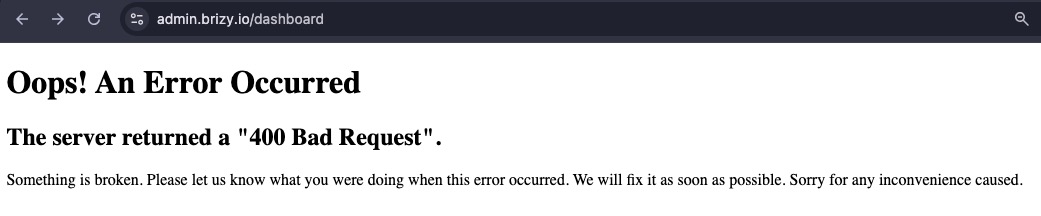
Now I go to https://www.brizy.io/account/member and it tells me to get a free trial of the service I've paid for, and I am logged in. I resolved that problem, looks like it was I was logged in as the user I added. There was no option to specify them as an editor or any other role.
It all looked so easy in the tutorial videos!
-

Hello Ian,
Kindly invite a collaborator as a Team Member. They must first sign up with Brizy Cloud and then accept your invitation to join your workspace; please note the sequence. Once they have become your Team Member, they can follow the procedure at https://jmp.sh/QYBLP3D2 to add their feedback to your project.
0 -
Hi Kc,
I think adding comments is the easy part. Getting to a point where someone has permission to add comments is hard. I seem to have got my own email address able to add comment on any of sites (achieved only after resetting the second users password - which many clients won't have the skills to do. In addition, I wouldn't want clients to add comments on other clients websites as apparently is the case now. Why should it be for every site in the workspace, not one website. I have also been unable to add more workspaces, they just get duplicated then deleted all automatically.
There isn't any indication of which account I'm logged in with, I know know I'm logged in because I can logout.
I've looked at team members whilst logged in with my admin account. The team member I added to my Pro account as an Editor is still pending even though I have logged in with both accounts. Must both the client and the designer be a paying subscriber to collaborate? That's how it looks.
0 -
Hello Ian,
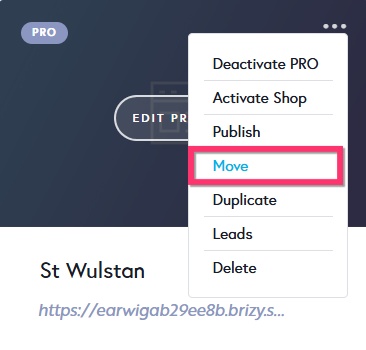
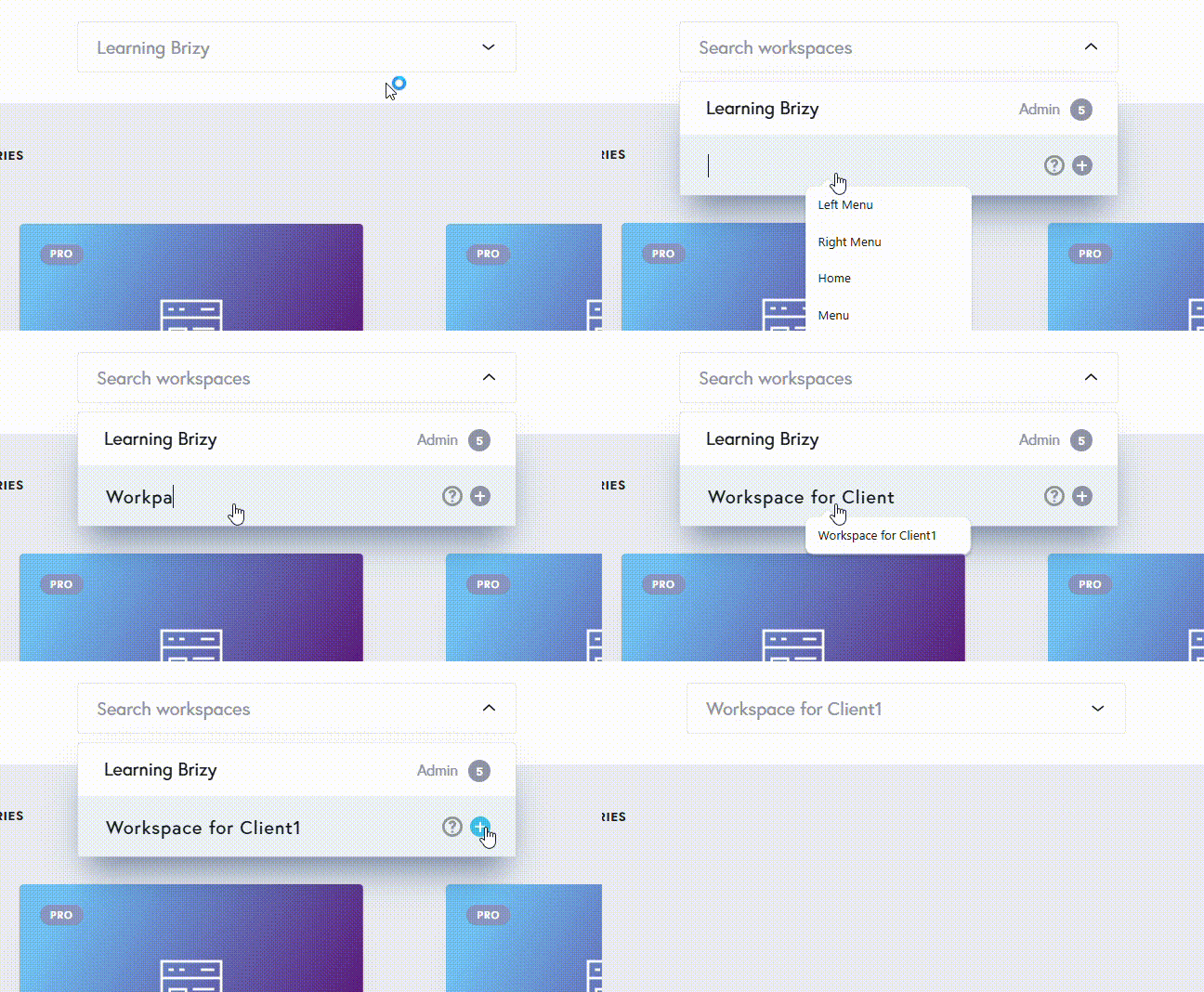
Kindly create one workspace for each client and move their projects to the appropriate workspace. After segregating client projects into their own workspaces, invite your customers to join each workspace as a Team Member. Use the "Move" option in the project thumbnail to move projects from one workspace to another.
I added a workspace in your account for testing purpose. It worked. You can add multiple workspaces.
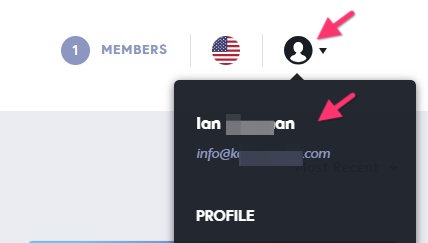
To check which account you are logged in to, click on the profile icon towards the top right corner and you will see the "Account Name" and the Email address.
Immediately after a Team Member has accepted your invitation to join your workspace, if you see their status as "Pending", kindly reload the Brizy Cloud dashboard to update the status of the Team Member. Your client and designer can be using Brizy Cloud trial plans before accepting your invitation to become a Team Member. They don't need to purchase a PRO plan.
0 -
Thank you. Still had some problems with workspaces but I have it working now. Still trying to sort out users for collaboration. I invite the user, they get the "You've been invited to collaborate!" email. The link in the email says to "Get started" which takes them to login screen. There is no password provided and no prompt to set a password, so what do they use to login if they cant or won't use Google or LinkedIn?
When I tried it before, the only solution was a password reset but that I am certain will be too complex for those I'm building the site for. Eventually complete resetting the password.. I have just been sat next to the second user - the client - trying to help login. I say to tap the icon as I put my finger right over the top of the icon that is right in front of them, telling them how to login. Then it's "Invalid credentials". Total nightmare.
0 -
Hello Ian,
When you invite a client or a designer to join your workspace, kindly give them this two step process to join your workspace. They must follow the sequence of steps described below. (If they do not follow the right sequence, the process could be messy)
I have sent you an invitation to access my workspace in my Brizy account. To access the website projects, kindly follow these two steps in the given sequence.
- Sing up with Brizy at https://www.brizy.io/account/signup
- In the invitation email I sent you, click on in the "Get Started" Link. This will give you access to my workspace
0 -
I wish it was that easy. Honestly I've been sat next to them on their computer, gone through two password resets so far.
The "Get started" link in the email doesn't log them in and doesn't ask them to login, instead it prompts them to create a new account. Without me, they wouldn't have got anywhere near this far. I've solved several problems for them on the way to getting this one problem solved.No problem logging in but instead of any collaboration, they get prompted to a start free trial of Brizy. No mention whatsoever of the website they have been invited to.
0 -
Hello Ian,
Have a look at how the Team Member invitations are expected to work at https://jmp.sh/1StSrCaB if your client follows the two step process outlined above. As you can see in the screen recoding, it is very simple process, if the recommended steps are followed.
The "Get started" link in the email doesn't log them in and doesn't ask them to login, instead it prompts them to create a new account. This happens if the client had not signed up with Brizy first (as recommended). If he followed the recommended two step process, it would have been a smooth process.
Your client will be prompted to a start a free trial if he attempts to access the Brizy Cloud Dashboard immediately after signing up. If he would follow the recommended sequence strictly and click on the "Get Started" link in the invitation email, he will not be prompted to start a free trial, but will go straight to your workspace.
0
Please sign in to leave a comment.
Comments
7 comments