i pulsanti non funzionano dopo aggiornamento brizy

Salve,
dopo gli ultimi aggiornamenti di brizy i pulsanti non funzionano!!
Quando rilasciate un aggiornamento brizy il mio sito da sempre malfunzionamenti, io non posso continuare così !!
Cosa devo fare per risolvere i problemi?
URGENTE!!
-

Hi Laura,
Thanks for reaching out, and I’m sorry to hear about the issues after the recent Brizy update.
Could you please try making a small adjustment to the affected blocks? For example, adjust the width slightly or add 1px padding, then save the page and preview it on the front end to see if that fixes the issue with the buttons.
If that doesn't help, please feel free to provide your site’s login details so we can take a closer look. Kindly add us as an Admin user to your WordPress Dashboard and send the following details to communitysupport@brizy.io.
Community Post link: https://support.brizy.io/hc/en-us/community/posts/28524370119186
WordPress Admin URL:
Username:
Password:Best regards,
Ariel H.0 -
Hi Laura,
Thank you for your cooperation.
I checked the page, and it looks like the only button that isn’t working is the one at the top right, next to the navigation menu. It appears there’s an issue with how it’s linked to the block.
I recommend changing the link type to URL, similar to how the other buttons are set up. You can use the block’s ID (e.g.#block-id) as the link. Please also review any other buttons that may be linked the same way and update them as needed.
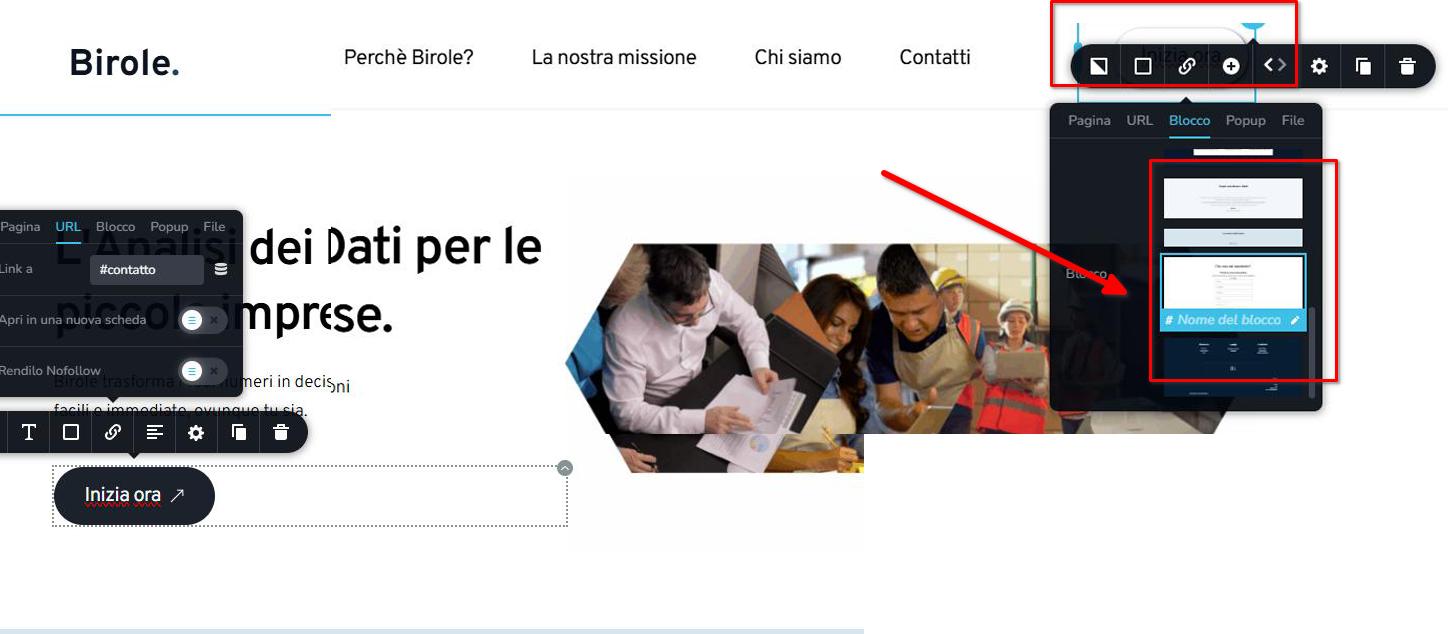
Best regards,
Ariel H.0 -
Ok, grazie Ariel.
0 -
Vorrei cambiare la mia e-mail per le comunicazioni di supporto tecnico, come posso fare?
0 -

Hello Laura,
Do you want to receive Brizy Support emails and notifications in your info@.....web.it Inbox? We can switch that for you.
0 -
Buongiorno,
preferisco support@birole.com
0 -
Hello Laura,
I have set the above email address for receiving Brizy Support emails and notifications. Notification for this comment also should come to this Inbox.
0 -
La notifica non mi è arrivata in support@birole.com
0 -
Hello Laura,
At our end, we have correctly set the above email address for sending Brizy Support emails and forum notifications.
Have you checked your SPAM folder for the notification?. If you continue to face this issue, you may need to whitelist the domain brizy.zendesk.com in the Certified Email system you are using.
0
Please sign in to leave a comment.
Comments
9 comments