Font issue and button link issue

Hi, I'm seeing more problems with Brizy as of late than in previous years. I'm working on www.theyonder.net for my current project.
For example, I have two issues that are driving me nuts that never used to be an issue for me.
Firstly, the button will not scroll to a section on the same page. Yes, I have the section labeled. The top menu works to link to the sections, but the button at the top called "learn more" will not link/scroll.
Secondly, the Google font cause lots of issues. Today, after completing my site and having all of my fonts all nice and pretty, the damn thing changed much of my fonts. I thought I solved the issue by going into the fonts tab and deleting the ones not working and then re-adding them. That worked for a moment, and it changed my fonts yet again.
So, for a workaround for now, I am downloading the fonts, then uploading them and this seems to be working at least for now.
Brizy, please look into these issues. I don't understand why more and more things break now with your web builder.
-

Hello Glen,
The feature to add an anchor link by selecting a block from the list of blocks is broken at the moment.

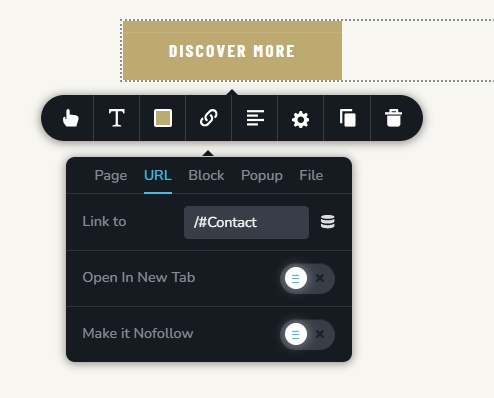
While we are taking time to fix this bug, to fix this issue in your project , kindly use the URL tab of the Link tool and type /#block-name. For instance, if the name of your block is "Contact", type /#Contact in the URL field to link to the Contact block.
 0
0
Please sign in to leave a comment.
Comments
1 comment