Menu, Header and footer dissapear with latest update

Hi,
All the websites for my clients have lost their Menu, Header and footer.
When i adjust the padding with -1 or 1 then the appear again. But it's a lot of work to adjust all websites.
Do you know when the new version/update will be available and all issues will be solved?
Thank you for your help.
Cheers,
Walter.
-

Hi Walter,
Thank you for reaching out.
We've received similar feedback recently, and we've already brought this to the attention of our team. We understand how frustrating this can be, especially when you're managing multiple client sites. While it may take a bit more time to fully address the issue, please rest assured that the issue is being looked into.
We truly appreciate your patience and understanding.
Best regards,
Ariel H.0 -

What do we do in the mean time??
Will changing the padding work? Bit of a stop gap.
To have something so important disappear from my website is a bit of a disaster.
Thanks
0 -
It also seems the global feature has dissapeared.
0 -

Hello Edward,
Making a minor change to the missing block (like increasing the padding by 1 pixel), and saving the project is the only solution at the moment. We can offer help to make this change if you send us credentials.
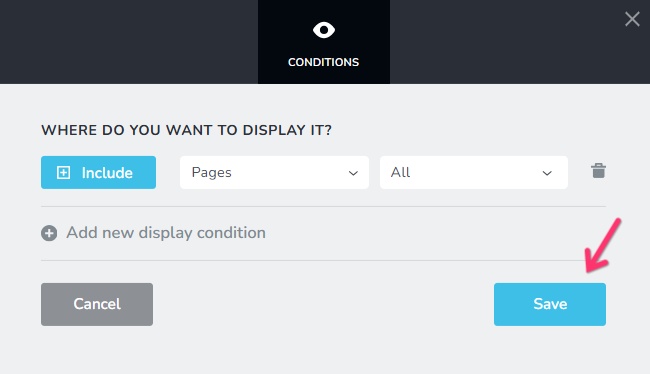
If another global blocks is missing, go to the block settings, access the "Display Conditions" for the global block, click on the "Save" button and save your project to make it visible again.
 0
0 -
Thats worked :)
thanks
0
Please sign in to leave a comment.
Comments
5 comments