Website scrolling gets stuck

-

Hello Justin,
We apologize for the inconvenience.
Do you have a popup on your website? If you do, kindly open the popup in the Popup Builder and make these changes and see if the issue gets resolved
- Make a minor change like adding a space to any text
- Resave the "Trigger" and "Display" Conditions for the popup following the procedure at https://jmp.sh/FMFcRXsZ.
- Update your project by clicking on the "Update" button at the bottom right corner.
0 -
In following these directions, I am unable to get the page to update. It perpetually spins, but does not complete the update.
I have turned off my firewall during this process with no change.
Please advise.
0 -
As an FYI, I’ve also disabled each and all of my plugins and disabled and re-enabled Brizy and Brizy pro. Still unable to update.
0 -
Hello Justin,
Can we have a look at your project to troubleshoot this issue? Please add a new user to your WordPress Dashboard and send the following details to our email: communitysupport@brizy.io
- Support Forum link: https://support.brizy.io/hc/en-us/community/posts/28337054104466
- WordPress Admin URL:
- Username
- Password
Please let us know in this forum when you send us the email.
0 -
Email just sent.
0 -

Hi Justin,
Thank you for sending over the site credentials.
We were able to log in, but it looks like the user account provided doesn’t have administrative access. Could you please update the account to an administrator role so we can proceed with the necessary checks?
Let us know once it’s updated.
Best regards,
Ariel H.0 -
User updated.
0 -
Hi Justin,
Thank you for your cooperation.
The issue you're encountering appears to be similar to the one discussed in the following support thread:
https://support.brizy.io/hc/en-us/community/posts/21281497557394It’s possible that Wordfence’s Extended Protection was previously enabled on your site. When activated, it adds a file called "wordfence-waf.php" to your root directory and modifies the ".htaccess" file to load that file before anything else. As mentioned in the thread above, we resolved the issue by removing the "wordfence-waf.php" file and resetting the ".htaccess" file to its default state. I recommend trying the same on your site to see if it helps resolve the issue.
For reference, I’ve imported your page into my staging site for testing, and the issue does not appear there. You can view it at the following link: https://staging.brizywp.online/demo01/dontscroll/
Please try this and let me know how it goes.
Best regards,
Ariel H.0 -
After following your suggestions, my site is now unable to load it's live state and throws a 500 Error.
I am able to access the Admin dashboard.
I will restore my previous site and attempt to uninstall, delete and reinstall Wordfence.
0 -
Hi Justin,
Thank you for the update.
If you need a hand troubleshooting further, feel free to share temporary cPanel access. I’d be glad to help check the error and the .htaccess file and any other files that may have been added by Wordfence’s WAF.
Best regards,
Ariel H.0 -
Hi Ariel,
I have manually removed all of the extended protection for Wordfence; Removed all of Wordfence's data and deleted the plugin entirely...then restarted the server.
Still no luck with the scrolling issue from Brizy. Please advise.
0 -
Hi Justin,
Thank you for the update.
To investigate this further, could you please allow access to your site again? It would also be helpful if you could include your hosting panel credentials so we can check for any server-side configurations.
Kindly send the details securely to communitysupport@brizy.io, please include 28337054104466 in the subject line to help us track your request more efficiently.
Looking forward to your response
Best regards,
Ariel H.0 -
Hi Justin,
I just wanted to follow up as we haven’t received the credentials yet. When you have a moment, please send them over so we can continue investigating the issue.
Best regards,
Ariel H.0 -
It was just resent.
0 -
At this point, Wordfence is completely uninstalled, with all aspects deleted, yet the scrolling issue remains. In addition to the scrolling issue, I (had) a button in my header that displayed a popup. This button simply stopped working at this same time. I have since switched this from a popup to a URL instead, so it works now, even after scrolling has frozen.
I am hoping this helps diagnose this issue as my site (and therefore referral source) has been inoperable for over a week.
0 -
Hi Justin,
Thanks for your update.
We just wanted to let you know that we haven’t received the credentials from Cloudstick yet. Additionally, we’ll need access to your WordPress Admin so we can further investigate the issue from our end.
Whenever you're ready, please send the details securely to communitysupport@brizy.io
Looking forward to your response.
Best regards,
Ariel H.0 -
Resent Cloudstick credentials again.
Resent Wordpress admin credentials again also.0 -
Hi Justin,
Just a quick update, scrolling on the page appears to be working now.
It looks like the issue was coming from the scroll-to-top popup. I’ve temporarily set it to draft, which seems to have resolved the scrolling problem. We’ve seen a similar issue on another website before, and in their case, resetting the display conditions on the popup fixed it, unfortunately, that solution didn’t work on your site.
I do have an alternative solution for the back-to-top button. If you'd like, I can go ahead and implement it for you.
Also, I noticed that the popup is currently set to display only on tablet and mobile devices, just wanted to confirm if that’s intentional.
Best regards,
Ariel H.0 -
Hi Ariel,
Yes, please implement the alternative solution. You can implement for all devices.
Please advise once completed so I can test.
Thank you.
0 -
Hi Justin,
I’ve lost access to your website. When you get a chance, could you please restore it? I’d like to add a bit of CSS and a short JavaScript snippet for the back to top button, as discussed.
Best regards,
Ariel H.0 -
Hi Justin,
Thank you for the update.
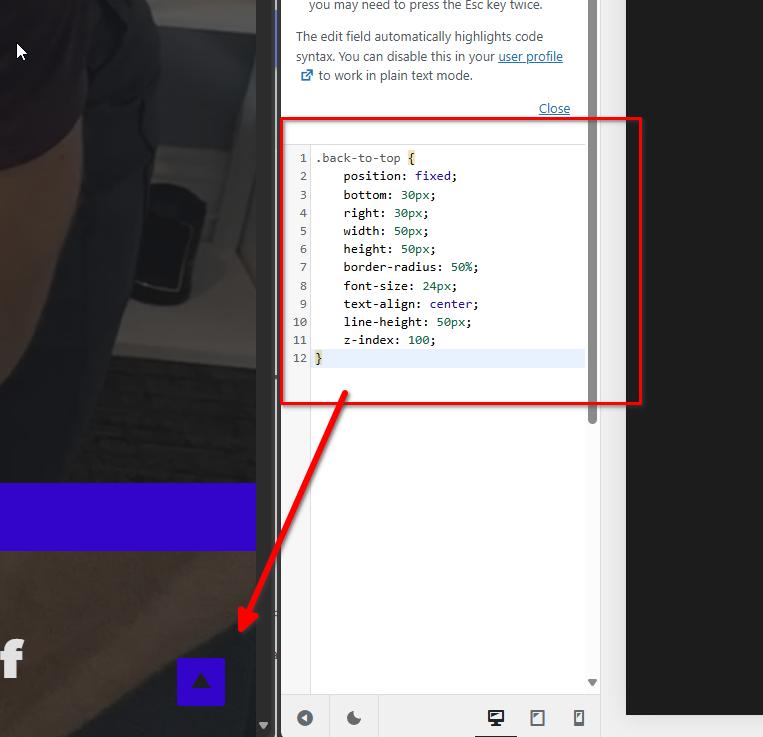
The icon has been added to the global footer, and we've also included CSS to position it at the bottom right of the screen. Feel free to replace the icon with one of your choices if needed.
Best regards,
Ariel H.0 -
Thank you Ariel. How/where might I change that icon?
0 -
Hi Justin,
Thank you for the update.
You can change the icon by editing the page. Just head over to the global footer, while the icon might be slightly covered by the update bar, you should still be able to click on it and replace it. The screencast demonstrates exactly how to do it: https://youtu.be/pLVTtjYqfvM
Please try this and let me know how it goes.
Best regards,
Ariel H.0
Please sign in to leave a comment.
Comments
23 comments