Malicious script (sienna.min.js) injected in page HTML but not visible in editor

Hello Brizy team,
I’m currently using Brizy Cloud to build my website, and I’ve encountered a serious issue related to a malicious script being embedded into my published page's HTML.
The script being loaded is:
<script src="https://website-widgets.pages.dev/dist/sienna.min.js"></script>
I’ve already:
-
Removed all custom code from the Global and Page settings (Header/Footer)
-
Removed all visible Embed blocks from the editor
-
Searched through each block on the page and cannot find this script anywhere
-
Tried publishing again and cleared all cache (including Cloudflare)
Still, the script is showing up at the end of the <body> tag when inspecting the public source (Ctrl+U) and is being executed on page load.
I suspect this may have come from a previously imported block or external template, but now I cannot remove it because it’s not visible in the Brizy UI.
Can you please:
-
Help me locate where this script is stored
-
Assist in removing it from the page permanently
-
Suggest how to avoid this in the future (maybe restricting embeds from unknown domains)
My website: https://www.e-smart360.com
Thank you very much in advance.
-

Hello Emmanuel,
You can disable the recently introduced Sienna Accessibility widget from your website by turning off the "Accessibility Widget" toggle switch under CMS > Project Settings > Site > General
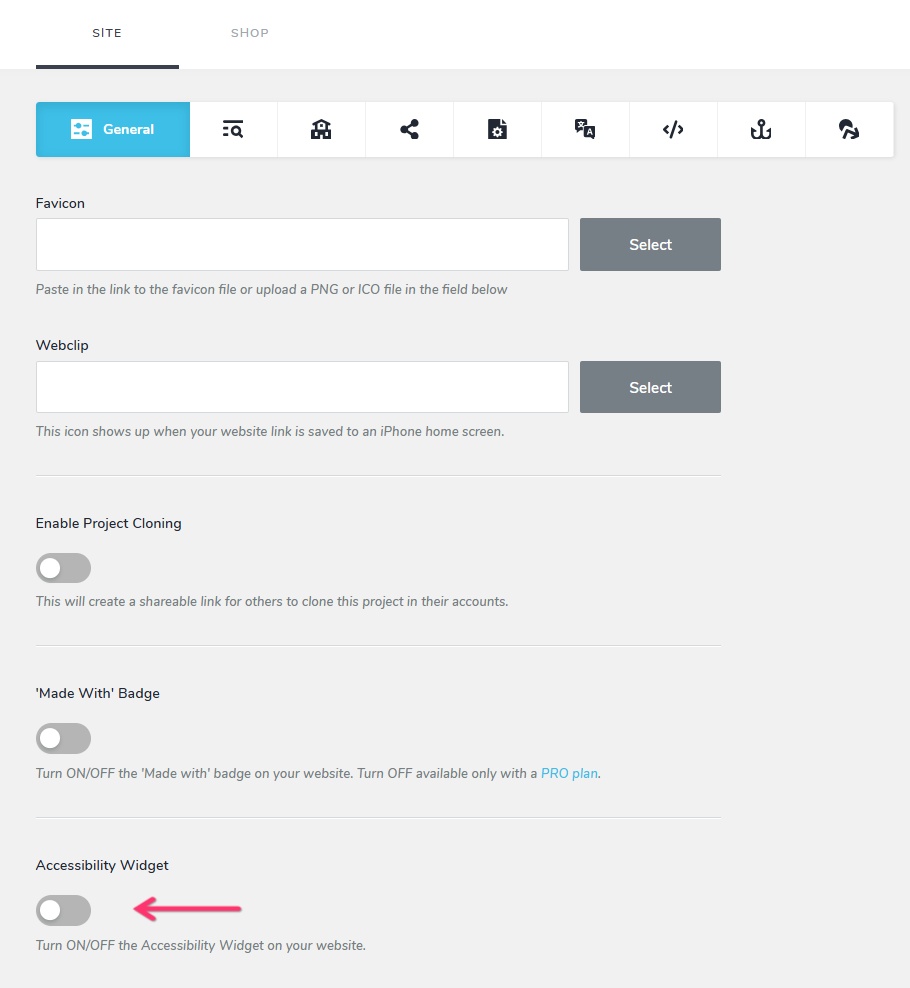
Did the Sienna script get flagged as "malicious" by an audit software? Please provide a screenshot of the audit report if it did.
0
Please sign in to leave a comment.
Comments
1 comment