Variant Image Not Displaying When Selected (Dropdown Issue)

I hope you're doing well.
I'm facing an issue with product variants on my store. Normally, when a customer selects a variant (for example, from a dropdown list), the corresponding image should automatically appear. However, this isn't working on my site at the moment.
After some research, I discovered this is a known limitation, especially when variants are created using the dropdown list (liste roulante) instead of checkboxes or color/size tabs. Unfortunately, I can't use the checkbox or color options due to the other known bug related to the color checkmark not displaying properly.
Could you please assist or suggest a workaround? This feature is important for showcasing the correct image with the selected variant.
Thank you in advance for your support.
Best regards,
0
-

Hello Mahfoudh,
Kindly add your product options as variations and then upload different images for different variations. Then when users click on each option, they will see a different product image. Have a look at https://chameleond963c929.brizy.site/shop/blooming-ritual-pourer and select colors "Black", "Pink" and "Green" and you will see a different image for each color.
I have added a variation for each of these colors like these. Have a look at https://jmp.sh/RdHmfUeZ for the procedure to add these variations.
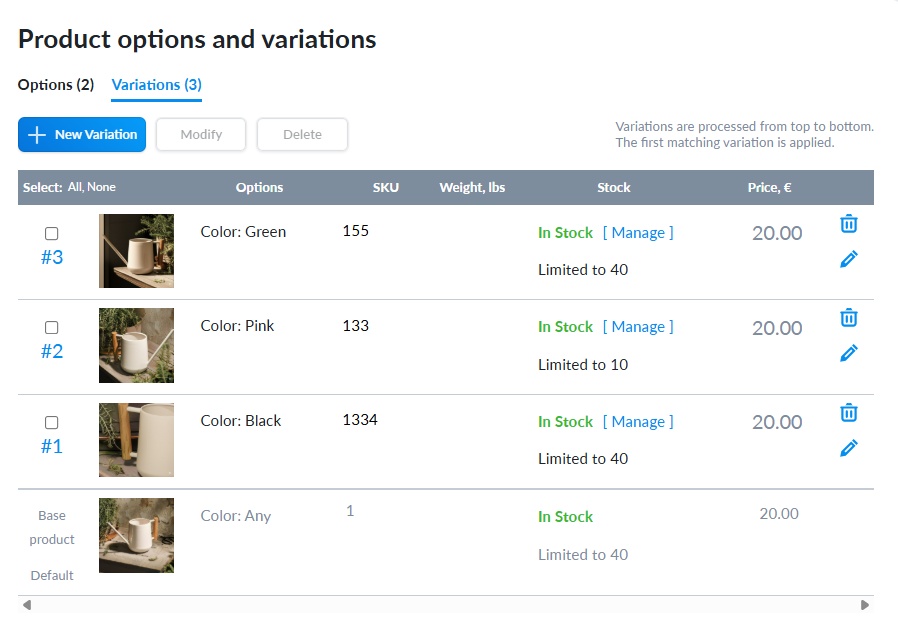 0
0 -
Hello George,
You nailed it again.
Thank uou very much!0
Please sign in to leave a comment.
Comments
2 comments