Migration and website menu

Hi Support
Please could I have help finding the cloud dashboard to complete the migration and also the menu bar is not working properly on the website – is there something that we need to update or do to get it working?
Many thanks.
Jenny Parsons
-

Hello Jenny,
Please check if you have these Brizy and Brizy Pro versions. If you do not, kindly update to these versions.
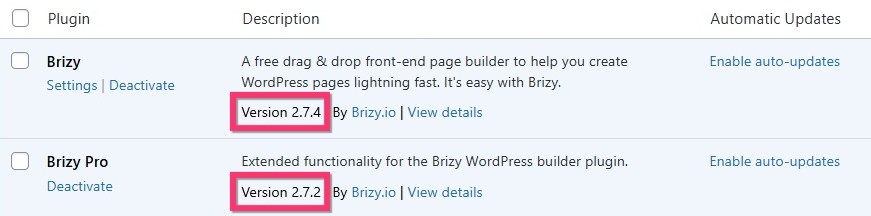
As the second step, make a minor change to the header block (like increasing the padding by 1 pixel), click on the "Update" button towards the bottom right corner and check if the menu issue get resolved.If you need help with this, kindly give us access to your project. Please add a new user to your WordPress Dashboard and send the following details to our email: communitysupport@brizy.io
- Support Forum link: https://support.brizy.io/hc/en-us/community/posts/28299052822930
- WordPress Admin URL:
- Username
- Password
Please let us know in this forum when you send us the email.
To see the projects you have in your Brizy Cloud dashboard, kindly sign in to your Brizy account at https://www.brizy.io/account/login and click on the "Go To Brizy Cloud" button.
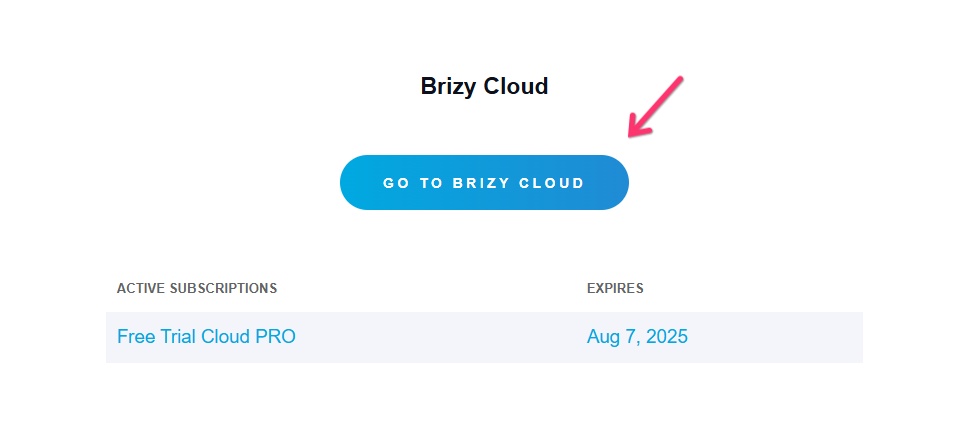
You will see a project that needs migration. If the project is not important for you, feel free to delete it. If you want to migrate it, kindly follow the procedure at https://support.brizy.io/hc/en-us/articles/25721772363666
0 -
Hi - we're still having probs with the menu - and just about to send over the above details
Many thanks
0 -

Hi Jenny,
Could you please check it again on your end? As my colleague KC suggested, the issue seems to be related to a version mismatch. Updating Brizy from 2.5.10 to version 2.7.14 has resolved the problem.

Best regards,
Ariel H.0 -
Thank you - that's great :-)
0
Please sign in to leave a comment.
Comments
4 comments