Custom Domain Not Connecting

Hello, I have tried connecting my domain to my Brizy Cloud website, but it does not seem to be able to connect. I double checked the settings, and even after 24 hours, the site was still not connected to the domain. I work with websites and domains a lot and it should not take this long to issue an SSL certificate and get the site live? Can someone please assist? Thank you.
-

Hi Erica,
Thanks for reaching out, and I'm sorry to hear you're having trouble connecting your domain.
To better assist you, could you please share the domain name you're trying to connect? Once we have that, we’ll be able to check the setup on our end and help you get it sorted.
Looking forward to your reply.
Best regards,
Ariel H.0 -
Hello,
I'm still waiting on a solution? I replied back to your email, but I have not received a response? Below is my email reply.
"The domain I am trying to connect is encorebusinessdevelopment.com. I followed your instructions properly and added the A record and Cname record, which both appear to be accepted by the Brizy system, but for some reason it looks like the site certificate is not being issued by Brizy. I'm not sure if it has anything to do with the fact that I manage my domain DNS's in Cloudflare or not, but I did delete the previous A-record, and use yours to replace it. I hope this is not going to be an ongoing issue every time I want to connect a new site to a custom domain. Please let me know how how we can get this resolved quickly. Thank you!."
Can someone please help me get this resolved. It's already been 3 days. Thank you!
0 -
Hi Erica,
Thanks for your message. I checked the DNS records for your domain, and it looks like it's still pointing to Zoho’s servers, not to Brizy Cloud.
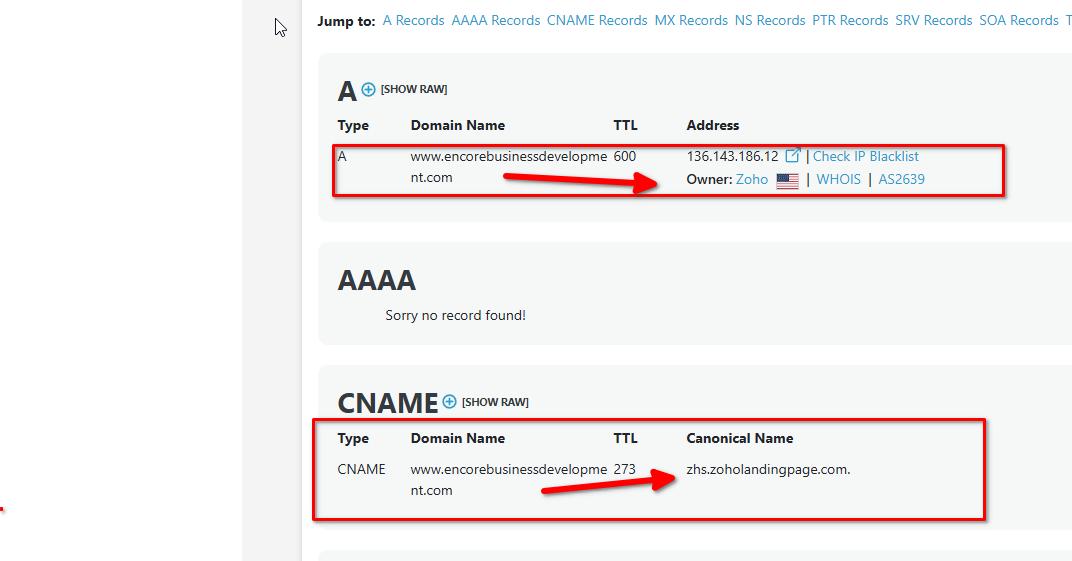
That’s why you’re seeing an SSL error when you try to visit the site at https://www.encorebusinessdevelopment.comRight now, both the main domain and the www version are set up to open a Zoho landing page. Since the domain isn’t connected to Brizy, we can’t issue a valid SSL certificate, which is what’s causing the security warning.
To fix this, you'll need to update your domain’s DNS settings and point it to Brizy Cloud instead. You can find the correct settings in the domain connection panel inside your Brizy account. Once the records are updated, Brizy will be able to issue the SSL certificate, and the error should go away.
This is how it should look like in your CloudFlare DNS manager:
Please try this and let me know how it goes.
Best regards,
Ariel H.0
Please sign in to leave a comment.
Comments
3 comments