This issue where the page breaks due to an automatic update is unacceptable. It caused me a loss in revenue!

Hello, I’m the owner of a website where I sell my software.
The homepage displays information about the software along with images.
Over the past five days or so, I’ve noticed a sharp drop in sales.
Today, by chance, I visited my site—and I was shocked… I saw that no images were being displayed! It’s a shame I didn’t take a screenshot…
This isn’t the first time this has happened. It occurs rarely, but it does happen.
So I went into the Brizy editor, made a small change just to enable the “Update” button, clicked update, then reverted the change and clicked update again.
As expected, that fixed the problem. I had a feeling it would, since it happened before.
But this still isn’t acceptable!
It’s very likely that multiple potential customers saw the broken homepage—it looked unprofessional and they immediately left. That would explain the significant drop in sales.
The fact that this might have caused lost revenue is not something I’m willing to tolerate.
If you continue pushing silent updates that break pages, I’ll have to reconsider my options!
At the very least, you must send an email alert when an update might break pages!
I previously disabled automatic updates specifically to avoid this kind of issue. Later, I re-enabled them for security reasons.
The fact that this happened again makes me question whether I should disable auto-updates once more.
I expect a proper response to this unfortunate situation. I using the paid version (Brizy pro, subscription license)
Thank you.
-

Hello Gil,
We apologize for inconvenience that a Brizy update has caused. Turning off automatic updates for Brizy and Brizy Pro is recommended. You don't have to update the plugins, as soon as an update is available. Feel free to update when you have time to review the pages following the update. This will help avoid unexpected issues on your website.
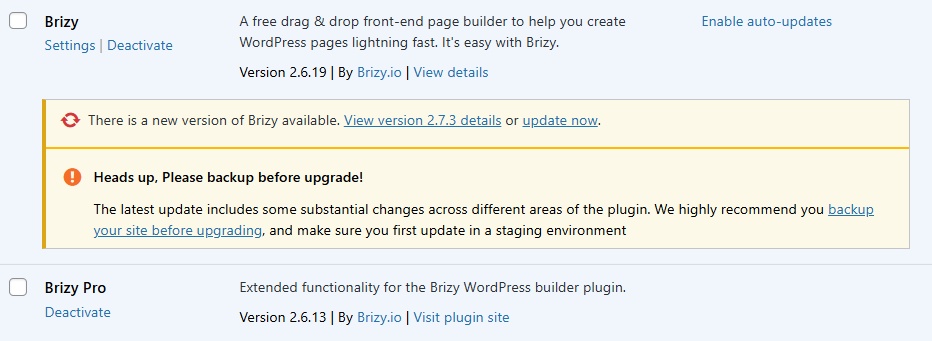
Even though we could not sent out a newsletter alert, we had a notification in the plugins area of WordPress. It said "The latest update includes some substantial changes across different areas of the plugin. We highly recommend you backup your site before upgrading, and make sure you first update in a staging environment"
 0
0
Please sign in to leave a comment.
Comments
1 comment