Possible Version Number Error in Brizy Free Plugin Update (2.510)

Hi Brizy team,
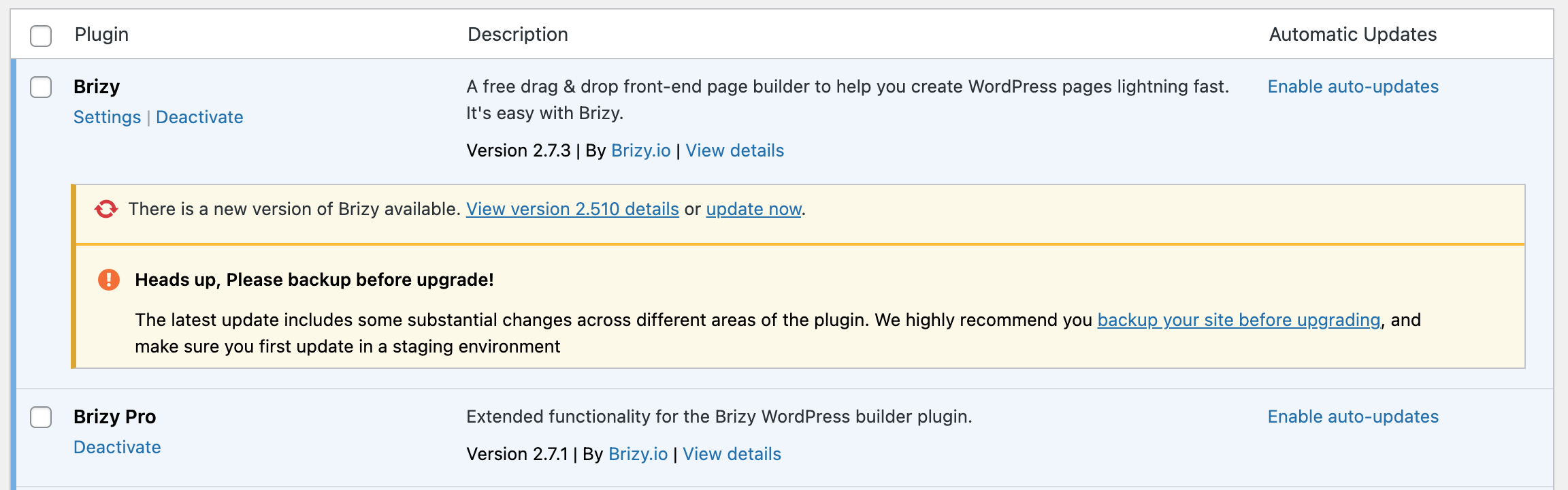
I’m not sure if this has already been reported, but I believe there may be a version number error in the latest Brizy (free) WordPress plugin update.
This is as of July 21, 2025.
WordPress is prompting me to update to version 2.510, but this seems like a typo—perhaps you meant 2.5.1? As it stands, WordPress treats 2.510 as a higher version than your current latest version (2.7.3) listed on your official site. This creates confusion and leads to errors, especially when auto-updates are enabled. In my case, it broke parts of my site due to incompatibility. I have manually uploaded the latest 2.7.3 version downloaded from your site, but WordPress tells me it's an old version.
If this is indeed an issue, could you please correct the versioning on your end to prevent these update conflicts?
Thanks so much for your work—Brizy is my favorite page builder, and I really appreciate the continued improvements!
Best regards,
Adam
-

Hi Adam,
Thank you for bringing this to our attention.
We’ve already escalated a similar version number issue to our senior support team. It seems to be affecting sites hosted on SiteGround, where WordPress displays an incorrect update prompt for Brizy version 2.510. Could you please confirm if your site is also hosted with SiteGround? This will help us better identify the root cause.
Looking forward to your response.
Best regards,
Ariel H.0 -
Hi Ariel,
Thanks for your quick reply. Yes, I confirm that I am using SiteGround for my hosting. It's interesting that it's affecting just those sites. Thank you for looking into it!
Many thanks,
Adam
0 -
Hi Adam,
Thanks for confirming that you're using SiteGround.
It seems this issue may be related to some caching on their end, as we haven’t seen the same version warning appear with other hosting providers. You can safely ignore the prompt, but if you'd prefer to hide it from the Plugins area, you can add the following code to your theme’s functions.php file or as a PHP snippet using the WPCode Lite plugin.
function hide_brizy_update_notice( $value ) {
    if ( isset( $value ) && is_object( $value ) ) {
        unset( $value->response['brizy/brizy.php'] );
    }
    return $value;
}
add_filter( 'site_transient_update_plugins', 'hide_brizy_update_notice' );
Let me know if you need help implementing it.Best regards,
Ariel H.0 -

And also, SiteGround's dynamic cache system is breaking single elements (sliders in my case), but as you cannot disable it this script could be added to .htaccess (as suggested here https://www.siteground.com/kb/disable-dynamic-caching-website/)
<IfModule mod_headers.c>Header set Cache-Control "private"</IfModule>0 -
Thank you, Ariel and Antonio for the helpful replies! I will see what I can do to implement your suggestions.
Many thanks,Adam
0
Please sign in to leave a comment.
Comments
5 comments