Brizy Contact Form Could Not Send to Gmail.com and Form Format is out of Design

Good Day,
I have try in many way to get the contact form to send to my gmail but it not received.
Firstly I try to set up with gmail account mail with the following settings :
_____________________________________________
Activated the : Google reCAPTCHA
Email Account : Gmail
Email to : name@gmail.com
Subject : ABC Message
From Email : name@gmail.com
From Name : ABC Message
Username : name@gmail.com
Password : (password of name@gmail.com)
_____________________________________________
When I try TESTING to send my gmail account did not receive, with the message (Message did not send) but in Brizy Leads Received. How do I solve this errors ?
But when I try to do in Wordpress Mail with the following settings as above and chnage the the From Email : wordpress@domainname.com it works well at this moment.
And for the Contct Form Format is out of design, Once I duplicate the form and delete the form the design is back to normal.
Plugin Version : Brizy Version 2.7.3 and Brizy Pro Version 2.7.1
Please advise what I can do to improve the errors and what setting to do when using Gmail Account settings on the username and password ??
Thank You
Lawrence
-

Hello Lawrence,
When using the Gmail option of sending email notifications, to authenticate your request, kindly use a Google App Password in place of your Gmail password.
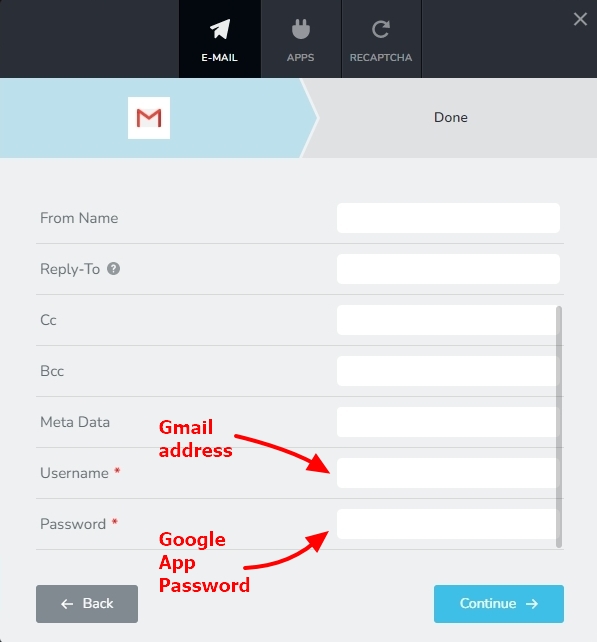
Have a look at https://support.brizy.io/hc/en-us/articles/360044216151 for the procedure to generate a Google App Password.
The "From Email" and the Username can be the same. However he "Email To" and "From Email" addresses must be different. Please use different email addresses for the "Email To" and "From Email". If you continue to face issue after following these guidelines, kindly share the URL of your form page. We will take a look.
0
Please sign in to leave a comment.
Comments
1 comment