Brizy PRO plugin not running asking for update

Hi, just encountered this - no notifications, just found out that some parts of my websites are not working.
This is not a good behaviour - it's not a problem to update, but I don't think that you should be the one to decide to turn off a paid plugin.
At least provide email notifications or something similar so that I know what's going on.
-

Hello Anton,
Every Brizy version has its corresponding Brizy Pro version. If Brizy and Brizy Pro versions are not compatible with each other, the Pro features will not work. These are the most recent and compatible versions. Kindly update to these versions fix the error in your WordPress dashbaord.
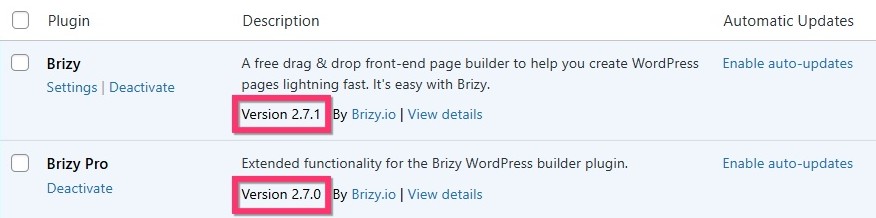 -2
-2 -

GLOBAL BLOCKS ISSUE REMAINS. An update to 2.7.0 and 2.7.1 and adjust the website. DO NOT RESOLVE THE PROBLEM.
0 -
Hi George, thank you for the reply.
I got it, I've already updated the plugins. The problem is that, the websites I've built several days ago for product launch got broken without any notification because the plugins were not updated. I have auto-updates for plugins disabled, and this brizy behaviour feels very unprofessional to say the least.
I don't want this to happen again, if you have a solution, let me know. But this should be certainly considered by the devs.
0 -
Hello Anton and Chris,
After updating to Brizy 2.7.1, make a minor change to the header block (like increasing a padding by 1 pixel) and update the project to make the header visible.
If certain element is not visible in the frontend, make a minor edit to the element (like increasing a padding by 1 pixel) and update your project to fix the issue.
0 -
Hi George,
You see, I don't have a problem with my websites right now. But this situation with the plugin being automatically disabled shouldn't have happened at all - this is the real problem.
And my real question is - why did this happen, and how not to make it happen again.
0 -
Hello Anton,
We haven't taken any action to disable Brizy Pro. A possible reason why you have experienced this issue is because Brizy plugin got updated from 2.6.22 to 2.7 and Brizy Pro did not. Brizy 2.7.0 and Brizy Pro 2.6.24 are incompatible with each other and hence you may have seen the notification "Brizy Pro is not running". When this happens, kindly wait for the update notification for Brizy Pro and update it. Alternatively, you could force the update notification by deactivating and then reactivating Brizy Pro.
0 -
George,
Once again, I bring to your attention - I have auto-update disabled for all plugins. I updated both plugins manually only after I got this "brizy PRO is not running..." message. Before that I was able to build two websites with no issues, and they were working.
0 -
Hello Anton,
The error "Brizy Pro is not running. Please update Brizy PRO to the latest version" is displayed when Brizy and Brizy Pro versions are not compatible with each other. We are not sure why you saw this error after updating both plugins to its latest versions.
0 -

Kc George –
The issue here for me (and I think the same complaint for Anton) is that, for some reason, WordPress does not notify that Brizy Pro needs an update. Yes, you can force an update but only if you know it needs one. So, if you do not happen to be in the Admin panel for a particular site with Brizy and Pro, you would have no idea that Brizy Pro needs an update. Pro just gets turned off, and of course all of its "extras." While I did get a notification from Wordfence for upgrading Brizy from 2.6.22 -> 2.7.2, there are no notifications whatsoever regarding Brizy Pro needing an update. The only way a dev would be aware of that is after upgrading Brizy to 2.7.2. But the point is, disabling Pro because an update is required is just not a professional way of doing updates, and devs suddenly realizing a bunch (or all) of their sites are broken.
Also, I just now deactivated Pro and then reactivated, and it still does not show an update is needed/available; Brizy Pro is "not running" but how do I upgrade it to 2.7.1 without deleting it and possibly losing my settings?
0 -
Sorry, I meant to also say that, I understand Pro 2.6.22 or .24 is not compatible with Brizy 2.7.x, but there should be some explanation of that in an email when Brizy 2.7 was released, so we would all know we need to immediately update both, and not be surprised when all of our sites suddenly break because Pro is disabled.
0 -
Hello Jeff,
Updates for Brizy and Brizy Pro are released from our end at the same time following the exactly same process for both plugins. The difference between the two plugins is that Brizy is hosted on the official WordPress plugin repository whereas Brizy Pro is not.
Updates notifications for plugins not hosted on the official WordPress plugin repository (those distributed outside of the repository) are usually delayed or not automatically available compared to listed plugins. This is because WordPress core update mechanisms rely on the repository for checking and retrieving updates for listed plugins. I guess we do not have full control over this situation.
If you see an update notification for Brizy, consider waiting for 24 hours before clicking on the "Update Now" option. Hopefully by then Brizy Pro notification will also appear.
0 -
Thanks, Kc G.
0
Please sign in to leave a comment.
Comments
12 comments