trying to bring my Go daddy DNS over to Brizy with no luck

0
-

Hello William,
To point your domain chamberlainexperiorgroup.com to your Brizy Cloud project, kindly follow these steps
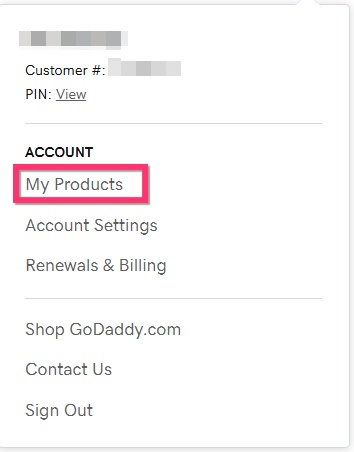
- Sign in to your GoDaddy account and towards the top right corner access your profile by clicking on your profile name and select "My Products"
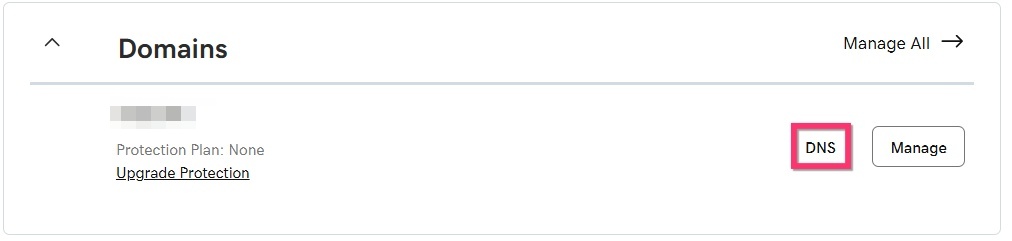
- Under the heading "Domains" next to your domain chamberlainexperiorgroup.com select the "DNS" option.
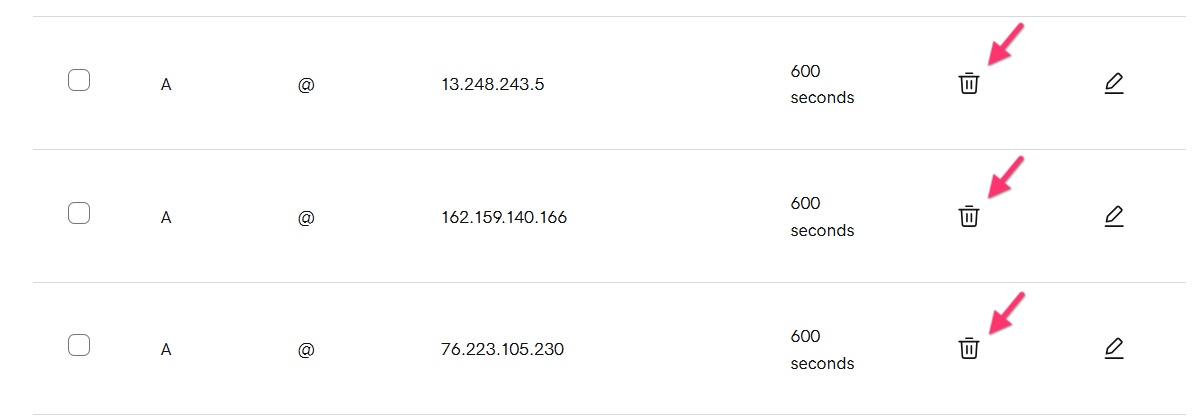
- Delete the three A Records pointing to external servers.
- Add a new A Record with these details.

- Edit the CNAME record data to egreta21fd79c.brizy.site

- Follow instructions under the heading "In case of SSL protocol error" at https://support.brizy.io/hc/en-us/articles/360041764052 to auto generate SSL certificate for your domain
0 - Sign in to your GoDaddy account and towards the top right corner access your profile by clicking on your profile name and select "My Products"
Please sign in to leave a comment.
Comments
1 comment