Version 2.7.0 issues

Wordpress is forcing me to update to the new version of Brizi Pro 2.7.0 and I'm having serious problems. Elements that appear in the editor are not visible online.
-

Hi Albert,
Thank you for reaching out.
Kindly share your WordPress admin login details with us so we can take a closer look. Please add us as an Admin user to your WordPress Dashboard and send the following details to communitysupport@brizy.io.
Community Post link: https://support.brizy.io/hc/en-us/community/posts/28087265030546
WordPress Admin URL:
Username:
Password:Please make a full backup of your site as a precaution.
Looking forward to your reply.
Best regards,
Ariel H.0 -
I've send it you the info. Thanks.
0 -
Hi Albert,
Thank you for the update.
It seems that the login is being redirected to WordPress.com, but unfortunately, it doesn’t recognize the username we’re using. This might be related to Jetpack’s Single Sign-On feature.
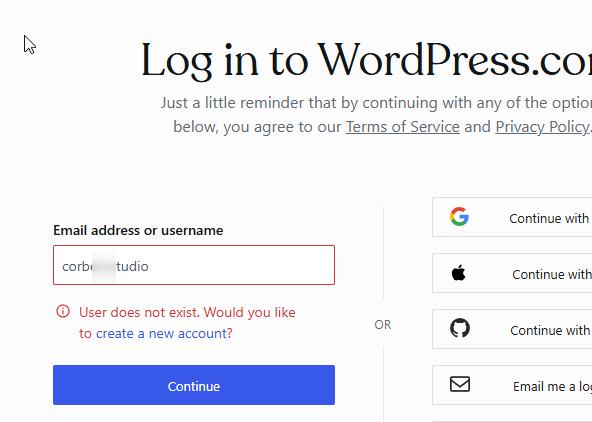
Could you please check the settings on your end, or consider temporarily disabling Jetpack so we can log in directly to your site?
Let us know once that’s done, and we’ll continue from there.
Best regards,
Ariel H.0 -
Now you can acces Jetpack is disactivated.
0 -
Hi Albert,
Thank you for the access, I'm now able to view your website, and everything appears to be working normally on my end.
To help us better understand what you're experiencing, could you please share a few screenshots demonstrating the issue? Also, may I know which browser you're currently using?
Looking forward to your response so we can look into this further.
Best regards,
Ariel H.0 -
Still having issues with pages like...https://intrepidpeak.com/es/
where I can't see two carousels that apear on the editor and on the other languages.
 0
0 -
Please need help. Clients are upset.
0 -
The page is ·"index_spa"
0 -
Hi Albert,
Thank you the update and we apologize for the inconvenience.
To resolve this, kindly update both plugins to the latest versions:
Brizy 2.7.1
Brizy Pro 2.7.0After updating, please make a minor change to the carousel (for example, increase the padding by 1 pixel) and save your work. This should help recompile the page and bring the carousel back on the live site.
Please try this and let me know how it goes.
Kind regards,
Ariel H.0 -
Hi Ariel,
I was able to fix it, but when I change one page I have problems with another. I don't think it's a very normal solution. I think this update is a bit unstable, I hope you can fix it because I'm a loyal user.
Best regards.
0 -
Hi Albert,
Thank you for the update, and I completely understand your concern.
I agree that the behavior isn’t ideal, and I want to let you know that we’ve already raised this internally with our support and development teams. In the meantime, making minor changes (like adjusting padding) can help recompile affected pages.
We truly appreciate your continued support and loyalty.
Kind regards,
Ariel H.0
Please sign in to leave a comment.
Comments
11 comments