Links gone wrong

Hi,
Some links on my site lead to the wrong page, even though they are all linked correctly, especially in the footer/Features. I've tried everything (?). Nothing works.
Please help. Sven
-

Hello Sven,
All the 10 hyperlinks in the footer of https://ostrich036ab310.brizy.site/ appear working fine. LinkedIn footer link however hyperlinks to the your Instagram profile. By adding the correct LinkedIn profile URL, you can fix this issue. If you continue to see issues with footer links, kindly test it using a different browser.
0 -
Thank you, Kc George, for your answer.
But, … with the Safari browser ...On the „Home“ site Impressum links to IHK Handelskammer Bremen
On the „SEA“ site Impressum links to the „SEA“ site
On the „Kreativ mit KI“ site Impressum links to the „Kreativ mit KI“ site
„Kontakt" always links to the Image site "IHK Handelskammer Bremen"
I tried other browsers. It is the same problem. „Impressum“ links to
different(!) sites but never to „Impressum"
0 -
Hello Sven,
I have fixed the issue with the Impressum link in the footer. Please check if it links to https://ostrich036ab310.brizy.site/impressum
0 -
Hello KC George,
the link in your answer links to https://ostrich036ab310.brizy.site/impressum, but it is not the "Impressum" page, it is https://ostrich036ab310.brizy.site/ihk . On the other pages of the site the Impressum link links to different pages. This is strange.
0 -
Hello Sven,
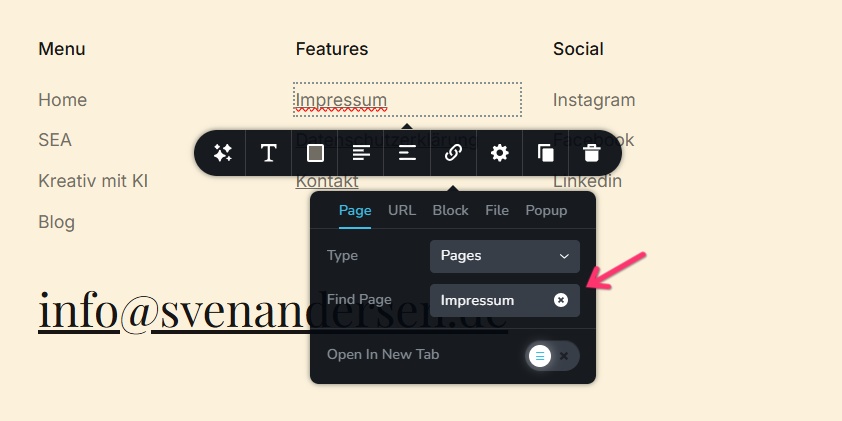
Kindly try changing the hyperlink from Impressum to IHK on all pages and see if it resolves the issue.
 0
0 -
It seems like the whole thing is totally messed up. The Impressum page was suddenly empty. When I set it up again, I can also call it up, but the text on the Impressum page then also appears on the ‘Datenschutzerklärung" page. When I click on the IHK link on the homepage, the Impressum page appears. Maybe delete all these pages and recreate them?
0 -
Hello Sven,
I have fixed some of the issues you have mentioned above. Please check
0 -
A step forward, ... ‘Impressum’ and ‘Datenschutzerklärung' link to the correct page. But the Kontakt page had no content . When I set up a ‘Kontakt’ page, this page appears at the top of every(!) other page. The link to the IHK page on the ‘Home’ page also links to the 'Kontakt' page
0 -
Hello Sven,
You have mentioned that "When I set up a ‘Kontakt’ page, this page appears at the top of every(!) other page" If this is not the desired outcome what is the expected outcome?
You also mentioned that "The link to the IHK page on the ‘Home’ page also links to the 'Kontakt' page" I do not see a link to IHK page on the homepage. What text appears on the IHK link?
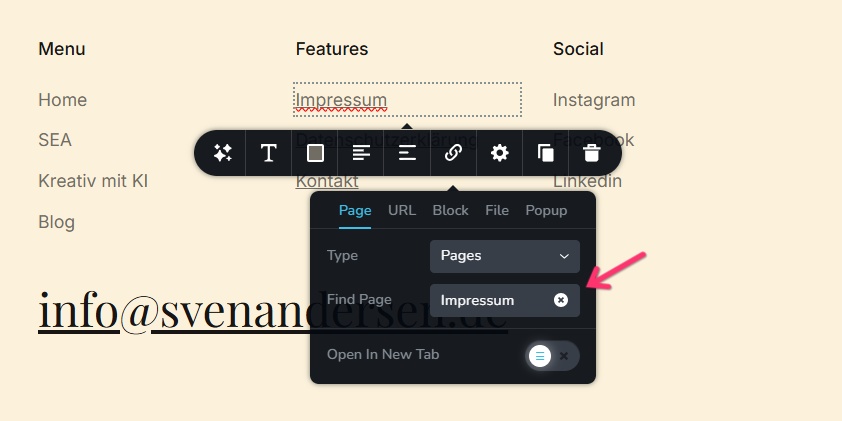
Have you tried the "Link" tool to fix the hyperlinks issues on these pages?
 0
0 -
The "Kontakt" page should be a standalone page. The IHK Link in the image with the " 25 - Die Handelskammer gratuliert" should link to a page of a certificate, which has somehow vanished and is now the "Kontakt" page. It is the first time that I read something about a "Link" tool.
0 -
Hello Sven,
The Contact page is now standalone. The image with "25 - Die Handelskammer gratuliert" links to the IHK page. Please check if you see the certificate in the IHK page at https://ostrich036ab310.brizy.site/ihk
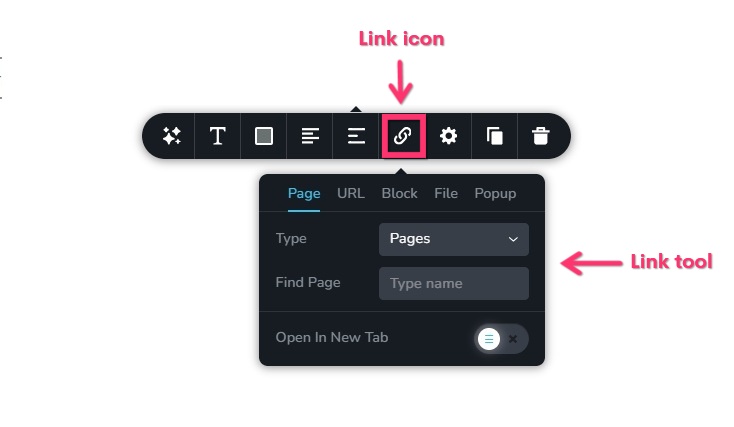
Link tool is the screen that you use for adding hyperlinks to any text, image or an icon. This tool pops up when clicking on the link icon.
 0
0 -
Of course I used the "Link Tool" often, just did not know that it is called "Link Tool".
Now the IHK page is on top of every(!) page on the site.
0 -
Hello Sven,
I have removed the the certificate from other pages. Now its only in the IHK page.
0 -
Hello Kc George,
everything is working now. A big Thank you from me!
Is it possible to say, what has gone wrong? Are there any
mistakes that I have made?
0 -
Hello Sven,
In your original design, you had repeated the header and footer design on each page. This is not the recommended practice. I setup your header and footer as global blocks so that the same design gets reused on all pages. Since header and footer are global blocks, any content added to the header or footer will appear on all pages.
When you want to add content to a page, kindly add it to the "Hero" block, which is the block just below the header. The reason why the content was getting duplicated on all pages was because you were adding it to the header block.
0 -
Next time I am smarter, ...
0
Please sign in to leave a comment.
Comments
16 comments