Restore previous content

Hello - I made a change to the header - it was global so it changed it on the home page. I want to restore, or even just view the previous text that I had. I don't remember what it was. Any way to see that?
0
-

Hi Patti,
Thank you for contacting us.
You might be able to restore it by changing the page template. You can try switching it back to the Default template by following these steps:
1. In the WordPress editor, look for the Template option in the right-hand panel.
2. Click the dropdown and select Default template.
3. Update or preview the page to see if the previous content reappears.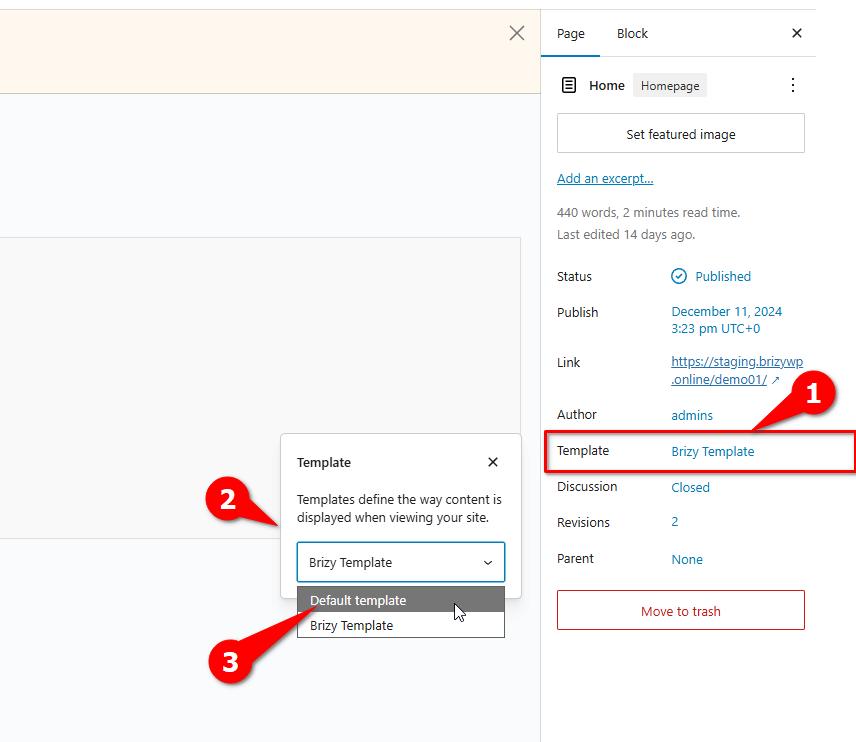
This might allow you to view the previous text that you had.
Please try this and let me know how it goes.
Best regards,
Ariel H0
Please sign in to leave a comment.
Comments
1 comment