Brizy Builder doesn't save the changes

-

Hello Mattia,
We are unsure of the potential causes of this problem because you are the first customer to report it.
- How many times did this occur? Did it happen just once or multiple times?
- If you create a test page do you think you can reproduce the above issue? You could create a new project, import a premade design template and go back to it after a week and check if you notice any changes to the design.
- Do you keep your design window open on a computer that is accessible to others, particularly children?
0 -
It did happen multiple times with the website for a client. At the beginning i had the website on draft and even if I was saving after re opening the builder all the changes wete gone. At the beginning I thought i forgot to save but then it happened another 2-3 times and then I tried with publishing the website directly. It seemed to work and i saved multiple times just to be sure but then lately i made a big change for this website of the same client which was the 2nd of June and the client saw the website as well but on the 1st of July all the last changes were suddenly gone.
The only that can have access to the computer is me and I have no children or other people that I live with.
0 -
Hello Mattia,
Let me describe a possible scenario where the above issue can occur. Let's say you have opened a page of your website in the Brizy Cloud editor in two different browser tabs, namely Tab1 and Tab2. You added a new block and refined its design to your heart's content between 10:00 and 11:00 AM while working in browser's Tab1. When you returned to work at 11:30 after taking a break, you opened Tab2 and made a tiny modification, such as adding a space, and saved your work. In this case, you would lose the newly added block that was created using Tab1 between 10:00 and 11:00 AM.
Do you think this may have happened? Do you keep 25-50 tabs open at a time in your browser? When having too many tabs open, its difficult to trace on which tab you edited earlier. Ideally you should open a page in the editor only in a single browser tab.
0 -
Ya I understand what tou mean but i normally use just one Browser and I try to keep always a few tabs open. I thought this might have been the problem the first time I faced the issue but since then I always kept the same tab open to avoid it and it did happen again. I also thought it could be a problem with the connection but the last changes I made i wasn't home and I'm sure I was using a good Wifi connection. The problem is the first times it did happen I've noticed it right away, or max a day later re-opening the website i was working on. But the problem is that this last time it happened I made sure the save multiple times the website, publish it and check if the changes were made from my computer and then opening the website from my phone. After that I even sent it to the client which have seen it a few day later and it was still good. But now, a month later, when the client asked me to make some new changes I noticed that the last ones were gone again.
0 -
Hello Mattia,
Regretfully, we are unable to predict how the content of your website might have changed on its own without human involvement after a month. We won't be able to take action unless the problem can be replicated at our end. At the moment, we do not have sufficient data to come to any conclusion.
You could follow these steps to reduce losses in case of the such incidents.
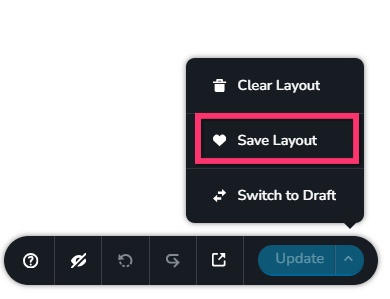
- Save your page as a design layout after competing major changes by selecting the "Save Layout" option towards the bottom right corner. This will save your page as a design layout which can be imported later. Saved layouts will be available in your Blocks and Layouts library.
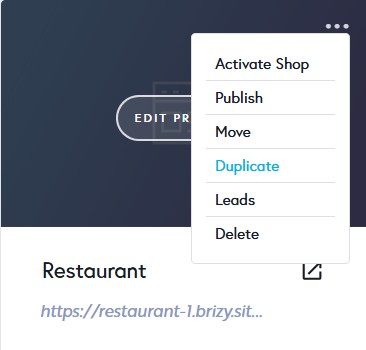
- After making significant changes, duplicate your project by selecting the "Duplicate" option available in your project thumbnail.
0 - Save your page as a design layout after competing major changes by selecting the "Save Layout" option towards the bottom right corner. This will save your page as a design layout which can be imported later. Saved layouts will be available in your Blocks and Layouts library.
-
Sure I can try! But I was wondering if you guys can check into my account and see all the steps I made and in case if it's possible to get back the changes I made somehow.
0 -
Hello Mattia,
Kindly provide us with the project preview URL (brizy.site or a custom domain) and an approximate date within the previous two weeks when you believe the deleted data may have been available. We will let you know if we can retrieve it for you.
0 -
This is the preview URL: Home
I've made the last changes the 27/05 and sent it the same day to my client to show it for an approval. Then the client asked for a new changes exactly the 27/06 which is when I realized all the previous ones were gone.
0 -

Hi Mattia,
Thank you for the update.
We're currently looking into the issue, but it may take some time for us to address it. We'll make sure to keep you updated and will get back to you as soon as we have any new information.
We appreciate your patience.
Best regards,
Ariel H.0 -
Hello guys, I hope you doing well. Is there any news about the problem we talked about a few weeks ago?
0 -
Hi Mattia,
Apologies for the delay. I’ve followed up on this request and will get back to you as soon as I receive an update.
0 -
Hi Mattia,
We have duplicated your original project under the name "WebsiteLise-Duplicate-Do not delete" Please do not delete this project.
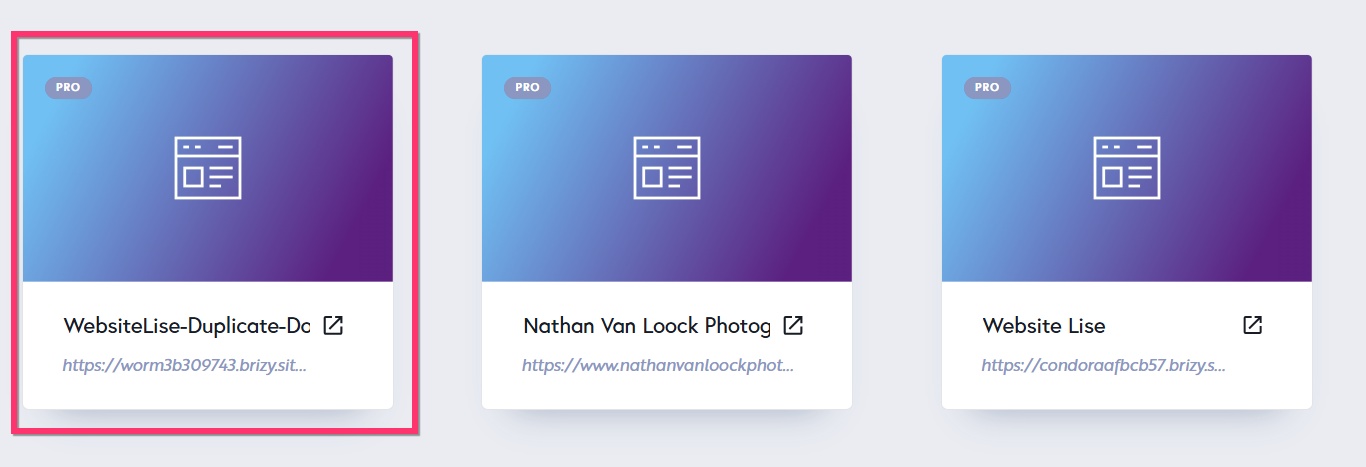
We will attempt to restore from a backup and keep you informed of the progress.
0
Please sign in to leave a comment.
Comments
12 comments