Brizy not loading

Hi,
I was working on Brizy builder this morning and when I clicked to make a section global, the system froze. Now when I refresh and try to load Brizy builder, it spins infinitely.
I have tried to find the issue:
- Brizy 2.6.22 and Brizy Pro 2.6.14 plugins are up to date.
- All other plugins have been deactivated.
- I don't have Wordfence on my site.
- I have activated Twenty Twenty Five theme.
- I have cleared Cache and cleared Browser history.
I can provide access if you would like to investigate.
Thanks!
-

Hi Orla,
Could you please share your WordPress admin login details with us so we can take a closer look? Kindly add us as an Admin user to your WordPress Dashboard and send the following details to communitysupport@brizy.io.
Community Post link: https://support.brizy.io/hc/en-us/community/posts/27743400821266
WordPress Admin URL:
Username:
Password:Also make a full backup of your site as a precaution.
Looking forward to your reply.
Best regards,
Ariel H.0 -
Hi,
Any update on this please? I need to make some updates on the site.
0 -

Hello Orla,
We apologize for the delay. I have escalated your request to the next level and we need some more time to fix the issue. We hope to get back to you by tomorrow.
0 -
The website should be accessible again now. Thanks
0 -
Hello Orla,
Kindly sign into your Cloudways account and under "My Applications" > childrensnursing.ie > Application Settings > PHP PFM Settings,
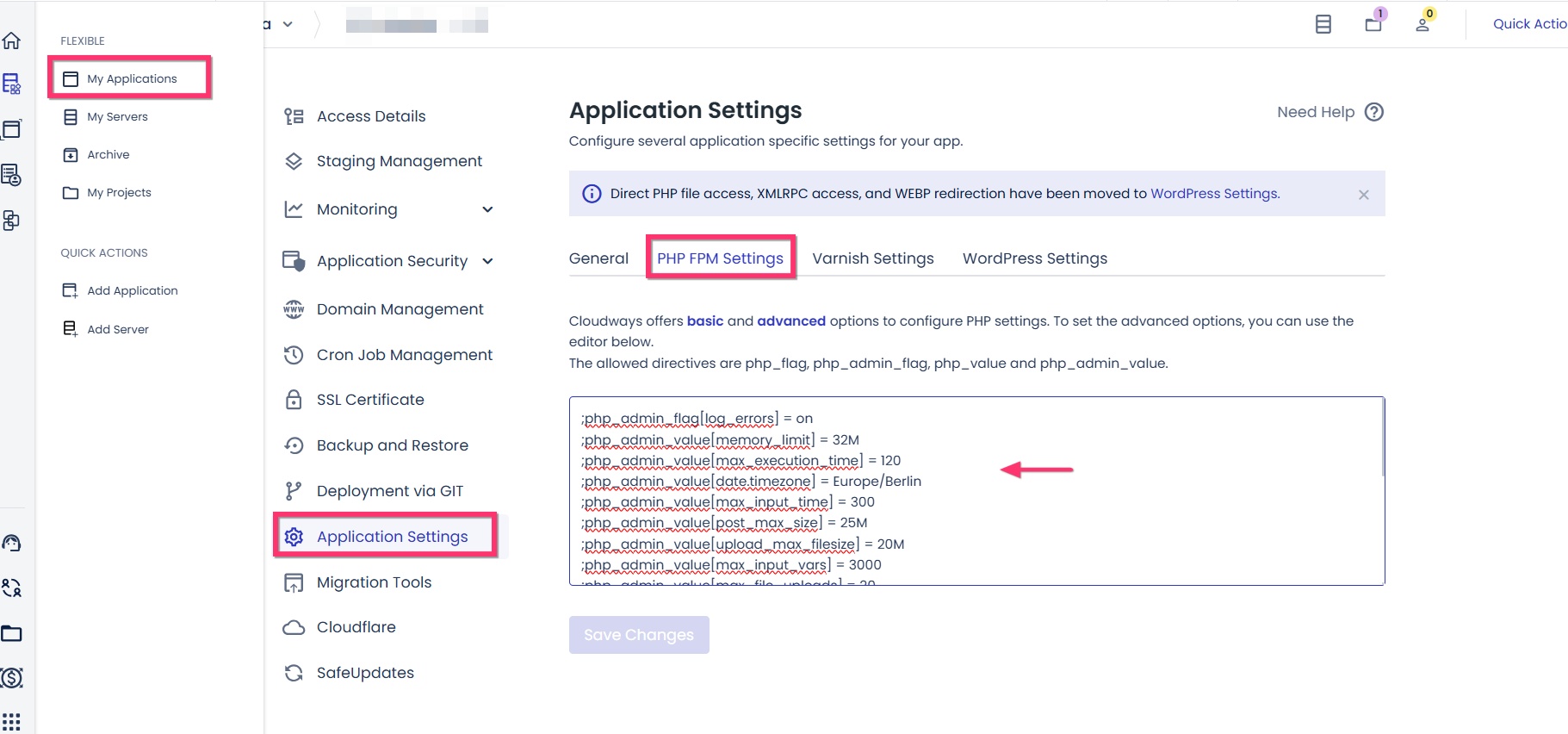
increase the PHP limits of your application to the values given below and get back to us.
;php_admin_value[memory_limit] = 512M
;php_admin_value[max_execution_time] = 512
;php_admin_value[max_input_time] = 512
;php_admin_value[post_max_size] = 512M
;php_admin_value[upload_max_filesize] = 512M
;php_admin_value[max_input_vars] = 3000
0 -
Hi Kc,
I have added those new settings in Cloudways now.
0 -
Hello Orla,
PHP limits you have set under Application Settings unfortunately did not take effect on your website. In your WordPress Dashboard under Tools > Site Health > Info > Server,
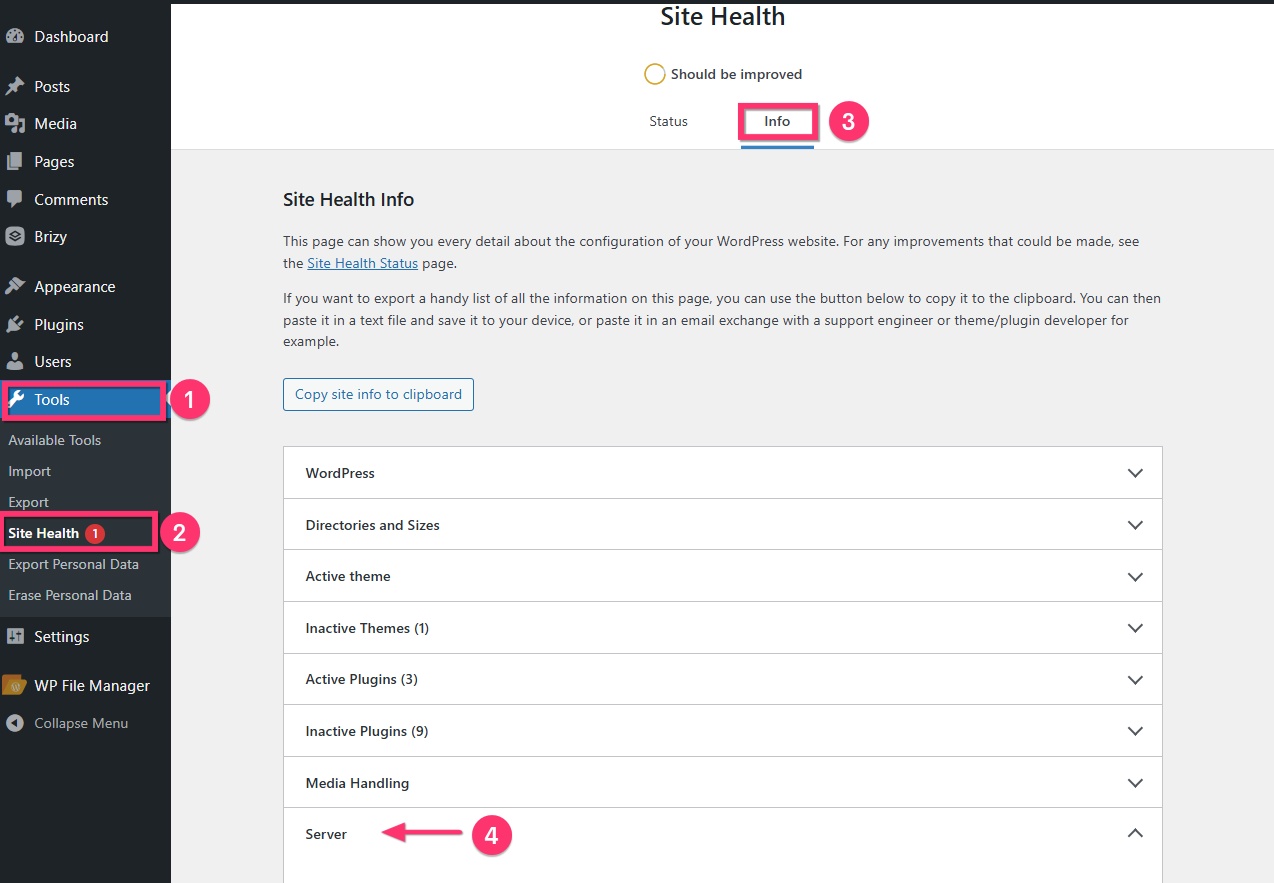
You can see these values.
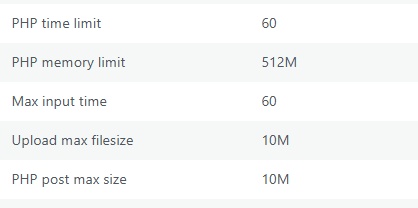 Can you take the help of your hosting support to increase PHP limits to
- PHP time limit : 120
- Max Input time: 512
- Upload max filesize: 512
- PHP post max size: 512
0 -
I have updated these settings on the server and they are displaying in Wordpress > Tools > Site Health as you instructed.
0 -
Hello Orla,
I am creating a private ticket for you. Please look for an email from support@brizy.io and we will continue this discussion via email. My colleague Basharat Reyas will be in contact with you through email.
0
Please sign in to leave a comment.
Comments
9 comments