rename menu items an page names

Hello,
I am building a multi-page and therefore creating many pages.
I have always named the pages like this: website-name-pagename.
If I now create a menu, I cannot change the name in the field. I can write in but not delete the old one. So the menu items are much too long.
Okay, I thought, then I'll just rename the page names. But that doesn't work either. At least I can't find it on the page where you create pages.
For SEO purposes, I would actually like to leave the names as they are.
Can anyone help me? I can't find anything about this in the articles either. But it doesn't work for me in the menu.
Thank you, I usually have to translate everything anyway, I don't speak English very well. A bit difficult. :-)
Viele Grüße
-

Hello Viele,
If you are asking about how to change the labels for your menu, kindly follow these steps
- Click on the "Cog" icon next to any menu item
- Edit the menu label
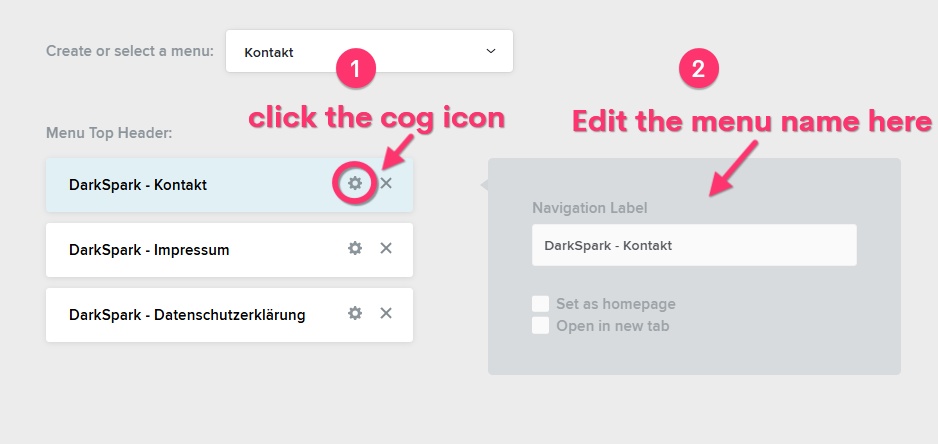
If this does not answer your question, kindly elaborate your question in more detail. You could possibly use a screenshot to demonstrate the issue.
0 -
Yes, thank you, that's exactly what I mean! But I can't delete the old text if I want to do that. Could it be the browser or something similar? I just couldn't delete it, only add new text.
:-)
0 -
Hello Viele,
Have a look at the screen recording at https://jmp.sh/KDI45Iue where I elaborate how I have changed your menu labels.
0 -
Hi, I'm trying another browser now, I know how it normally works. I think it's the javascript.
0 -
If the issue happens only on your regular browser and it works well on all other browsers, kindly clear cached images and files in your regular browser following the procedure at https://uaptc.edu/clear-cache
0 -
Okay, thanks, it works in another browser. Probably because of javascript.
0 -
Okay, I'll try other browsers. I usually have Firefox. I have now loaded Chrome and it works.
0
Please sign in to leave a comment.
Comments
7 comments