Colors lost after update

After last update, i found license deactivated, after enter correct license code, i lost all custom colors i had set before.
That behavior in 2 production website.
Why? How i can solve?
Thanks
-

Hi Francesco,
Thanks for reaching out.
Brizy doesn’t normally reset global colors, but this can happen if the license was inactive during the update or if there was a conflict during the process.
To fix the issue, you can duplicate and rename the Current Style, then save your changes. This should apply to all pages once duplicated.
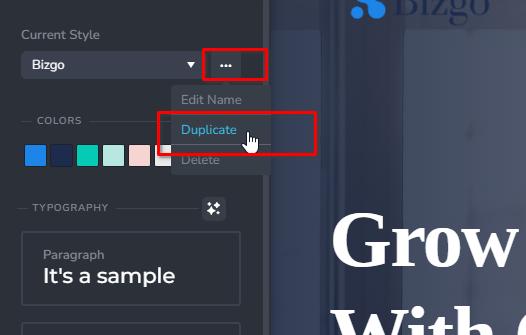
To avoid this in the future, make sure the license is active before updating, and consider creating a full backup of your site before updating any plugins.
Best regards,
Ariel H.0 -
It's very annoying. Another website with colors, font changed. I don't update plugin, i go after long time to website and found that has lost colors and fonts, why? After i go to admin and Brizy ask me to insert key ??
Now i have to found a backup and recover all the styles had before.0 -
Hi Francesco,
Sorry to hear about the issue. It seems the Brizy Pro license was deactivated, which can cause fonts and colors to reset. Re-entering the key should restore the styles, and if not, restoring a backup is the best option. We strongly advise keeping the license active, or at least making sure it's active before updating, to avoid this in the future.
Kind regards,
Ariel H.0 -
Hi Ariel,
but i don't deactivate license, how can it deactivate automatically ?
This occurs on three websites.0 -
Hi Francesco,
Thank you for the update.
This usually happens due to a version mismatch, when Brizy (Free) gets updated automatically but Brizy Pro does not update at the same time. As a result, you may see a warning in the dashboard that Brizy Pro is not activated.
Even if you didn’t manually deactivate the license, the mismatch can cause the system to temporarily treat the Pro plugin as inactive. We’ve seen this happen occasionally, especially when automatic updates are enabled.
If this occurred on multiple sites, we recommend checking that both Brizy and Brizy Pro are updated to their latest versions.
Best regards,
Ariel H.0 -
Thanks
But the problem is not that plugin PRO is not active, the main problem is that PRO has lost key and even if i reinsert the original key plugin reset all my settings: font types, colors, font size....
I'm scared about the other website, i no longer trust the plugin. It's not the first time occured a similar problem. Last time when update (with key inserted) from version 1.9 to 2 has lost all settings, now same situation but with another reason.
Do you plan to solve this problem in the future?0 -
Hi Francesco,
Thank you for the additional details, and I completely understand your concern.
This is actually the first time I've encountered this specific issue where the Pro key appears to reset settings such as fonts, colors, and sizes. If you have an active website where this can be replicated, we'd be glad to investigate further, please feel free to share the credentials.
While we can’t guarantee a quick fix, we’ll make sure to escalate this internally, so it’s looked into closely.
Looking forward to your reply.
Best regards,
Ariel H.0
Please sign in to leave a comment.
Comments
7 comments