Custom field has iframe content - Embed element inserted in custom assets layout has no dynamic button

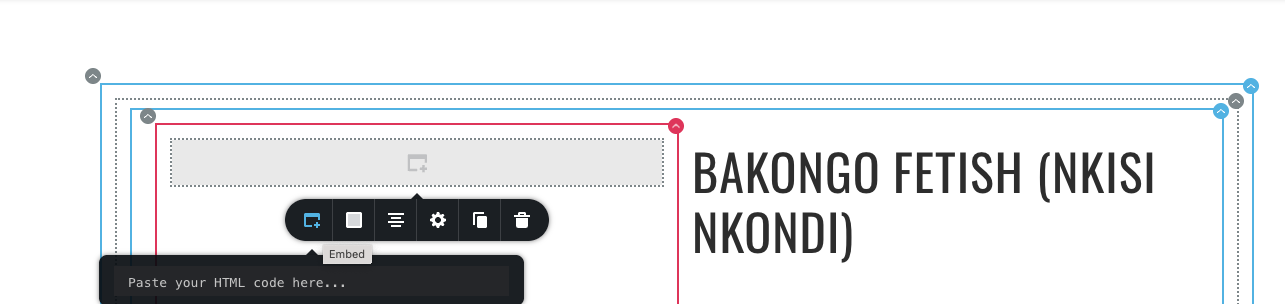
When creating a post for artefacts, the client has iframe code for 360-degree rotation; the embed element does not have access to call up the iframe code from the custom inputs. Is this a bug or a feature? Is there a workaround?
-

Hello Pah'mboni,
The Embed element is designed to bring in content from an external URL, like an image or a form hosted on another server. It doesn't provide a mechanism to directly access elements within the same Brizy page. It's not designed for that purpose.
When embedding a 360-degree image rotation, you must include the image's URL within the embed code. The embed code needs to know the location of the 360-degree image file (its URL) so that it can be loaded and rendered within the viewer.
0 -
I think you have misunderstood the query.
I have a list of custom assets with custom fields, such as title, image, description, and 360 image (this is input as iframe HTML from an external service providing the 360 image). In the layout view, I can make the Custom Title show using a text element and the custom image show using an Image element, BUT I cannot make the iframe from an external service show in the embed code. Title, Image has a little icon to call up custom values. But embed does not have. Is this your understanding of my query? Is there a workaround?
0 -

Hi Pah'mboni,
Sorry about that. From my understanding, you're looking to dynamically display iframe content from a custom field using the Embed element in your layout, is that right?
If so, unfortunately, the Embed element does not support dynamic content. This means it's not possible to pull iframe code from a custom field the same way you can with the Text or Image elements. There's currently no built-in workaround to dynamically insert iframe HTML from a custom field into the layout. This isn't a bug, it's a limitation of how the Embed element works. Sorry for the inconvenience.
If this isn’t the answer you were expecting, could you please share a screencast showing the issue for better understanding?
Best regards,
Ariel H.0
Please sign in to leave a comment.
Comments
3 comments