Does Brizy’s Posts block allow ordering by custom fields like _EventStartDate?

Hi there,
Think I've asked this before. But is there a way to order by custom fields like _EventStartDate? when outputting events using Posts option?
See www.fonfestival.org/ under Upcoming Events, they should be ordered by the event date but the options as we know are title, date (published) & random.
-
Can we filter out past events (where
_EventStartDateis less than current date)? -
If not, is there a way to hook into Brizy's WP_Query to override it?
We tried to create some custom code that worked and then use a shortcode but it wasn't right. See:
And the shortcode is: [fon_events posts_per_page="6"]
function fon_events_homepage_style_shortcode($atts) {
    $atts = shortcode_atts([
        'posts_per_page' => 6,
        'category' => '',
    ], $atts, 'fon_events');

    $args = [
        'post_type' => 'tribe_events',
        'posts_per_page' => $atts['posts_per_page'],
        'meta_key' => '_EventStartDate',
        'orderby' => 'meta_value',
        'order' => 'ASC',
        'meta_type' => 'DATETIME',
        'meta_query' => [
            [
                'key' => '_EventStartDate',
                'value' => current_time('Y-m-d H:i:s'),
                'compare' => '>=',
                'type' => 'DATETIME',
            ]
        ]
    ];

    if (!empty($atts['category'])) {
        $args['tax_query'] = [[
            'taxonomy' => 'tribe_events_cat',
            'field' => 'slug',
            'terms' => $atts['category'],
        ]];
    }

    $events = new WP_Query($args);
    ob_start();

    if ($events->have_posts()) {
        echo '<div class="tribe-events-calendar-list__events">';

        while ($events->have_posts()) {
            $events->the_post();
            $event_id = get_the_ID();
            $event_link = get_permalink();
            $excerpt = get_the_excerpt();

            echo '<div class="tribe-events-calendar-list__event">';
            echo '<article class="tribe-events-calendar-list__event-card">';

            // Image
            if (has_post_thumbnail()) {
                echo '<div class="tribe-events-calendar-list__event-image-wrap">';
                echo '<a href="' . esc_url($event_link) . '" class="tribe-events-calendar-list__event-image-link">';
                the_post_thumbnail('full');
                echo '</a>';
                echo '</div>';
            }

            // Date badge (uses your existing shortcode)
            echo '<div class="tribe-events-calendar-list__event-datetime">';
            echo '<span class="tribe-event-date-tag">' . do_shortcode('[custom_event_data id="' . $event_id . '"]') . '</span>';
            echo '</div>';

            // Title
            echo '<header class="tribe-events-calendar-list__event-header">';
            echo '<h3 class="tribe-events-calendar-list__event-title">';
            echo '<a href="' . esc_url($event_link) . '">' . get_the_title() . '</a>';
            echo '</h3>';
            echo '</header>';

            // Excerpt
            echo '<div class="tribe-events-calendar-list__event-description tribe-common-b2">';
            echo '<p>' . esc_html(wp_trim_words($excerpt, 25)) . '</p>';
            echo '</div>';

            echo '</article>';
            echo '</div>';
        }

        echo '</div>';
    } else {
        echo '<p>No upcoming events found.</p>';
    }

    wp_reset_postdata();
    return ob_get_clean();
}
add_shortcode('fon_events', 'fon_events_homepage_style_shortcode');
Then some custom CSS:
.tribe-events-calendar-list__event {
  margin-bottom: 2rem;
  background: #fff;
  border-radius: 12px;
  overflow: hidden;
  box-shadow: 0 2px 12px rgba(0,0,0,0.08);
}

.tribe-events-calendar-list__event-card {
  display: flex;
  flex-direction: column;
}

.tribe-events-calendar-list__event-image-wrap img {
  display: block;
  width: 100%;
  border-bottom: 4px solid #f5f5f5;
}

.tribe-events-calendar-list__event-content-wrap {
  padding: 1.25rem;
}

.tribe-event-date-tag {
  display: inline-block;
  background: #fff;
  color: #333;
  padding: 0.4rem 0.75rem;
  border-radius: 8px;
  font-weight: 500;
  font-size: 0.9rem;
  box-shadow: 0 2px 6px rgba(0,0,0,0.1);
  margin-bottom: 1rem;
  position: relative;
  top: -20px;
  left: 1rem;
}

.tribe-events-calendar-list__event-title {
  font-weight: 700;
  font-size: 1.1rem;
  margin: 0 0 0.5rem;
}

.tribe-events-calendar-list__event-description {
  font-size: 0.95rem;
  color: #444;
}
But it wasn't working properly and I don't think is a viable long term solution.
What would you suggest?
Thanks,
Darren
-

Hello Darren,
There is no easy way to list events based on event date with Brizy's native capabilities. If your events calendar plugin allows, adding the event listing using their shortcode or WordPress widget would be the best solution.
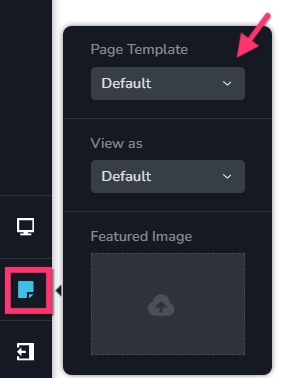
If the plugin does not support, shortcodes or WordPress widgets for event listing, you may need retain the event listing pages in your theme design (and not redesign it using Brizy). In this approach, you will have to recreate your header and footer in your theme to make the event listing page have a consistent header/footer with the rest of your website. Have a look at https://brizy.support/events/ for an example. On this website, all pages of the website uses Blocksy header and footer including Brizy pages. You can use theme header and footer for your Brizy pages by selecting the "page" icon on the left sidebar and then the "Default" option under "Page Template".
 0
0
Please sign in to leave a comment.
Comments
1 comment