Activate Shop

Dear Brizy Support Team,
I hope you're well.
I'm trying to activate the Brizy Shop add-on, but each time I click on it, I'm redirected to the Brizy Cloud page without any clear option to activate the shop. I couldn’t find the Ecwid Business Plan or any way to select the proper e-commerce setup within the interface.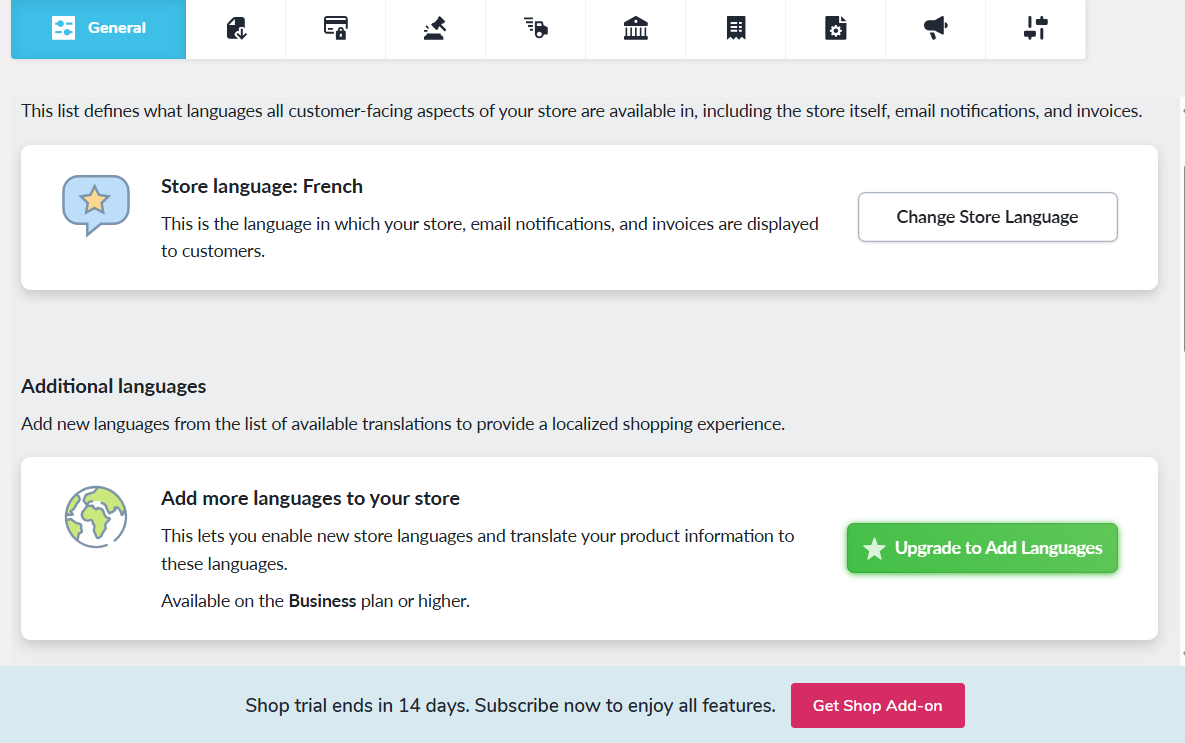 I ended up buying brizy cloud personal, when I`m already a pro user, because this is what we get when we try to add the shop.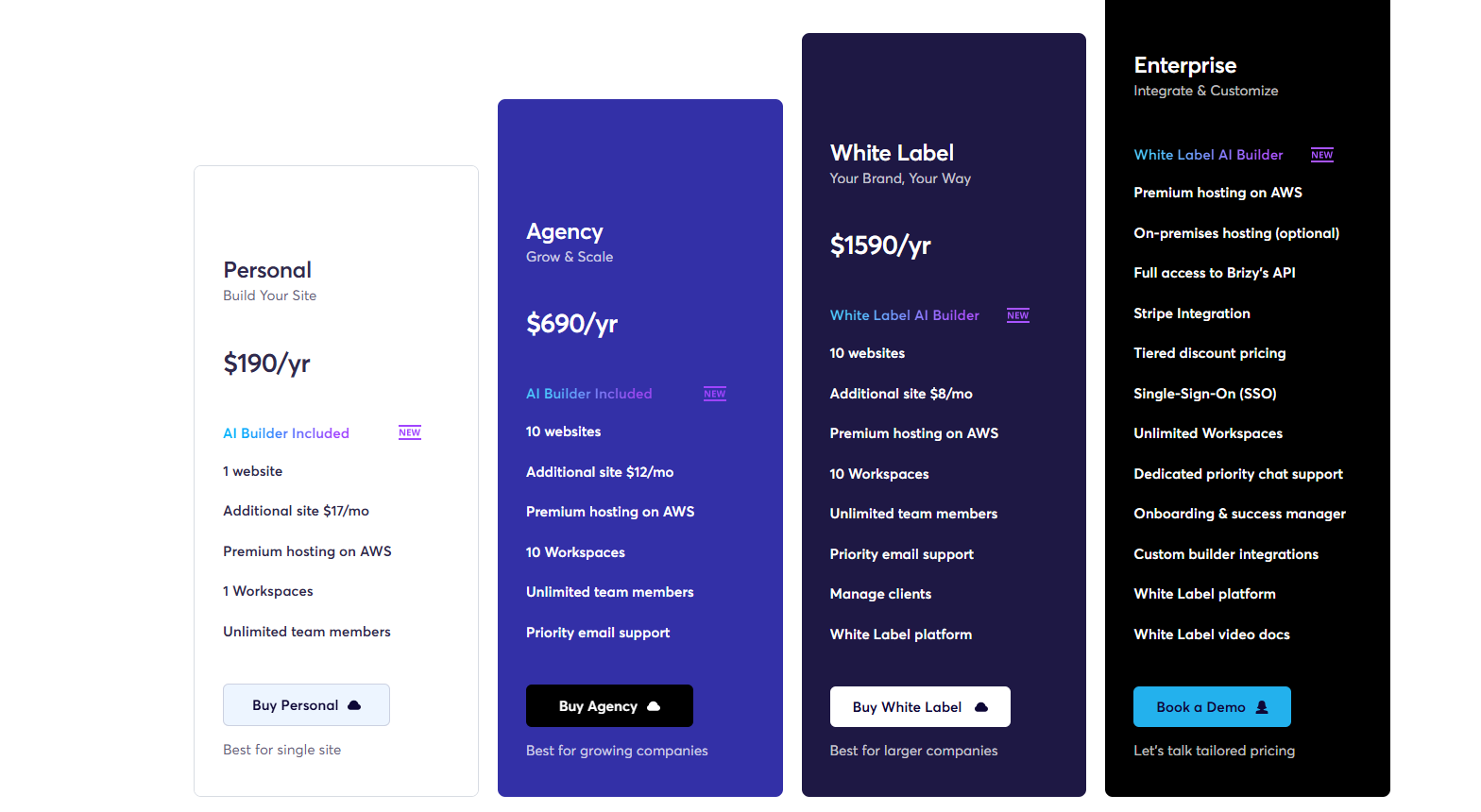
Could you please guide me step by step on how to properly activate Brizy Shop and ensure it’s connected to the correct Ecwid plan?
Thanks in advance for your help!
Best regards,
-

Hello Mahfoudh,
We haven't formally launched this product yet, despite the Shop feature being operational in Brizy Cloud. We are currently making final touches, such as creating a web page where customers can buy the shop's "Venture," "Business," and "Unlimited" plans. Before buying a store plan, please wait for an official announcement via our newsletter and Facebook group.
You can however get started on the 14 days trial plan to checkout the shop features while you are waiting for the official launch. Click on the "Activate shop" option in your project thumbnail
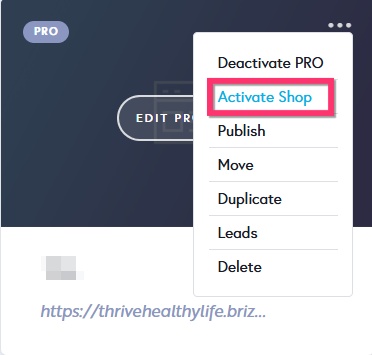
Then select the Shop Free (14 days) option from the drop down and click on "Activate Shop" button.
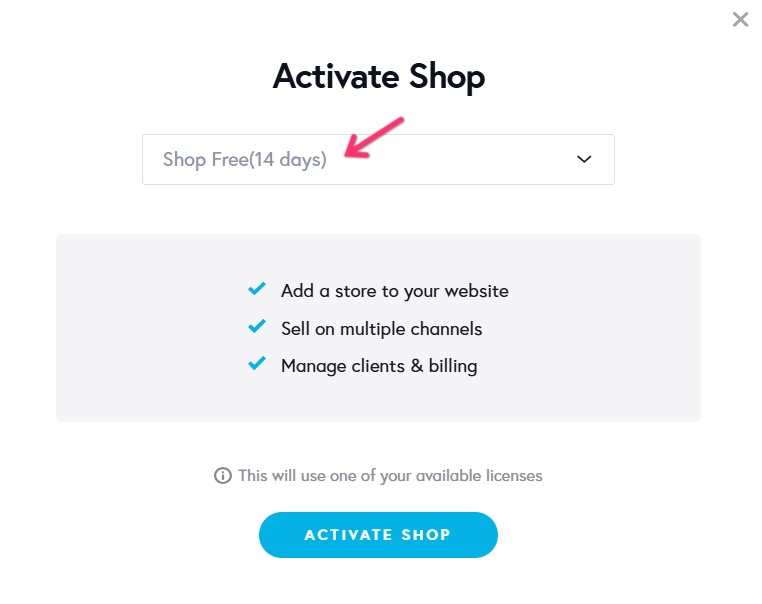 0
0 -
Hi George,
Thanks so much for your prompt response—I really appreciate your help!
I had a quick follow-up question regarding the available apps in the shop. Is the current list final, or is there room to request additional integrations?
I’d love to suggest Shippio as a potential addition. It’s a great tool, especially since it’s free to use, and I believe it could really benefit a lot of users looking for streamlined shipping solutions.
Looking forward to hearing your thoughts!
Best regards,
0 -
Hello Mahfoudh,
Are you asking about adding Shippio as a shipping and delivery method? You can do that under CMS > Project Settings > Shop > Shipping > Add Shipping following the procedure at https://jmp.sh/FLpxcuZ5
0 -
Hi George,
I have another problem related to my shop. And particularly shop link. I already built a website with brizy cloud. soumayapatisse.com, I want to convert it to shop, So after activating the shop, it appears that it stays at soumayapatisse.com/shop. Is it necessary to keep the shop linked to this link, or I can custom it by keeping my first website.0 -
Hello Mahfoudh,
Kindly disregard the slug /shop added to your homepage. Slug added to the homepage of a website does not take effect in the frontend. Your website will continue to be available at https://www.soumayapatisse.com/ and not at https://www.soumayapatisse.com/shop.
0 -
Hi George,
I just wanted to clarify that my question is about the shop, not the website itself. The website seems to be functioning normally, but I'm having trouble understanding how the shop is structured.
1. Is the shop created as a separate page within my site—like mydomain.com/shop—or does my entire website become the shop once it's activated?
2. When I add a product to the shop, is a product page generated automatically (with a shareable link), or do I need to create it manually? The same goes for categories—do they need to be manually added?
3. After adding a product and previewing it, I see a link like mydomain.com/shop/product-name. But when I try to view it from the storefront, the link appears to be broken or doesn't exist.
Thanks in advance for helping me understand how this works.
Best regards,
0 -
Hello Mahfoudh,
- The shop can be structured according to your preferences. It can be setup on your website homepage or at /shop. Have a look at https://macaw627323c7.brizy.site/ for a sample Brizy Shop.
- After adding products to your shop, you can design your product details template to display your products according to your preferences. Products will have its unique URL like https://macaw627323c7.brizy.site/shop/lumiglow-vitamin-c-serum. Similarly you can design your shop category archive template. Here is an example. https://macaw627323c7.brizy.site/shop/best-sellers
- Kindly share a link to demonstrate the issue. I could not understand your question.
Have a look at our knowledgebase articles related to Brizy shops at https://support.brizy.io/hc/en-us/sections/25563138501266-Shop
0
Please sign in to leave a comment.
Comments
7 comments