Issue with new plugin updates

Hi,
I updated the Brizy basic and pro plugins today for one of my clients, and his site was super messed up. I have issues often when I update this particular client's site.
I reverted to a previous backup, so it looks fine right now.
It's a pretty basic build with very few plugins. I was wondering if someone was available to help me troubleshoot why this website specifically has issues with Brizy updates.
-

Hi Cari,
Thank you for reaching out to us.
Please provide us with temporary access to your WP Admin page so we can take a look. Please add us as an Admin user to your WordPress Dashboard and send the following details to communitysupport@brizy.io.
Community Post link: https://support.brizy.io/hc/en-us/community/posts/27290410550546
WordPress Admin URL:
Username:
Password:Looking forward to your reply.
Best regards,
Ariel H.0 -
I have sent over the requested email. Thank you
0 -
Hi Cari,
Thank you for your cooperation. I noticed that your website is using a very old version of Brizy and Brizy Pro.
To update safely without breaking the site, the best approach is to first temporarily disable all plugins. Then, delete the old versions of Brizy and Brizy Pro, and install the latest versions from scratch. After activating them, it’s important to enable any caching plugin first (in your case, Speed Optimizer), so you can purge the cache right away.
Once the cache is cleared, you can go ahead and enable the rest of the plugins. This is demonstrated on this screencast: https://youtu.be/XtTEpzA2SpU
Please let us know if you have any further questions.
Best regards,
Ariel H.0 -
I have been keeping it updated at least once a month. I am not sure why, when I rolled back, it went all of the way back to those versions. I have followed your instructions and the front end looks good, but I am still getting the following error regarding the Brizy Basic plugin.
 0
0 -
Hi Cari,
Thank you for bringing this to our attention. We’ve received similar reports, and the issue has already been raised to our senior support team for review.
These are the latest versions: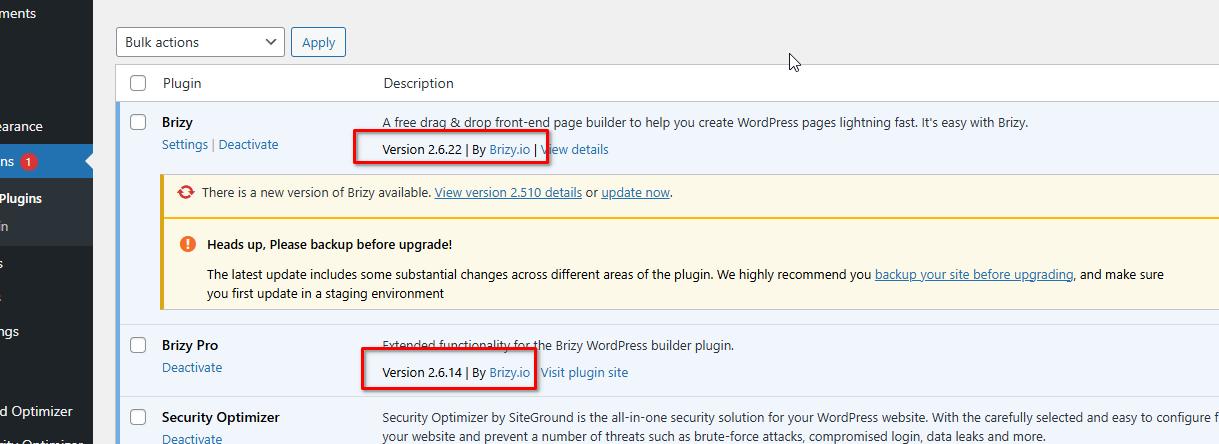
For now, please feel free to ignore the warning. I’ll keep you updated and let you know as soon as I have more information.
Best regards,
Ariel H.0 -
Hi Cari,
Thank you for your patience. After looking into the issue, we’ve found that it only seems to occur on websites hosted with SiteGround. To resolve this, we recommend clearing the server-level cache. For more details, please refer to the following link: https://www.siteground.com/kb/clear-site-cache/
Best regards,
Ariel H.0
Please sign in to leave a comment.
Comments
6 comments