Display references

Hi, I have a video game custom item with multiple references that are properties like:
Nintendo gameboy, Action game, Features shooting, etc
How do I display these in their page? I am looking for some sort of tag functionality but with multi-reference fields.
-

Hello Olivier,
Can you please specify the name of the project where you have the custom asset by the name "Video Game" and multiple references like: Nintendo Gameboy, Action game, Features shooting, etc.? We will take a look
0 -
I don't have a custom asset yet, just asking for a way to display the multiple references within each custom asset page
0 -
Hello Olivier,
The answer to your question depends on how you have setup your custom assets and your taxonomies. If your custom asset is "Video Games" and its taxonomy is "Genre", you will select the dynamic value "Genre Title" to display the genres associated the Video Games.
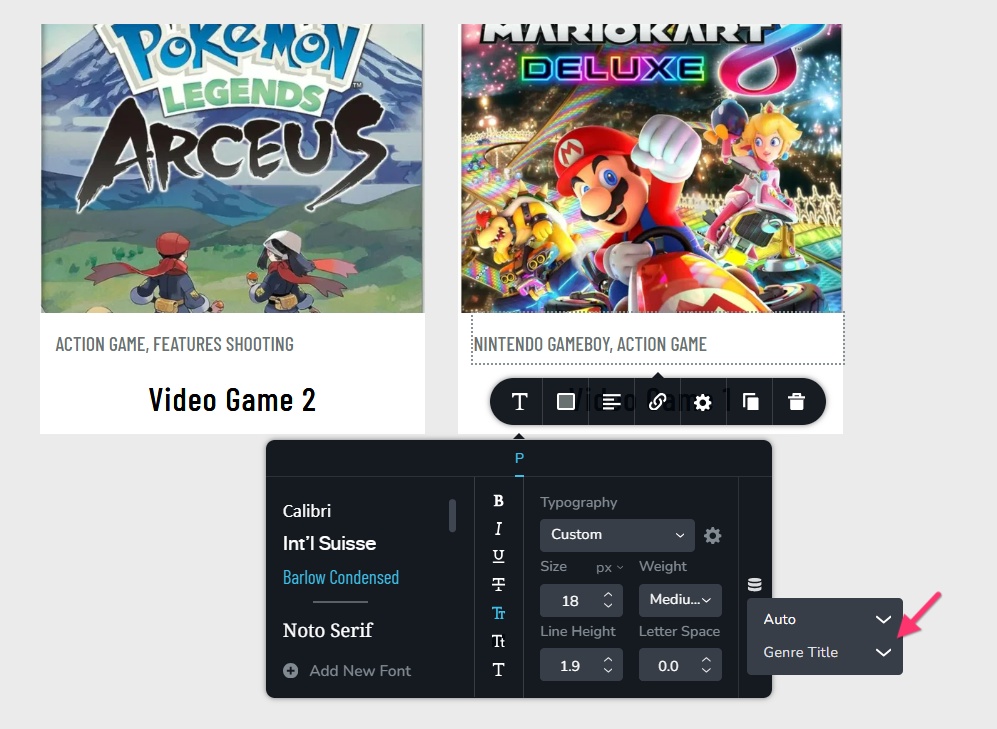 0
0 -
Best support ever 😝 I was getting tripped by not selecting "auto" on top. Works! Now here's a question...how do I make these clickable? I basically want the tags functionality, if they click on it, they can see a page with all the assets having that tag (Like "Action game" would show all action games)
0 -
Hello Olivier,
If you have a taxonomy called "Genre" you can link to your taxonomy archive page by selecting the "link" icon, selecting "Auto" in the first drop down and then "Genre URL" in the second drop down. However this option will work only if you have a single taxonomy added to each video game.
 0
0 -
Works...but there is problem for multiple references. Is this a limit or a bug?
I need each clickable :) 0
0 -
Hello Olivier,
Its a limitation with the current implementation.
0
Please sign in to leave a comment.
Comments
7 comments