How to Render a Brizy Saved Template (Header/Footer) in a Custom PHP File (LearnPress Course Page)?

Hi Brizy Support,
I’m trying to display a Brizy Saved Template (just a header and a footer) inside a custom PHP template file that overrides the default layout for LearnPress course pages.
My setup:
-
WordPress + LearnPress + Astra Child Theme
-
I created two Brizy Saved Templates: one for the header (ID 8078) and one for the footer (ID 8085)
-
I’m overriding the LearnPress course layout using a file at:
/wp-content/themes/astra-child/learnpress/single-lp_course.php
What I’ve tried so far:
-
I used do_shortcode('[brizy_template id="8078"]') but nothing renders
-
I also tried brizy()->template()->render(8078), but that didn’t work either
-
LearnPress content loads fine, but the Brizy templates don’t show up at all
What I’m trying to achieve:
I’d like to wrap the LearnPress course page layout with my Brizy header and footer so the course page matches the rest of my Brizy-styled site.
In other words, I want to manually display a Brizy header above the course content, and a Brizy footer below it, using a custom PHP template.
My questions:
-
Is there any supported way to display a Brizy Saved Template from inside a PHP file like single-lp_course.php?
-
If not, is there a workaround or method that allows Brizy headers and footers to apply to LearnPress course pages?
-
Are Brizy templates limited to only working inside Brizy-edited pages or theme templates?
The website I'm working on is: https://adamn75.sg-host.com/courses/learn-to-thrive/
Thank you so much for your help!
Best regards,
Adam
-

Hello Adam,
Are you attempting to display Brizy header and footer on LearnPress Course pages? There is no easy method to achieve this objective. Let me recommend an alternate approach to solving this problem.
- Use the Astra Header- Footer builder to recreate the Brizy header and footer design following the instructions at https://wpastra.com/docs/create-header-with-header-builder/ If required, tweak the Brizy header and footer designs to match the Astra header and footer.
- Retain the Astra header and footer for all your LearnPress Course pages (and do not switch to Brizy header and footer)
- You could retain the Brizy header and footer on pages other than course pages (like Home, Fuel Your Body, Foster Your Fitness etc.) You also have the option to switch these pages to the "Default Page Template" available in the Brizy sidebar towards the bottom. When selecting this option, your pages will switch to Astra header and footer; then delete the Brizy header and footer. This will allow you to use Astra header and footer on all pages of your website.
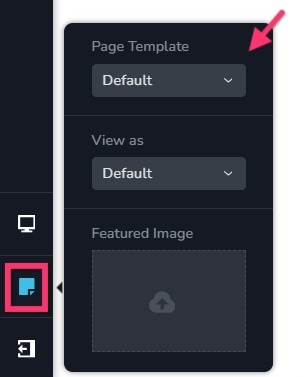
Have a look at https://brizy.online/ for a website developed using the Default Page Template. All pages on this website uses Blocksy header and footer and the page content is designed using Brizy.
1 -
Hi K C,
Thank you for your helpful and thorough reply! I will follow what you said about using the Astra header. It's working so far, even though Brizy makes more beautiful headers... ;) I'll use Astra for now though since I need it to appear on all pages, even ones built via the LearnPress plugin.
Thanks again!
Adam
0
Please sign in to leave a comment.
Comments
2 comments