English not appearing as second language, translation

Hi.
This issue is regarding translation.
My site´s default is Spanish, which i have selected. Then, when i try to select "English" as the language to be translated into, English is missing from the list-dropdown of languages.
See video
https://screen.medway.io/conversations/7d2b8907-cf9a-558b-8597-3d53b245d20f
-

Hello there
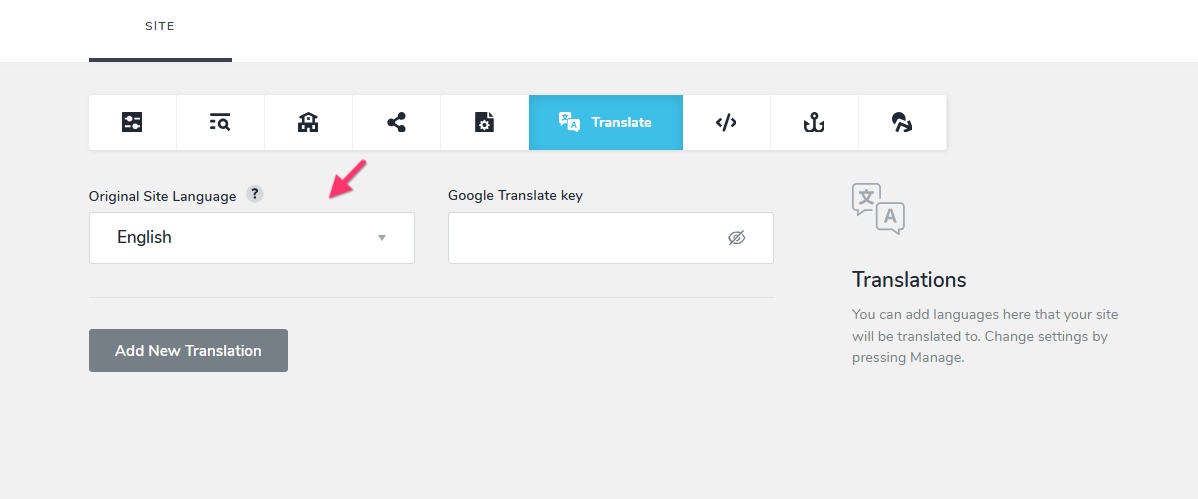
Have you logged into your project from multiple browser windows? Please close all browser windows and login again in a single window and then set the "Original Site Langauge" as Spanish.
 0
0 -
Changing the default language and adding English translation must be done in two steps
- Change default language to Spanish and save your work
- Add English as a translation
I have done this for you
0 -
Thanks very much KC George
0 -
There´s an issue remaining with languages.
The back-end is set up for Spanish to English translation.
I have added the icon on the header, to switch between the two languages.
But when i check the live site, the switch button isn´t working, not displaying the design, .. nothing.
See video
https://screen.medway.io/conversations/8ae1e005-f939-593e-8779-41a25a421147
0 -
Please help, trying to get this fixed so i can carry on with the project. Thank you
0 -
Hello there,
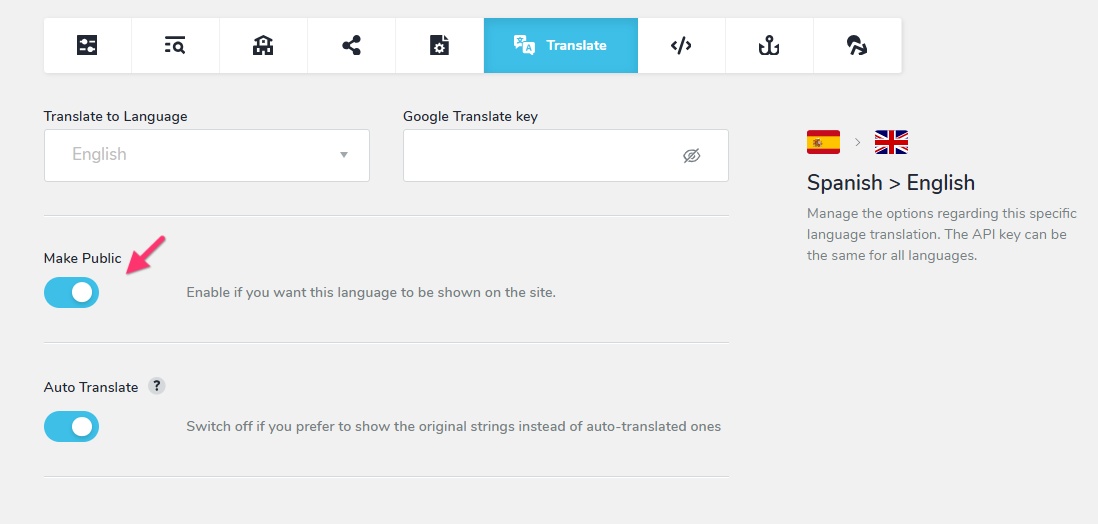
Because you had not selected the "Make Public" option to enable translation, the translation languages were not displayed in your project. This switch must be turned on before the translations appear on your website. I have now enabled it.
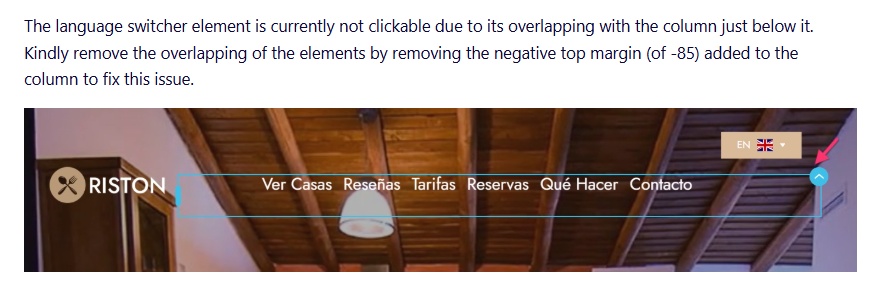
The language switcher element is currently not clickable due to its overlapping with the column just below it. Kindly remove the overlapping of the elements by removing the negative top margin (of -85) added to the column to fix this issue.
 0
0 -
Thank you.
I see homepage displaying it now. OK.
But, I created two pages using the same header as the homepage, exact copy-paste of the home page.
Now, the header on those two pages has dissappeared... and because they were a copy of the homepage´s header, should remain visible and work fine like the homepage. But they don´t.
This is truly driving me insane, and I am a patient person,.. its 3 days now... i have built many sites before with Brizy, nothing ever happened like this before.
I honestly believe there´s a bug in the theme.
The two pages url so you can check are:
/es/casa-rural
/es/la-campina
I have not clicked or unclicked any icon to stay visible or invisible. I haven´t touched anything. But all of a sudden, the header in those two pages are missing in all devices.
Please help, and asap.. i just simply cant delay this project 24h for every question - answer.
4 years being a client of Brizy´s, and this remains the biggest issue... when something goes wrong, it´s time to PRAY.
0 -
As i keep testing, more issues remain.
- The issues stated above, where header was gone on mobile and tablet. Unsure why that happened, as mentioned, i did not click or unclick anything to make it visible or not. My guess, that´s a bug.
- Now, on the live site, only the English flag appears on Desktop (spanish flag not displaying). However, on mobile and tablet spanish flag do appear. Only missing on Desktop.
- When I switch languages on the live site, no translation happens at all. Translation not executing on any text etc..
0 -
Hello there
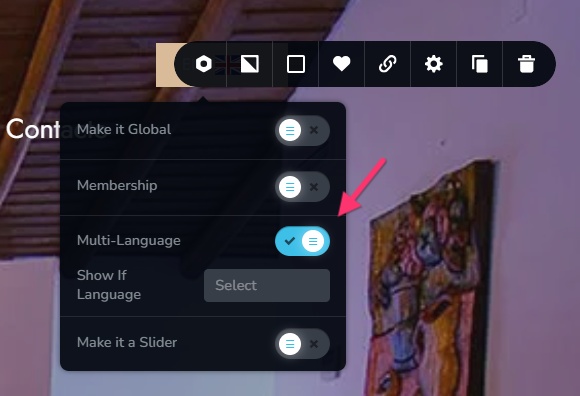
In the two pages you have mentioned above, kindly check the Multi-Language setting for your header cum hero section. When you select this option, you must also set the languages for which this block must be displayed. If you do not select any language, the specific block will be hidden for all languages.
About only the English flag appearing on Desktop - Can you please confirm if you have implemented my suggestion to remove the overlap between the language selector and the column below it?
To make automatic translations work, you must add a Google Translations API key following the procedure at https://support.brizy.io/hc/en-us/articles/22465707546386
0 -
I had that already ticked on
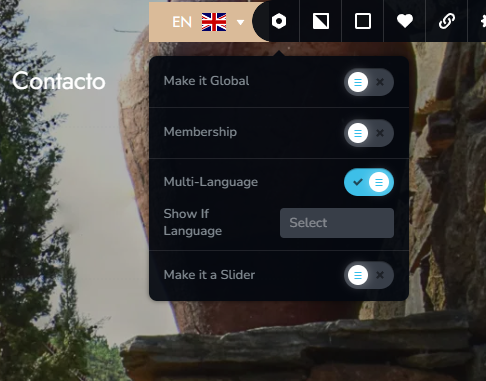
I will work on the overlapping you mention.
ONE IMPORTANT THING.
On Desktop, the default flag that appears first, it´s English, when in fact should be Spanish flag, since that´s the default. In fact, checking mobile and tablet, on those two, the Spanish flag appears first, with English below. This issue seems to occur only on Desktop.
0 -
And as mentioned above, the Header, which was in place just fine in homepage, and the two pages i created, has now disappeared in all devices.
The two pages url so you can kindly asap check are:
/es/casa-rural
/es/la-campina
0 -
Hello there,
Possibly my previous explanation was not clear. Kindly watch the screen recording at https://jmp.sh/hmmCXVhQ where I explain in more detail the the reason why the header was missing on those two pages.
At my end the when visiting the website homepage, I see the Spanish flag by default (and not English) on all devices.
 0
0 -
Many thanks K.C. George.
I appreciate your effort to explain it. Thank you.
0 -
For privacy reasons, Is it possible for you to make all this Q&A private just for me please?
0 -
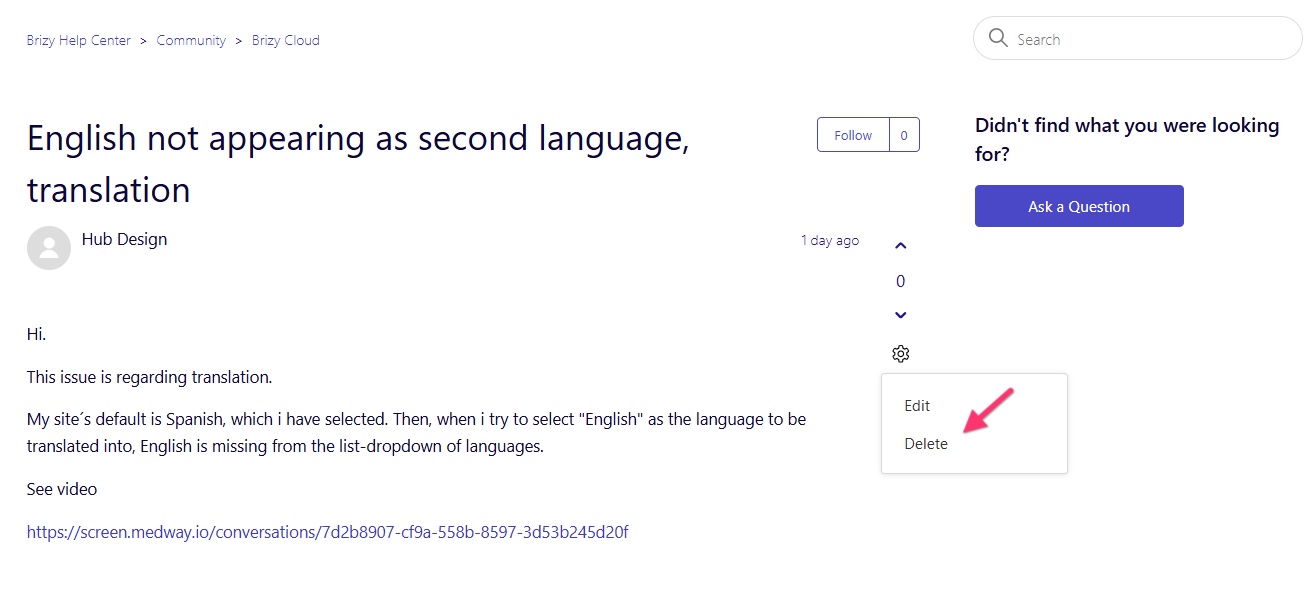
You could delete this post by selecting the "Delete" option
 0
0
Please sign in to leave a comment.
Comments
15 comments