Menu Not Appearing on Tablet or Mobile

Hi there,
I need to send you account info and website details privately please, not here on public board.
I created a site with Brizy Cloud PRO. Like many others before it, i am familiar with the system.
However, the menu I created, appears fine on Desktop. But it simply does not show at all on tablet or mobile. Nothing. The entire menu is missing on tablet and mobile.
That didn´t occur before.
Please let me know how to proceed so you can check asap. Thank you
-

Hello there,
Did you face the above issue on Project #19? The column around the menu element was hidden. I have made the column visible now. Please check again.
 0
0 -
Hi, that´s the project.
However, i noticed what you did. You actually clicked on that icon, and the header disappeared entirely on the mobile site. That´s not the issue. So i "unclicked" it and the header is now showing back on mobile.
The issue is different. Basically. The Menu I created for the site, only appears on Desktop. But does not appear on tablet or mobile.
And because the menu only appears on desktop. I need the main menu that appears on desktop, to also appear on mobile and tablet, so i can convert it to humburguer on mobile and tablet.
0 -
Now, on top of the earlier issue, another one appears.
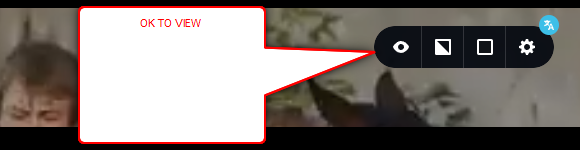
Your action has now made the entire header disappear on both tablet and mobile, and even though I have them both OK to view, i keep refreshing the live site, and header is missing
 0
0 -
In fact, now the header has disappeared in all devices, including desktop. Gone.
And the symbol appears as "ok to view", it´s not crossed so the header should appear on live version.
Please check, this issue was not the issue reported, but it seems your action has done something to the header on all devices and i cannot get it back.
0 -
Please see attached video.
This is what´s happening. I leave the icon unclicked, and then save it. The header should therefore be visible.
BUT, after saving it, i do a hard refresh CTRL+F5, and the site goes back to the eye icon being clicked upon.
There´s a bug there and i cannot move forward.
0 -
video for you, there´s definitely a bug now on this project, i am unable to save the header as "ok to view".
https://screen.medway.io/conversations/06893e23-b8a6-5ca8-9abd-0a5798a4ed51
0 -
Hello
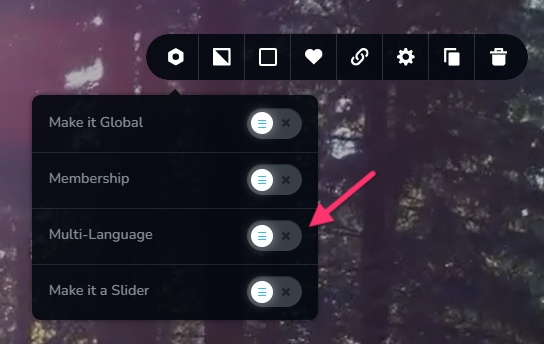
The header disappeared because you enabled the "Multi-language" option for your header. I have disabled it to bring the header back in the frontend.
 0
0 -
Thanks. i am confused though.
What´s the correlation between one and the other.
I am now going to work on adding translation to the site. Does that mean that if i make it "multi-language", the header is then going to disappear? ..
0 -
The issue i initially reported, it remains an issue. See video.
THe main menu, does not appear on tablet and mobile. And the "eye" icon is ON, so the main menu should appear, but it doesnt.
https://screen.medway.io/conversations/c0d994dc-20a9-53d7-aaba-6834a0a5eacb
0 -
Kindly enable the multi-language option for the header only after adding one or a few translations. It will then work well.
0 -
Hello
Can you please logout of your project for the next half hour. I will fix this issue and after that you can continue working. Please confirm after you have logged out.
0 -
Hi yes, i have logged out now. Thank you. Will wait for your news, many thanks
0 -
Please check now if the mobile and tablet menus are visible in the website frontend and at the backend.
0 -
Yes thank you. All seems in place now.
I have built many sites already using Cloud. Can you confirm this was a bug and not something i was doing wrong, or if it was, please let me know what it was so i can learn it and avoid this issue again.
0 -
Hello there,
The feature to hide and unhide appears working well without bugs. The column around the menu was hidden; unhiding the column resolved the issue for you.
 0
0
Please sign in to leave a comment.
Comments
15 comments