Global Header Errors when we edit

When we try to make changes to our pages, the global header and footer are making an error. Please help!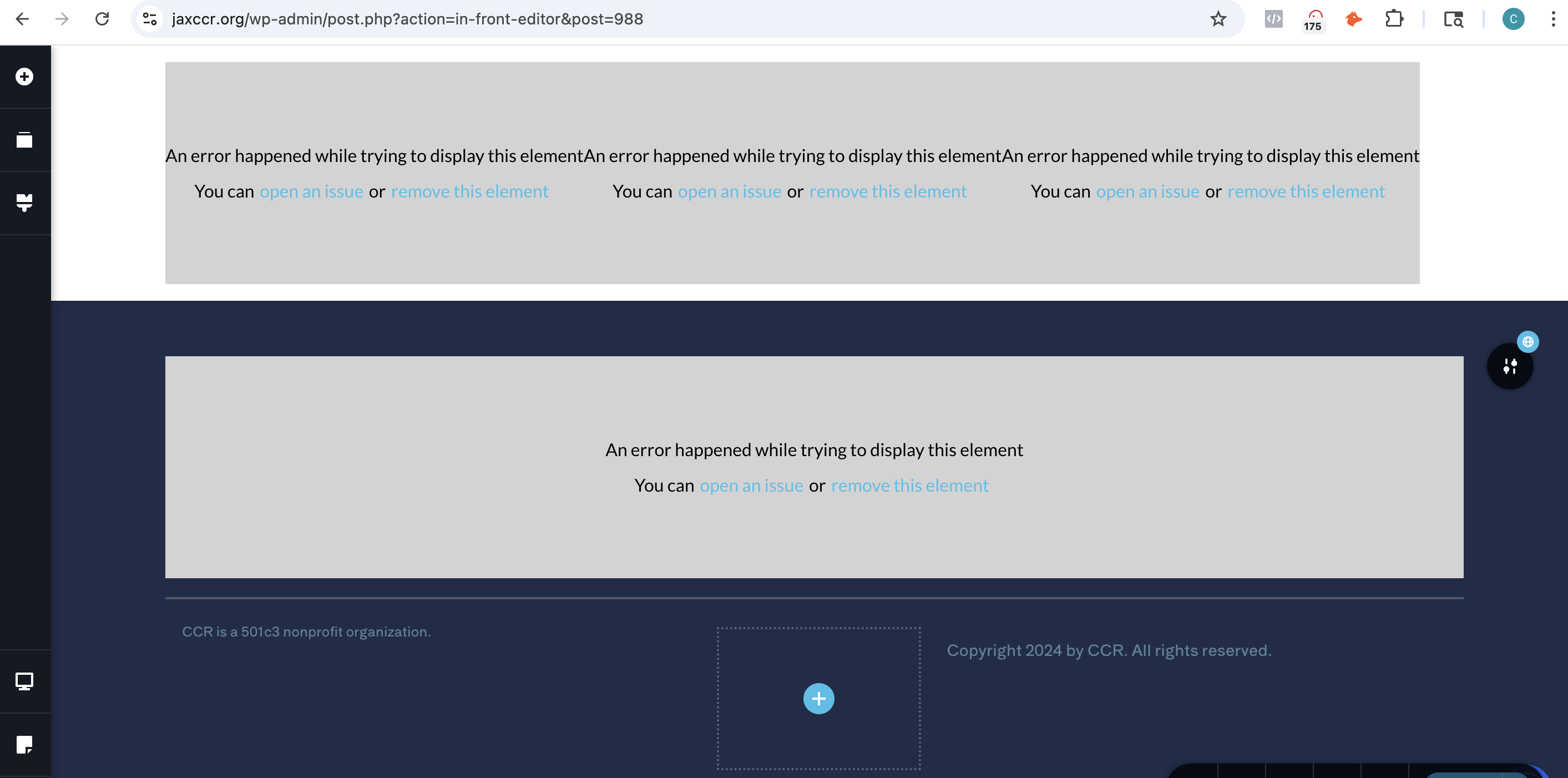
-

Hi Charmaine,
Thank you for contacting us.
Please ensure that both Brizy and Brizy Pro are updated to their latest versions. Sometimes layout issues can result from version mismatches or recent updates.

If the issue continues, try to isolate it by disabling all other plugins except Brizy and Brizy Pro. It’s also a good idea to temporarily switch to a default theme like Twenty Twenty-Four to see if the theme might be causing a conflict.If this didn't help, please share your WordPress admin login details with us so we can take a closer look. Please add us as an Admin user to your WordPress Dashboard and send the following details to communitysupport@brizy.io.
Community Post link: https://support.brizy.io/hc/en-us/community/posts/27151788530066
WordPress Admin URL:
Username:
Password:Also make a full backup of your site as a precaution.
Looking forward to your reply.
Best regards,
Ariel H.0 -
Good morning,
We tried the fix you suggested, but it did not work. We use SiteGround and I have added communitysupport@brizy.io as a collaborator to the jaxccr.org site so you can take a closer look. You should have received an email from SiteGround to accept the access.
I just got notice that the request expired. I am sending it again today.
Warmly,
Charmaine0 -
Hi Charmaine,
Thank you for sharing the SiteGround collaboration link. Unfortunately, we weren’t able to access it as it didn’t work on our end.
To proceed, please either provide your WordPress Dashboard admin password or add our email address as an administrator so we can assist you further - https://yoast.com/help/how-do-i-add-a-new-admin-user/
Let us know once that’s done. We’ll be glad to continue from there.
Kind regards,
Ariel H.0 -
Hi Ariel,
We use SiteGround and I have added communitysupport@brizy.io as a collaborator to the jaxccr.org site so you can take a closer look. You should have received an email from SiteGround to accept the access.
In case that did not work, I also added your email address as an administrative user. WordPress sent an email to you as well. Let me know if that worked.
Warmly,
Charmaine0 -
Hi Charmaine,
Thank you for sending over your site credentials. We've gone ahead and updated Brizy to the latest version (2.6.22). However, your site is still showing Brizy Free version 2.5.10 as the latest version in the Plugins area, even though the update was successful.
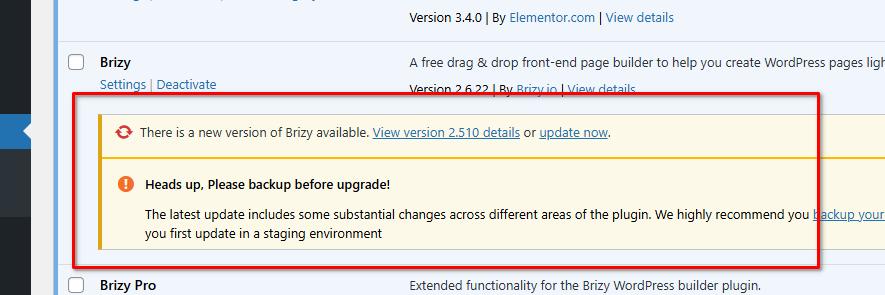
This display issue shouldn't affect your site, and the update should resolve the image-related problem you were experiencing. That said, I recommend ignoring the plugin update notification for now and not attempting to update it again, as it may revert back to the older version.
I suspect this might be related to SiteGround's caching system. One of my colleagues is currently looking into this further, and I’ll keep you posted as soon as I have an update.
In the meantime, it would be helpful if you could also report this to SiteGround support and see if they can offer any insights on their end.
Best regards,
Ariel H.0 -
I updated and it did not resolve the issue. Please advise.
0 -
Additionally, the issue was still occurring on the old version of the plugin.
0 -
I contacted SiteGround, and they have advised the following:
Caching is not normally applied on the admin, so it's not likely to be the problem.
Caching was disabled by SiteGround team and the same error still occurred. A senior technician will also review and I will share any insights from SiteGround if/when they are available.0 -
Hi Charmaine,
Thank you for the update.
We've come across a few similar cases recently, and it appears this issue only occurs on websites hosted with SiteGround. It's usually related to server-side caching, specifically object or update caching, which can cause WordPress to display outdated plugin information.
We're still investigating this on our end. In the meantime, we've reinstalled Brizy version 2.6.22 for you, so you can safely disregard the plugin update warning for now. This version should allow you to continue updating your pages without any issues.
Best regards,
Ariel H.0 -
Hi Ariel,
I just wanted to update you that the issue persists. We recently updated our WordPress version and the client's Brizy Plugins due to - I forgot you had told us not to. Should we stay on the older version? And, if so, would you mind putting it back on for us?
Warmly,
Charmaine0 -
Additionally, we have some new sites we were going to build using Brizy on SiteGround. Is there another host that is more compatible with Brizy builder?
0 -
Hi Charmaine,
Thanks for the update!
We kindly advise continuing to use Brizy 2.6.22 together with Brizy Pro 2.6.14, as we’ve received reports of other issues related to the recent updates, which our developers are actively working on. For now, it's best to stay with this version.
As for hosting, while Brizy generally works with most major providers, some users have reported a better experience with IONOS, Hostinger, or ScalaHosting, compared to SiteGround. These might be good alternatives for your upcoming projects.
Best regards,
Ariel H.0 -
Hi there,
I restored backup to Brizy 2.6.22 and Brizy Pro 2.6.14.
However, Brizy Pro 2.6.14 will not run with the new WordPress PHP version.
Of course, we do have to maintain the WordPress updates. So it's really not best for us to stay with this version.
What can we do?0 -
P.S. We are not having this issue with other site we have hosted on SiteGround also built with Brizy
0 -
Hi Charmaine,
Thanks for the update. You may now proceed with updating Brizy to 2.7.1 and Brizy Pro to 2.7.0 — these versions include important fixes for several issues that were reported after the initial 2.7 release.
Once updated, please clear all caches and let us know if you run into anything unusual. We’ll be happy to assist further if needed.
Best regards,
Ariel H.0
Please sign in to leave a comment.
Comments
15 comments