Relational assets & display

Hi, I want to create a database of game items.
1- There are the game items
2- These game items are compatible with MULTIPLE games
3- These game items have DIFFERENT effects when paired with different games.
So I have 3 custom assets...
1- Game items that has a multiple relations with...
2- Compatible games that has multiple relations with...
3- Effects custom assets.
In effects custom asset I have stuff like
GAME ITEM + GAME = New potion
GAME ITEM + GAME 2= New outfit
GAME ITEM + GAME 3= More life, etc.
I have 3 questions...
1- Is this even the best way to do this? The biggest issue I have is that my game item has different effects depending on the game.
2- How do I display a SINGLE game item, and I have the list of all the effects that this game have on all the different games?
3- Is it possible to pick one game (like Game 2) and show all of the compatible Game items?
-

Hello Olivier,
This project may not be feasible with Brizy Cloud. Let me explain why. You can link custom assets with multiple taxonomies in Brizy Cloud. (Blog posts is like a custom asset and categories is a taxonomy. You can have multiple taxonomies like "Categories", "Topics" "Genres")
In the context of your project,
- "Game Items" can be setup as custom assets
- "Games" and "Effects" can be added as taxonomies (provided "Effects" are associated directly with "Game Items")
- Listing of all "Game Items" compatible with a "Game" is possible
Let's say there are several combinations of "Game Items" and "Games" and each combination has it associated "Effect". Creating a one-on-one correlation between these combinations and "Effects" is beyond the scope of what Brizy Cloud can do.
0 -
Ok dumb version it is then with tabs and accordions! What element do I use to loop all of the individual GAME ITEMs and GAMEs?
0 -
Hello Olivier,
Let's say you have setup "Game Items" as a custom asset (like Posts) and "Games" as a taxonomy (like categories) in your project
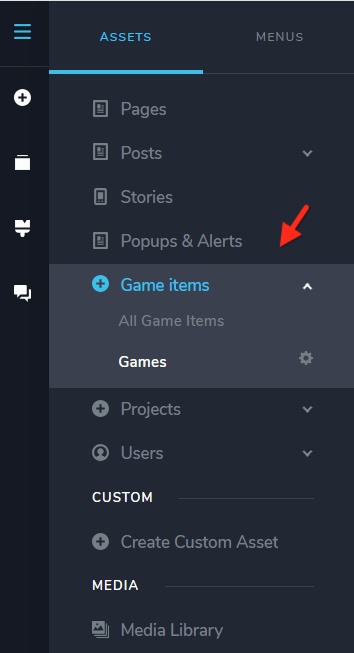
You can then list all "Game Items" that are compatible with a "Game" in the Game Category Archive template using the "Posts" element
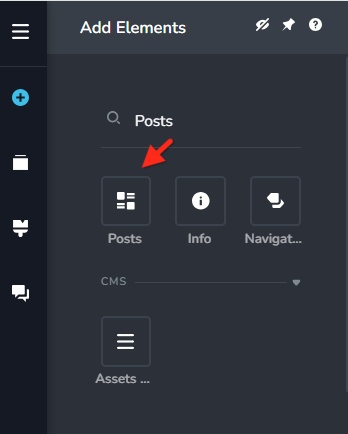
Within the "Posts" element, you will make these selections for the category archive template.
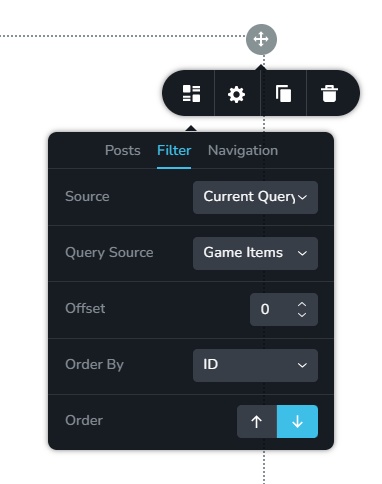 0
0 -
Perfect!! Last question...is there an easy way to add items other than manually? CSV import or something?
0 -
Hello Olivier,
Regretfully, there is no option to upload posts or custom assets using a CSV file. Manually adding each one is the only choice.
0
Please sign in to leave a comment.
Comments
5 comments