Spinning Wheel , Wont Update

godaddy hosted Wordpress site wont update pages, i have tried:
Deactivating all plugins
changing themes
reinstalling brizy
increasing php mem size
nothing seems to be working
-

Hi Matthew,
We're sorry to hear you're having this issue with Brizy.
Could you please provide temporary access to your WP Admin so we can take a closer look at your site? Kindly add us as an Admin user in your WordPress Dashboard and send the details to communitysupport@brizy.io:
Community Post link: https://support.brizy.io/hc/en-us/community/posts/26782411749138
WordPress Admin URL:
Username:
Password:Best regards,
Ariel H.0 -
Login Creds Sent
0 -
Hi Matthew,
Thanks the update.
I was looking through the emails we’ve received, but I couldn’t find any message under your name. Could you please confirm if you followed the format mentioned in our last email when sending your site credentials?
The format is important, as we receive several website credentials through our community support email address. It helps us track support requests more efficiently and ensures we can respond to your issue.
Looking forward to your confirmation.
Best regards,
Ariel0 -
Hi Casey,
Thank you for your cooperation.
We’ve looked into the issue, and it appears to be specific to the homepage. This typically happens when the page is quite large and contains many elements, some hosting providers set limits that can affect how such pages are saved.
To address this, we recommend reaching out to your hosting provider and asking them to increase the PHP Max Input Variables setting to 10000. This should help prevent any issues related to saving large pages.
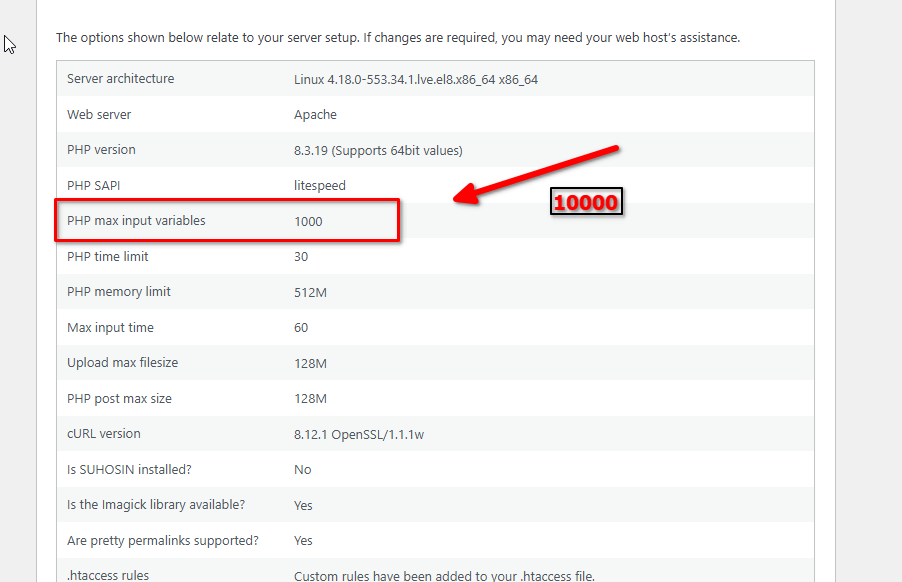
Additionally, if the issue persists, it’s possible that a security firewall on the server is blocking the request when it exceeds certain limits. In that case, we suggest reducing the number of blocks on the homepage to avoid hitting those restrictions.
If you have any further questions, please let us know.
Best regards,
Ariel H.0 -
i increased the local size to 10000 and had godaddy increase it also, they increased it to 9000, still no luck on the homepage . I cant seem to remove anything off of it to get it to save either. Any suggestions on removing a block from it without having to recreate the whole thing?
0 -
Hi Matthew,
Thank you for the update.
I’ve gone ahead and saved the home page as a layout for you. As a workaround, you can create a new home page (or a temporary page) and import the saved layout there. From that version, you should be able to remove some blocks before saving the page again. This is demonstrated on this screencast - https://youtu.be/i4oTAtvQzkU
This approach should help reduce the content size and allow you to save your changes without starting from scratch.
Best regards,
Ariel H.0
Please sign in to leave a comment.
Comments
6 comments