Recurring Issue: Menu Block Moves Down (After Updates?)

Dear Brizy Support,
I keep experiencing the same recurring issue on my website www.wendyidzenga.nl, which was built using Brizy.
From time to time, usually after an update (whether it’s Brizy, WordPress, theme, or plugin related), the menu block on the site suddenly appears in the wrong position—it gets pushed down the page instead of staying at the top where it belongs.
What’s strange is that when I open the page in Brizy edit mode, the menu appears in the correct place (at the top). However, without saving anything, it still shows incorrectly (lower on the page) on the live site.
To fix it, I need to make a small change—like resizing the logo slightly—and then save the page. After that, the menu appears correctly again.
This time, I’ve only fixed the homepage. On all the other pages, the menu is still showing in the wrong place. It’s especially odd because this is a global menu block, so it should behave consistently across all pages.
Unfortunately, I now have to open and save every single page individually to fix the issue, which is very time-consuming. On top of that, I often only notice the problem after someone else alerts me, which is not ideal.
Currently, only the homepage menu appears correctly; the rest do not.
Could you please help me understand what might be causing this and how to prevent it from happening again in the future?
Best regards,
-

Hello Michiel,
If your page has one or a few global blocks at the top, then regular blocks and one or a few global blocks at the bottom, this issue does not normally occur. When you have a regular (non global) block above the global header, the global header tends to move around.
Is the block above the header with a quote, a global block? Kindly make it a global block and check if the issue resolves.
 0
0 -
The block above the header (with the quote) is not a global block, because the website owner wants to display a different text on each page. So making it a global block is not an option.
Is there another way to tackle or prevent this issue?
0 -
Hello Michiel,
Let's say you have a regular (non global) block on your homepage. When you make it a global block, Brizy will automatically add the following "Display Condition" to the page and as per the following display condition, the specific block will be displayed only on the homepage (even though it has now become a global block)
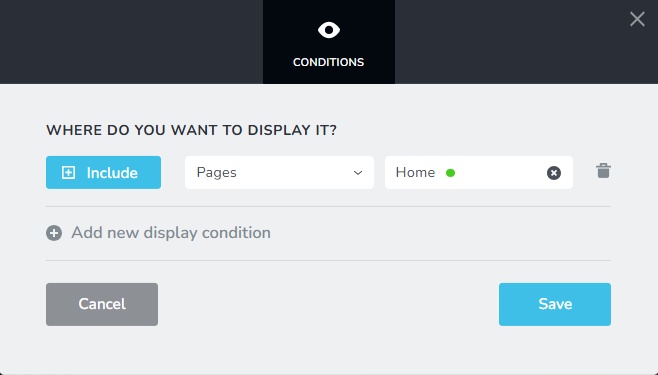
Hence even if you have a block which is displayed only on a single page, making it global is alright as long as the Display Condition is correctly configured. Kindly follow these steps for each page on your website to fix the moving header issue.
- Open the page in the Brizy editor
- Make the first block a global block and save the automatically added "Display Condition"
- Update the project
0 -
Thanks! It works!
0 -

Hello everyone,
unfortunately this problem also occurs on all my clients' sites with EVERY update. In addition to the other new problems that occur over and over again with updates, this is a really annoying undertaking.
Why is it not possible to keep the block order regardless of whether a block is global or not?
Is there a solution on the agenda for future updates?Greetings
0 -
Hello Kevin,
Is this issue occurring in any of your client URLs or you could fix it already? The current global blocks implementation has this limitation. Setting the blocks above the global header also as global is the solution for the problem.
0 -
Hello everyone,
I try to fix all the pages with the error as quickly as possible after each update in order to make the original version available to my clients again. This happened again with the last update.
The function of global blocks is great, but sometimes I need a global block as a header, sometimes I need a global block in the middle of other blocks and sometimes I need a global block at the bottom of the page. In my opinion, this flexibility should also be possible for this good feature.
Even if the top block is global, this problem occurs with blocks below it if the order of global and non-global varies.
So for the time being, I will have to continue to respond to the frustrated calls of my customers after every update and save minimal adjustments promptly to restore the desired order live.
Thanks for a reply anyway.
Regards0 -

Hi Kevin,
Thank you for your feedback, and I’m really sorry for the issues you're experiencing after each update. I understand how frustrating it is to fix layouts and deal with client concerns.
Your input on global block flexibility is noted and has been shared with our team for future improvements. If you notice specific layout issues, feel free to send an example, and we’ll gladly take a closer look.
Thanks again for your patience.
Best regards,
Ariel H.0
Please sign in to leave a comment.
Comments
8 comments