Blog post single cell text color changed with Brizy blog post template

-

Hi Ryan,
Thank you for contacting us. It looks like the screencast link you shared isn’t working on our end. Would you mind sending it again?

Looking forward to your reply.
Best regards,
Ariel H.0 -
Woops. Sorry here you go: https://go.screenpal.com/watch/cThVFxnQFCp
0 -
Hey I also noticed all of my headings (ie: H2) are the same size as regular text in every post now even though it appears correctly in the editor. I have headers (including h2) set to a larger font size in my Brizy plog post template. Is this related?
0 -

Hello Ryan,
For some unknown reason, the text color does not take effect when switching to dark background color in the Gutenberg editor in your project. This works fine at my end. Have a look at https://brizy.online/how-to-style-a-console-table/
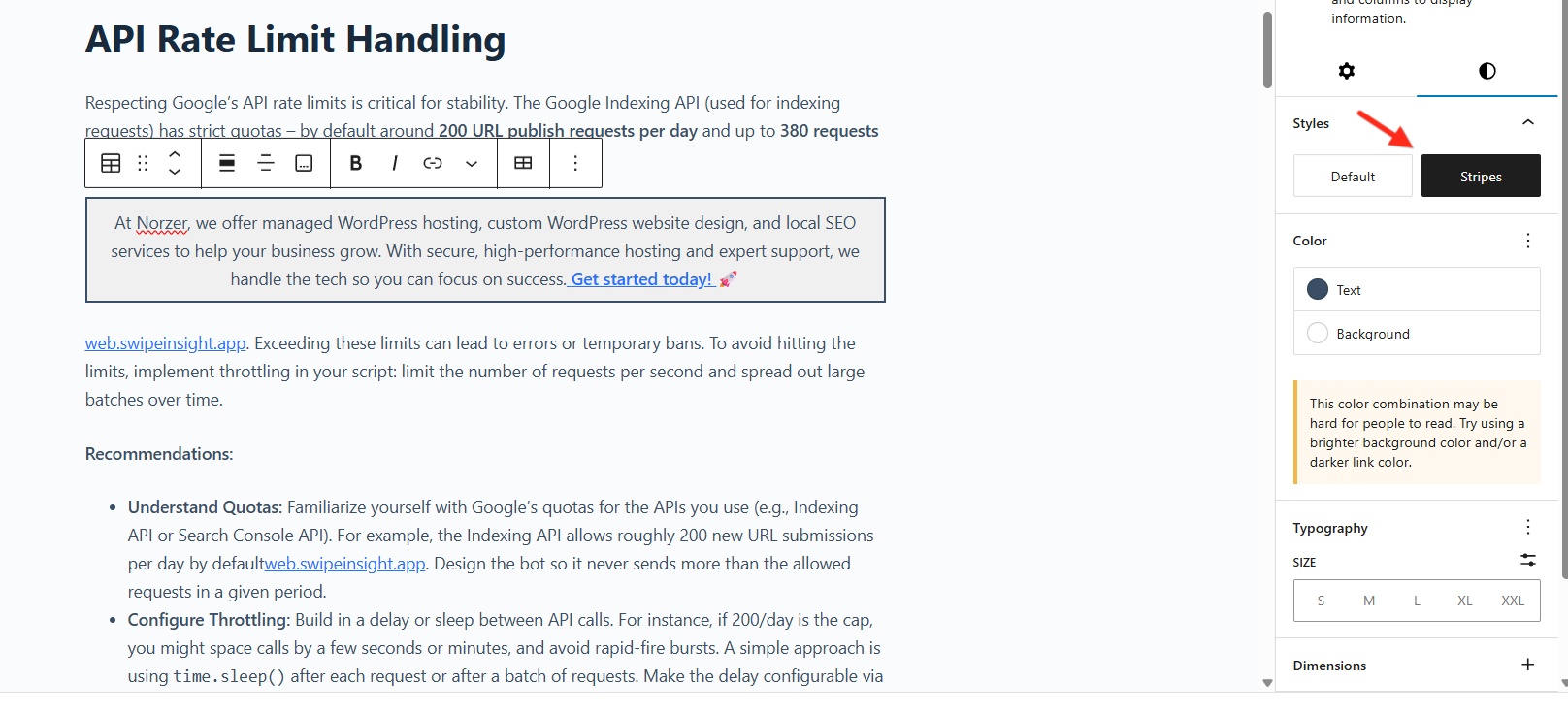
As a work around, I have changed the design of your text box slightly. Have a look at https://norzer.me/automating-google-index-monitoring-what-i-learned-from-building-a-free-python-tool/

The background color is set to white and the text color is set to black and I have added a border and have enabled the "Stripes" option to give it a mild gray background. Would this design work for you?
 0
0 -
thanks for this. If it were just this post then that would be ok. but I have other posts and also since I notice none of my styling seems to be taking. See me post above about the H2s. All text is now the same size even though I have H2 set to a specific font size. Any idea whats up? thanks
0 -
also i noticed its not taking the footer from my blog post template where I have a footer there. ??
0 -
Hello Ryan,
We have added this Display Condition to display the footer on all blog posts. Blog posts are now displaying the footer correctly.
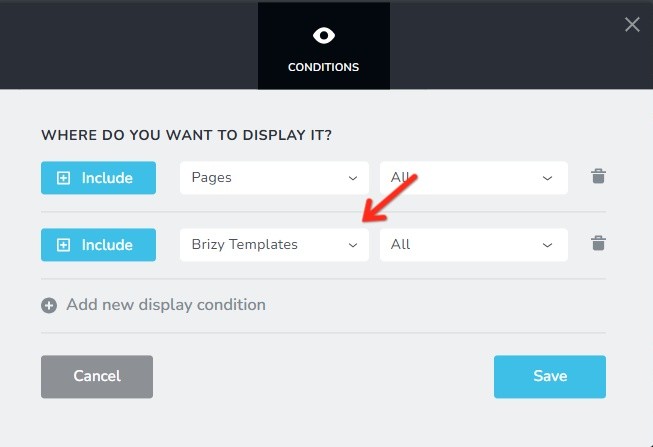
In the Gutenberg Editor, if you apply "bold" to a heading typography, the mapping of Gutenberg typographies to Brizy typographies will not work correctly in the blog post template. To fix the issue, you must remove "bold" from all your headings in your blog post.
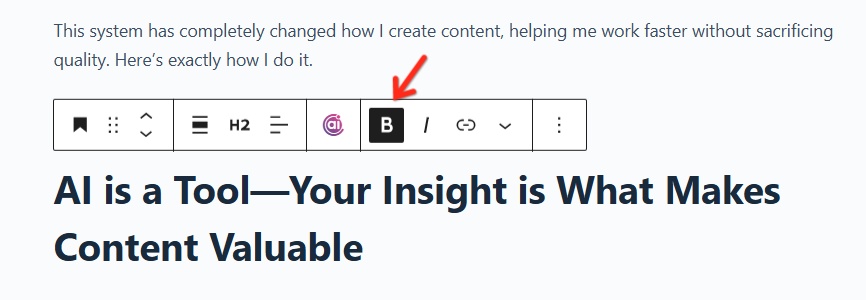
To make it easier for you to implement this change in your project, we have added a code snippet to the plugin "Header Footer Code Manager". This code gets added to the header of your website and will remove the "strong" tag added to headings in the Gutenberg editor.

Now the blog post headings display correctly for logged in users. Kindly purge cache to for this change to reflect in the website frontend.
0 -
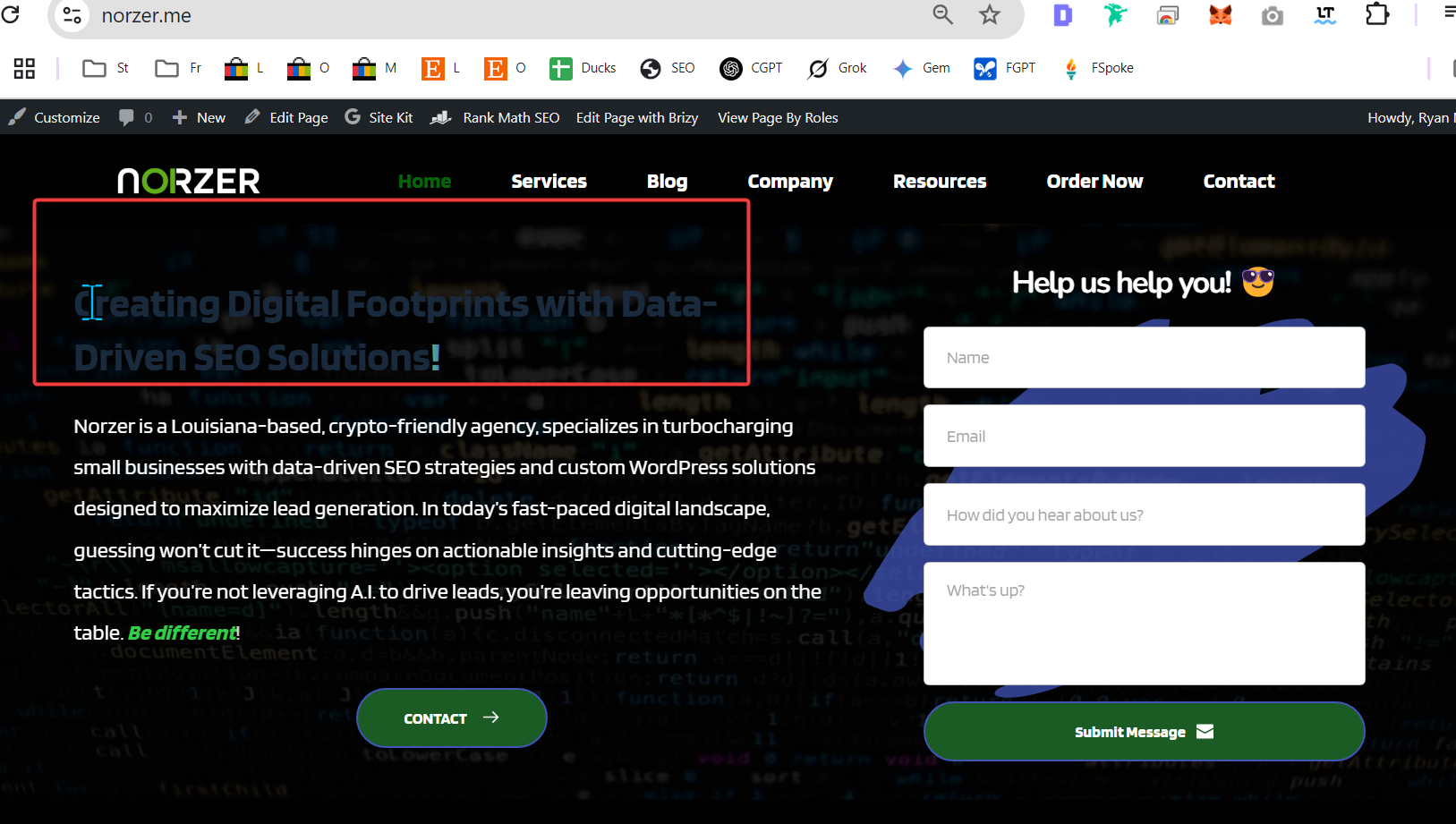
Thanks for this but now my H1 on my homepage is a dark grey rather than a multi-color gradient font. See below.
Also, the way we are doing this isn't the way its supposed to be done, right? I have client sites and don't have to jump through these hoops. What is the root cause for these issues? That's what I need to know.
This is a client blog post that I have setup the same way AFAIK and it looks fine: https://mizakandpacetti.com/how-long-does-a-personal-injury-claim-take-in-ohio/
Thank you again.
 0
0 -
btw i disabled the snippet for now because the home page is more important than the blog posts. thank you
0 -
Hello Ryan,
In the Brizy Content element which we use in the blog post template, the following setting maps Gutenberg Heading 2 to Brizy Heading 2.
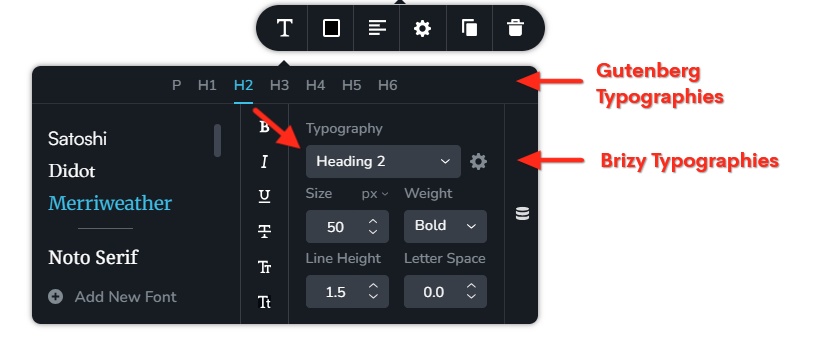
In the Gutenberg Editor, if you apply "bold" formatting to a Heading typography, Brizy stops recognizing it as a Heading. Hence the mapping of Gutenberg Headings to Brizy Headings in the Brizy "Content" element fails.
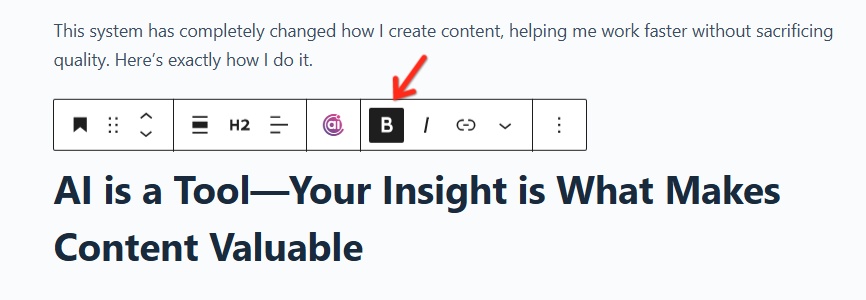 This is the reason why some of your blog post headings do not show in the website frontend. Removing the bold formatting from the Gutenberg Editor is the solution to the problem. If you want your headings to have a bold typography, follow this two step procedure
- In the Gutenberg Editor, apply the appropriate Heading typography and do not apply any formatting
- Apply formatting to headings in the Brizy Global Styling panel
Have a look at https://norzer.me/automating-google-index-monitoring-what-i-learned-from-building-a-free-python-tool/. In this blog post, you have not applied bold formatting to your headings in the Gutenberg Editor. Hence, all headings appear well formatted in the website frontend.
0 -
thank you. i will look this over next week.
0 -
ok that worked. thanks. am i doing something similar that is causing the one cell table text color to change? that's the original question for this ticket. One more thing I noticed. My links aren't blue text. Where is that set? thanks
0 -
Hello Ryan,
Brizy does not have a global setting for link color and link hover color. Kindly add this code in your WordPress Dashboard under Appearance - Customize - Additional CSS to set link and hover colors.
/*Add link color and hover color*/
p a {
color: #3581e4 !important;
}
p a:hover {
    color: #fe4800 !important;
 }
0 -
ok thank you. i will try this. So, on all Brizy sites unless this is declared hyperlinks are black?
Finally, can you see my last question in the above message about the text in my table? that was the original thread topic. thank you.
0 -
Hello Ryan,
I could not replicate the original issue you have mentioned in this thread. On my website, I could display a white text on a black background. See this at the end of the blog post https://brizy.online/how-to-style-a-console-table/
We were unable to identify the cause of this issue on your project. Therefore, it was suggested to try a slightly different implementation as a workaround.
0 -
Hello, Thanks for the response. I can't replicate either on my other Brizy sites either which is the problem.
For example, this works fine: https://mizakandpacetti.com/how-medicaid-can-affect-estate-administration-in-ohio/
So, on this specific site (Norzer), I notice 3 issues. There could be more, but that's what I notice and I need to get to the root of the issue. I have tried switching themes, and the problem persists.
1) Header text doesn't stick to what I define in my Brizy post template if I bold it in the actual post itself. This doesn't happen on any of my other Brizy sites.
2) The color and background and text inside my one-cell table that I use as an advert changes for some reason. This doesn't happen on my other Brizy sites.
3) The font color for links is blue on all of my other Brizy sites (again, see here -- https://mizakandpacetti.com/how-medicaid-can-affect-estate-administration-in-ohio/) but for some reason it doesn't work w/o some custom CSS on Norzer.
Can we get to the root of what's causing this. I'm happy to get on a phone call or give you access to my hosting provider if you want to check performance stuff but it still occurs even with all that stuff disabled in my tests.
Thanks -Ryan
0 -
Hello Ryan,
- In the Gutenberg Editor, if you apply bold, italics or another formatting to blog post headings, the one-to-one mapping of Gutenberg typographies to Brizy Typographies will fail. This is how Brizy currently works. In all projects, this is how it should work. Are you sure this does not happen in other projects?
- We could not get to the root of what's causing this. But we've added some CSS under your Additional CSS in your WordPress Dashboard to fix this issue. Please check if the text in advert boxes look better. Please also check if the CSS does not affect any other text in your website.
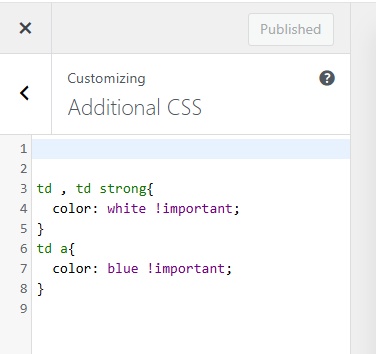
- Brizy does not have a setting for link color. We are not sure how the blue color is set for links in other projects. The link color (dark blue) does not have good contrast with the black background color applied to advert boxes. You may need to try a slightly different link color which offers good contrast in white and black backgrounds (light blue may work)
0 - In the Gutenberg Editor, if you apply bold, italics or another formatting to blog post headings, the one-to-one mapping of Gutenberg typographies to Brizy Typographies will fail. This is how Brizy currently works. In all projects, this is how it should work. Are you sure this does not happen in other projects?
-
Hey again,
I had one of my devs dig into this and this is what he said. We are happy to get on a call if needed. Please advise.
--
We’ve discovered a critical issue with how Brizy handles Gutenberg content inside its templates — and it’s clearly a problem caused by Brizy. We’re using the Blocksy theme, which is fully compatible with Gutenberg and renders block styles correctly. However, as soon as we assign a Brizy template to single blog posts, the default Gutenberg styling (for links, paragraphs, tables, etc.) is either completely ignored or overridden by Brizy’s CSS.
We tested this thoroughly: With Brizy deactivated, the post content displays exactly as styled in Gutenberg. With Brizy active, using a Brizy template, the same post content loses all expected Gutenberg formatting. This confirms that Brizy is hijacking the_content() output without applying or inheriting the appropriate Gutenberg styles — even in themes like Blocksy that are designed to work seamlessly with the block editor.
This is a serious issue because it breaks expected WordPress behavior and creates inconsistent presentation of content. Please confirm whether this is a known limitation, and let us know what Brizy is doing to address it. This behavior makes Brizy incompatible with Gutenberg content unless manually corrected, which shouldn’t be necessary.
--
0 -
Hello Ryan,
Your developer is right; using the Brizy template removes the Gutenberg styling for bold, italics and hyperlinks. We acknowledge that this is a limitation. Brizy currently has a 5% incompatibility with the Gutenberg editor, making it only 95% compatible. The best approach available right now is to use CSS code to get around the 5% incompatibility.
0 -
Thanks for the response. Do you have a goal to get 100% compatible or is that just not something that's possible? Also, why would it work on one site and not another?
0 -
Hello Ryan,
We do not currently have a plan to resolve the 5% incompatibility with the Gutenberg editor. This isn't because its impossible; but because our developers are occupied with other new features and more critical bug fixes and this request couldn't make it into the plans. Why it works in other websites is a mystery to us as well. Unless we look at those websites, we wouldn't know why it works there.
0
Please sign in to leave a comment.
Comments
21 comments