Website stopped working, plugin won't install!!

Please help me quickly this is urgent as our entire website is reliant on Brizy, and without warning it stopped working. I purchased the pro version and that worked for a day, now it's saying I need a more updated version of brizy free and that is giving me this error:
Could not copy file. brizy/public/editor-build/prod/editor/icons/glyph/tail-down.svg
-

Hi,
Thank you for contacting us.
To better assist you, could you please provide more details about what led up to the issue? For example, were there any recent updates or changes made before the error appeared? Also, if you could share a screenshot of the exact error message you're seeing, that would be very helpful for us in identifying the cause.
In the meantime, please try the following steps to isolate the issue:
1. Temporarily disable all third-party plugins except Brizy and Brizy Pro, then try again to see if the issue persists.
2. If you're trying to upload an SVG image, make sure SVG support is enabled by going to Brizy > Settings > General Settings and enabling the SVG Support option.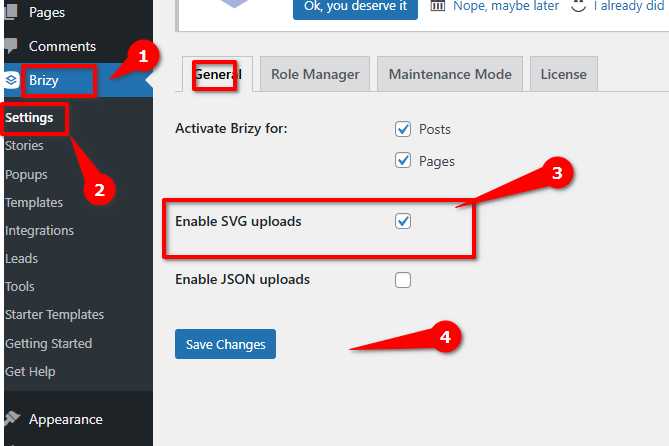
Let us know how it goes and feel free to send over the screenshot and any additional details you can provide so we can help you more quickly.
Best regards,
Ariel H.0
Please sign in to leave a comment.
Comments
1 comment