Embedded Links Not Working

I am using a feature on this new site build that I have used hundreds of times.
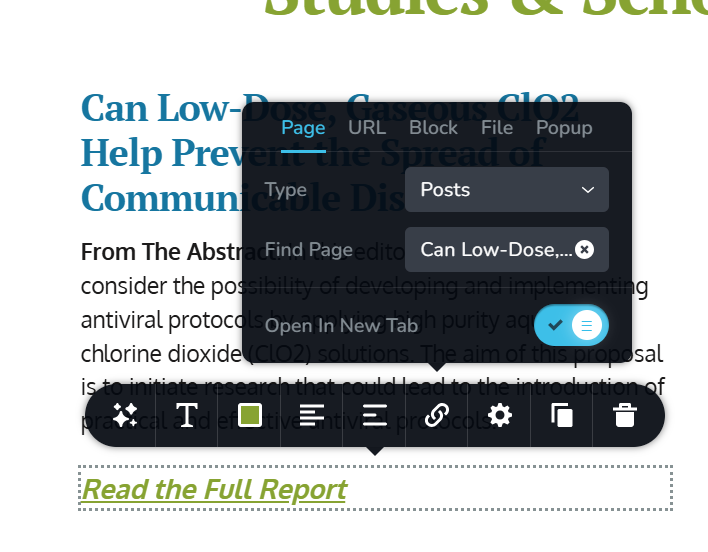
...embedding a forwarding link to a post. What is bizarre is that it is acting as though I had inserted a '#' for it is circling right back to the same page, on a new tab, when the link is clicked.
-

Hello Michael,
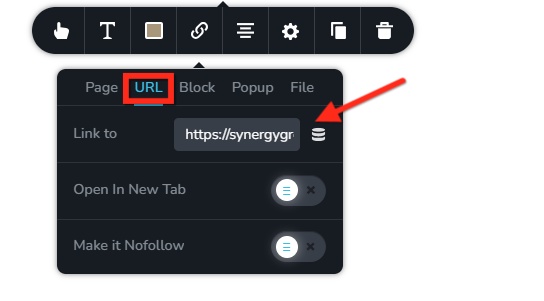
We apologize for the inconvenience. The internal linking to Pages/ Posts stopped working. I have reported this bug and we will work on fixing it. In the interim, kindly paste the URL of the blog post under the URL tab to fix the issue in your project.
 0
0 -
Sir, we have another problem on a different site, and it has been checked against various browsers:

I have set up a hamburger menu on this site and, as you can see, I have two sets of sub-menu items. Neither of these dropdowns are working as they should be. I have not checked this against other sites with the same type of menu, nor have I sought to see if there was a plugin conflict for I wanted to catch you before your day's end.
0 -
Hello Michael,
Can you try this on a page and see if the hamburger issue resolves?
- In the global header, kindly make a minor change (like increasing padding by 1 px)
- In the global footer, make a minor change like adding a space at the end of a text
- Make a minor change to on-click popups on the page (like increasing padding by 1px)
- Click on the "Update" button at the bottom right corner to save you changes.
0 -
- Done
- Done
- There are no pop-ups
- Done.
Results, while the menu expands as expected in the page editor, it will NOT expand on any pageview. Plus, I will say that AGAIN (as was the case with your Forms issue), having to make such manual adjustments on every one of the 100 or so sites for which I hold Brizy licenses is a tremendous inconvenience. I feel so horribly stuck. I have been a supporter of Brizy for nearly 6 years, and EVERY site I have built since has been dependent up your team. It seems like with every Wordpress update, or Brizy update you someone is opening up new cans of worms, that cost me tremendous lost hours.
0 -
I have now tried shutting down every plugin other than Brizy, Brizy Pro and Classic Editor, and change the theme from Blocksy to 2025 and there does not seem to be any conflict with other plugins or Blocksy.
0 -
Hello Michael,
After updating Brizy to its most recent versions, the submenus in certain projects remained functional. For some projects, it might not be necessary to update your projects after updating Brizy to the most recent versions.
To troubleshoot the above issue, could we have a look at your WordPress dashboard? We'll ask our developers to look into your project. We will explore the possibility of resolving the issue without you having to update every project.
0 -
I will send login credentials to you at the community support email address.
0 -

Hi Michael,
Thank you for your cooperation. It seems the issue may be related to the recent update. We've now escalated this to our senior support team for further investigation. I’ll follow up with you as soon as I have an update. Apologies for the inconvenience.
Best regards,
Ariel H.1 -
Hello Michael,
We have released Brizy 2.6.16 to fix the hamburger menu and a few other issues. Kindly update to this version and check if the hamburger menu issue resolves.
0
Please sign in to leave a comment.
Comments
9 comments