All new blog posts show "404 Page not found!"

I am migrating my site over from HTML to Brizy. I just switched the main Blog page over to Brizy. You can see it here: https://norzer.me/blog.
All blog posts prior to me switching over seem accessible from this page. Ie: https://norzer.me/blog/norzer-google-index-bot-automate-google-index-checks-with-python/
However, the most recent one, "Grammarly vs ChatGPT: Which AI Tool Makes Writing Easier in 2025?" gives me a "404 Page Not Found" when I try and click on it.
Very strange because it loads the featured image, title and summay okay.
Any idea why this may be going on? I suspect it has to do with the old Blog page being non-Brizy but that page is deleted and emptied from the trash. Also, I have tried saving permalinks again.
You already have a login to my website via wp-admin.
Thanks
-

Hi Ryan,
Thank you for contacting us.
The issue occurs because there's a page with the slug "/blog" that was edited using Brizy. Since your permalink structure is set to "/blog/%postname%/", WordPress expects "/blog" to be used for the blog archive, not as a standalone page. This creates a conflict and breaks the intended post URLs.
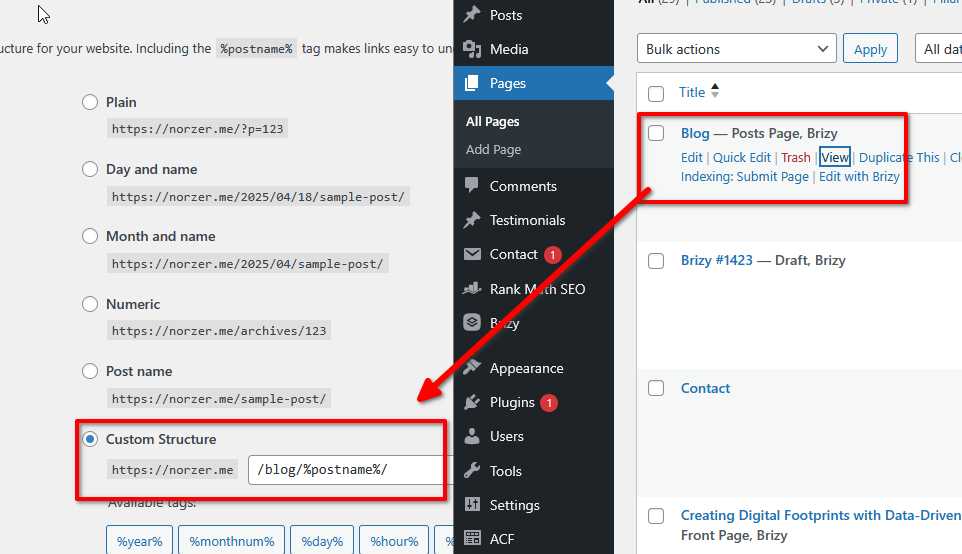
To resolve this, you have two options:
1. Remove or rename the existing "Blog" page to free up the "/blog" URL for the permalink structure to work properly.
2. Change your permalink structure to something like "/news/%postname%/" if you want to keep using the "/blog" page built with Brizy.
If you’d like to have a blog listing at "/blog" without conflicts, I recommend setting it as your Posts page under Settings > Reading, and avoid editing it directly with Brizy.
Give this a try and let me know how it goes.
Best regards,
Ariel H.0 -
Thanks for the response.
That blog page you see is the one I actually created to act as the main blog page using Brizy. I then set that as the "Posts page" in settings. You can click in and see this. Am I doing it wrong? When you say it expects it as a "blog archive", can I create this somehow? I tried creating an archive as a Brizy template as a test and called it "blogging" but there is no POSTS element I can add.
I really don't want to mess w/ the URL structure for SEO purposes.
Thanks
0 -
Ignore. I got it. I changed the permalink setting to Post Name. I had no idea that was set that way. It appears WordPress automatically created the redirects. thanks
0
Please sign in to leave a comment.
Comments
3 comments