Save to draft button stuck on loading

One of my clients is using wordpress with brizy pro but has some issues when editing a page. Editing text is fine, but when adding an element like an image or a whole new block, saving doesn't work anymore and the button stays on the spinning load icon. I've tried cleaning up using wp-optimize, but that only works for one save and then it goes back to non functional.
Here are some details of our setup:
- Wordpress 6.7.2
- PHP 8.4
Plugins:
- Brizy 2.6.14
- Brizy Pro 2.6.8
- WP-Optimize 4.1.1
What can I do to fix the issue? Or could you please look into it, then please tell me how I can privately send you the login details for wordpress and the hosting.
-

Hi Thomas,
Thank you for contacting us.
The issue may be caused by a conflict with another plugin. To help us narrow it down, could you please try temporarily deactivating all third-party plugins except Brizy and Brizy Pro, then check if the issue still occurs? This will help us determine if another plugin is interfering with the saving process.
If the problem goes away after deactivating the other plugins, you can reactivate them one by one to identify which one is causing the conflict.
Give this a try and let me know how it goes. We'll be glad to assist further in case this doesn't help.
Best regards,
Ariel H.0 -
Hi Ariel,
The issue already occurred before installing wp-optimize, which is the only other third party plugin installed. I did try to disable it, but that had no effect and we still have the same issue as said above: adding an element or block results in the page not being able to save.
Best regards,
Thomas0 -
Hi Thomas,
Please provide us with temporary access to your WP Admin page so we can take a look. Please add us as an Admin user to your WordPress Dashboard and send the following details to communitysupport@brizy.io.
Community Post link: https://support.brizy.io/hc/en-us/community/posts/26013751358098
WordPress Admin URL:
Username:
Password:Additionally, we will also need temporary access to cPanel:
cPanel host address:
Username:
Password:Best regards,
Ariel H.0 -
Hi Ariel,
I've sent the login details.
Best regards,
Thomas0 -
Hi Thomas,
Thank you for your cooperation and for trusting us with your Hosting Console credentials.
After checking, the issue is related to ModSecurity, which was blocking some requests due to the request body size being too large.
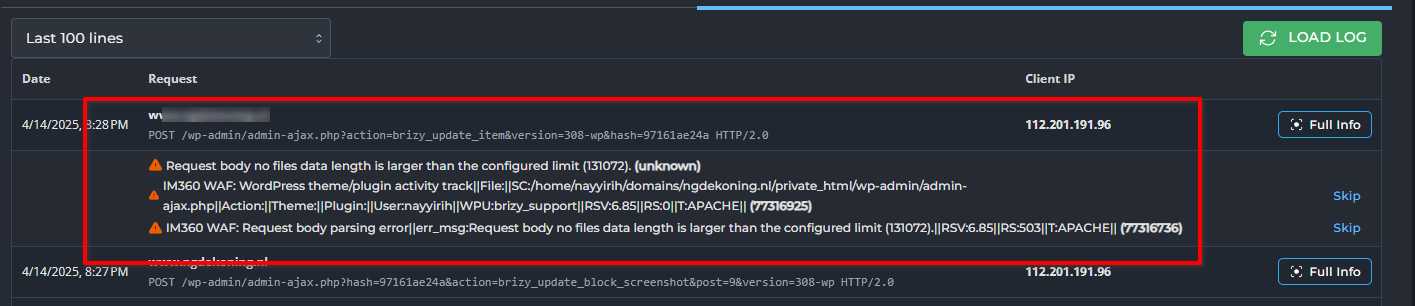
This often happens with page builders like Brizy, especially during AJAX calls to admin-ajax.php.
To resolve this, we added the following directives to your .htaccess file:
<IfModule mod_security.c>
  SecRuleRemoveById 77316925
  SecRuleRemoveById 77316736
</IfModule>
This allows the requests to go through and enables Brizy to save your page content properly - https://youtu.be/jadA35aBCRg
If you have any further questions, feel free to reach out.
Best regards,
Ariel H.0 -
Hi Ariel,
Thanks, it didn't work though, but that's not your fault. For some reason disabling the rules didn't have any effect because the same error messages pop up in the log, so I will get in contact with my hosting provider to get that sorted out. However disabling ModSecurity completely did fix it, but that is obviously not a permanent fix. So ModSecurity does seem to be the problem. Thanks for your effort, now I know what the problem was and will get the rest sorted out with my hosting provider!
Best regards,
Thomas0
Please sign in to leave a comment.
Comments
6 comments