Problem with activation Brizy Pro

Hello
I'm not able to activate Brizy Pro license key, The remote server response code is 403.
I contacted the hosting provider, they said everything is fine.
They suggested me to contact the plugin's developer for further support.
Thanks
Bojan
-

Hi Bojan,
Thank you for contacting us.
Please try the following steps to help us narrow down the issue:
1. Check the time and date settings on your computer to ensure they are current and up to date.
2. Confirm with your hosting provider that the cURL version on your server is 8.x or higher, as older versions may cause issues when connecting to our license server.If the issue continues, please provide us with temporary access to your WP Admin page so we can take a look. Please add us as an Admin user to your WordPress Dashboard and send the following details to communitysupport@brizy.io.
Community Post link: https://support.brizy.io/hc/en-us/community/posts/26007643334802
WordPress Admin URL:
Username:
Password:Additionally, we will also need temporary access to cPanel:
cPanel host address:
Username:
Password:Best regards,
Ariel H.0 -

Good Morning Ariel,
The issue seems to be on the server side authentication. The response "The remote server response code is 403" noted across several hosting platforms, so I am thinking this is not a hosting root cause.
0 -
Hi Duane,
Thank you for reaching out. We've received a few additional reports regarding this issue and have already escalated it to our senior support team for further investigation.
Best regards,
Ariel H.0 -
Any updates or direction on this issue?
0 -

Hello Duane,
The error occurred because your server IP was blocked by our firewall. We have now added your IP to our whitelist. Please try activating your license key once more and let us know if it works.
0 -

Hello,
I’m experiencing the same issue: when I enter my Brizy Pro license key, the following message appears:
"The remote server response code is 403."
My website is hosted on OVH.
Thank you in advance for your help!
0 -
Hi Dylan,
Thank you for reaching out. Could you please share your site’s URL so we can check the IP address?
Best regards,
Ariel H.0 -
Hello Ariel,
Thank you for your message. Here is the URL of my site: https://maplemp.fr
Thank you in advance for your help.
Best regards,
Dylan CHÉTY0 -
Hi Dylan,
Thank you for the update. I’ll check with our senior support team and get back to you as soon as I hear from them. Apologies for the inconvenience.
Best regards,
Ariel H.0 -
No luck on our end. If you like, please share a good support email and I can send you the logs we are seeing from this side.
0 -
Hi Duane, please send it to communitysupport@brizy.io.
0 -
Hi Duane,
Just following up — we haven’t received the logs yet.
If you're still seeing the issue, please send the log file to communitysupport@brizy.io and include the reference number 26007643334802 in the subject line. This will help us track your case more efficiently.
Looking forward to your update.
Best regards,
Ariel H.0 -
Hi Dylan,
Thank you for your patience.
Could you please try again and let me know if you’re still encountering the error?
Looking forward to your response.
Best regards,
Ariel H.0 -
Hi Ariel,
Thank you for following up. Unfortunately, I am still encountering the same error when I enter the license key: “The remote server response code is 403.”
Please let me know if you need any additional details from my end to help resolve the issue.
Best regards,
Dylan CHÉTY0 -
Hi Dylan,
Apologies for the inconvenience.
Could you please provide us temporary Administrator access to your WordPress Admin Dashboard? You can send the login details to communitysupport@brizy.io with the subject line: 26007643334802. If you’ve customized the default admin login URL, kindly include that information as well.
Looking forward to your response.
Best regards,
Ariel H.0 -
Ariel,
I just sent the email with the temporary admin login details to communitysupport@brizy.io as requested.
Thank you again for your help.
Best regards,
Dylan CHÉTY0 -
Hi Dylan, thank you for your cooperation. I’ll follow up on this and get back to you as soon as I have an update.
0 -
We have created a user (admin) login for you sent to the support email. This is a NULL site, but in the same server enviroment as all the rest with the same activation error(s).
0 -
Hi Duane,
Thanks again for your efforts in helping us troubleshoot this. Unfortunately, we haven't received it yet. Please make sure to include the reference number 26007643334802 in the subject line of your email for quicker tracking.
Looking forward to your reply.
Best regards,
Ariel H.0 -
Any updates? We have several sites in development now being stalled by this.
0 -

I have the same problem , error 403
my website : www.basic-securite.com
can you help me please
thanks
0 -
Hello Isaac and Dylan,
We have whitelisted IPv4 and IPv6 addresses for these two websites. Kindly try again to activate Brizy Pro licenses for these domains.
0 -
Hi George,
Thanks for your help. Unfortunately, I’m still getting the 403 error when trying to activate Brizy Pro on https://maplemp.fr/maplemp.
Could you please double-check?Best regards,
0 -
Hello Dylan,
Can we take a look at your WordPress Dashboard to check this issue? Please add a new user to your WordPress Dashboard and send the following details to our email: communitysupport@brizy.io
- Support Forum link: https://support.brizy.io/hc/en-us/community/posts/26007643334802
- WordPress Admin URL:
- Username
- Password
Please let us know in this forum when you send us the email.
0 -
Hello,
I've sent the requested information to communitysupport@brizy.io as instructed.
Thank you in advance for your help.0 -
Hello Dylan,
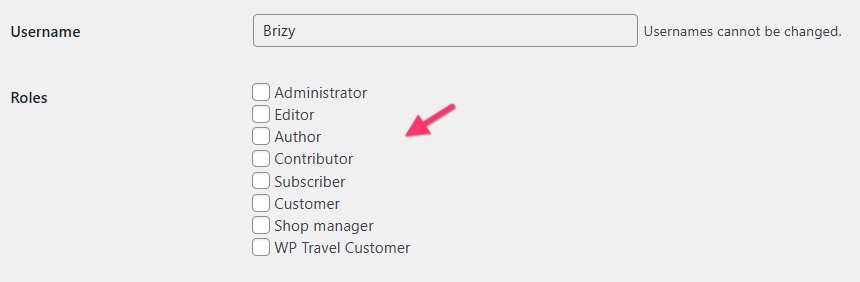
Thank you for the credentials. This user you have added does not have access to the WordPress Dashboard and can only access the website frontend. Can you check the role assigned to this user?
 0
0 -
I apologize for the oversight — I have now updated the user role.
Please feel free to try again.Best regards,
Dylan0 -
Hello Dylan,
Thanks. We have escalated this issue to a developer. We hope to get back to soon when we have an update from the developer.
0 -
Hi everyone,
We received an update today regarding this issue. The 403 error you're seeing may be happening because your site or server is currently blacklisted by our security system. This can happen for a few reasons, such as:
-Your domain or IP address appears on one or more global blocklists (used to prevent spam or malicious activity)
-Your server is part of a shared hosting environment with a bad reputation
-Unusual or suspicious traffic patterns were detectedWe use Sucuri as our security software, which relies on external blocklists like Alienvault and others to help generate the BLACK02 security signature.
https://labs.sucuri.net/signatures/waf/black02-blacklisted-ip-address/If your IP address was reported for malicious activity, even unintentionally, it may have been flagged and blocked by Sucuri.
Sometimes, clean sites can be blocked unexpectedly if they're on shared servers or if the IP was previously misused. We recommend checking your domain and IP using tools like:
MXToolbox - https://mxtoolbox.com/blacklists.aspx
Sucuri SiteCheck - https://sitecheck.sucuri.net
MultiRBL - https://multirbl.valli.org/lookup/A possible solution is to contact your hosting provider and ask them to either move your website to a different server or provide a dedicated IP address. This often helps avoid issues caused by sharing an IP with other users.
If your site looks clean but is still being blocked, feel free to send us your domain name and IP address, and we’ll be happy to take a closer look.
Best regards,
Ariel H.0 -
Hello,
I’m still receiving the following message when trying to activate my Brizy Pro license:
“The remote server response code is 403.”Despite multiple attempts (IP whitelisting, Sucuri and blacklist checks, clean WordPress configuration), the issue persists.
The site is running normally, the environment is clean, and no blockages are detected.Could you please let me know what steps I should take next to resolve this?
Best regards,
Dylan C.0
Please sign in to leave a comment.
Comments
50 comments