Native Button - UTM Script

Hi, we have a script in our header section to pull UTM info dynamically over button click.
Unfortunately Brizy won't allow for native buttons taking on the dynamic data when redirecting to another page.
Which leads us to having to use an embedded code to work and replacing all buttons (of course compensation with css for styling):
<a href="https://www.url.com/" onclick="event.preventDefault(); redirectWithUTM(this.href);""> Click btn </a>
Tried adding css classes but they actually won't impact the functionality of the buttons.
Is there a workaround in the button settings?
Thanks a lot.
-

Hello Dennis,
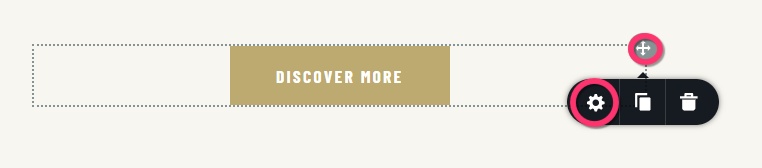
To add an onclick attribute to a Brizy button, select the top right corner of the button container and then the Cog icon.
Then under the "Advanced" tab, under the heading "Custom Attributes" add your onclick attribute.
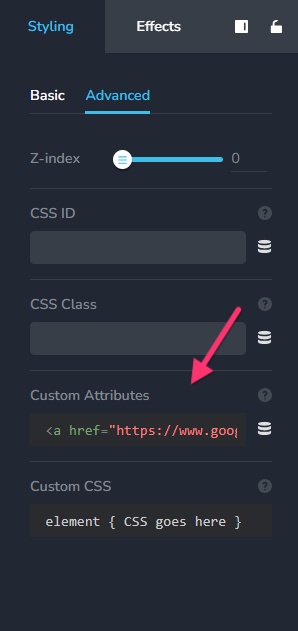
The UTM parameters should be sent via the URL by the script that was added to the header of your website and the onclick attribute that is added to your button. Please give this a try.
1 -
Amazing K C George.
Sharing our script that worked alongside:
<a href="#" onclick="redirectWithUTM('https://www.google.de'); return false;"></a>
href = "" left empty as it is overridden.
So in this process, we add base URL manually when deviating from base URL.
Our JS Code<script src="https://code.jquery.com/jquery-3.7.1.min.js" integrity="sha256-/JqT3SQfawRcv/BIHPThkBvs0OEvtFFmqPF/lYI/Cxo=" crossorigin="anonymous"></script>
<script>
// Direct solution with navigation in same window
window.redirectWithUTM = function(clickedUrl) {
// Ensure we have an absolute URL
var absoluteUrl = clickedUrl;
// Force absolute URL format if needed
if (!absoluteUrl.match(/^https?:\/\//i)) {
absoluteUrl = 'https://' + absoluteUrl.replace(/^\/+/, '');
}
// Get current UTM parameters
var currentParams = new URLSearchParams(window.location.search);
var utmParams = {};
// Collect existing UTM parameters
['utm_source', 'utm_medium', 'utm_campaign', 'utm_content', 'utm_term'].forEach(function(param) {
if (currentParams.has(param)) {
utmParams[param] = currentParams.get(param);
}
});
// Build the final URL manually
var hasQueryString = absoluteUrl.indexOf('?') !== -1;
var baseUrl = hasQueryString ? absoluteUrl.split('?')[0] : absoluteUrl;
var existingParams = hasQueryString ? new URLSearchParams(absoluteUrl.split('?')[1]) : new URLSearchParams();
// Add UTM parameters
Object.keys(utmParams).forEach(function(key) {
existingParams.set(key, utmParams[key]);
});
// Construct final URL
var finalUrl = baseUrl;
var paramString = existingParams.toString();
if (paramString) {
finalUrl += '?' + paramString;
}
console.log("Final URL:", finalUrl);
// Navigate in the same window
window.location.href = finalUrl;
return false;
};
</script>
If you can find improvements for our script code to slim down a bit more, please let us know.
Thanks!0 -
Hello Dennis,
Glad to know you could make it work. Could you please share the URL of the page that uses the UTM parameters?
Since we don't typically work with coding, we lack the expertise to recommend modifications to your code.
0
Please sign in to leave a comment.
Comments
3 comments