Brizy hosting really slow

Hi
It's been a long time I wanted to give you some feedback about Brizzy hosting
I made a video cause it speaks better
https://www.loom.com/share/d6bc5401e47845cca1c22eb88a882732?sid=78d8bb8b-bb6a-41ac-a17c-799358ab20dc
Let me know how to move forward
Thanks
Olivier
-

Hi Olivier,
Thanks for sharing your feedback.
When a page is updated, all cache gets cleared, which is why the first load is slower. To improve loading speed, you'll need to regenerate the cache for all pages, and after that, the page should load faster next time.
Additionally, based on the GTmetrix report, the front end is showing good speed performance, which indicates that overall optimization is working well - https://gtmetrix.com/reports/www.tothetop.io/DYDKTGNW/
Let us know if you need further assistance.
Best regards,
Ariel H.0 -
Thanks for the feedback always good to know the mechanic
Now how do you suggest to "regenerate the cache for all pages"
Once we'll be done with this, we'll check monitoring again
thanks
Olivier
0 -

Hello Olivier,
Kindly consider installing the Website Cache Warmer extension to Google Chrome browser and warm the cache after finishing updates to your website projects. Read more about this extension at Free Website cache warmer
0 -
Hi Ariel, Hi George
Regarding the cache, I'm using a link checker which since it loads all the pages, make sure all pages caache are ready: https://www.brokenlinkcheck.com/broken-links.php#status
This said, the gtmetrix you've sent me is an optimal one (desktop, direct datacenter connection)
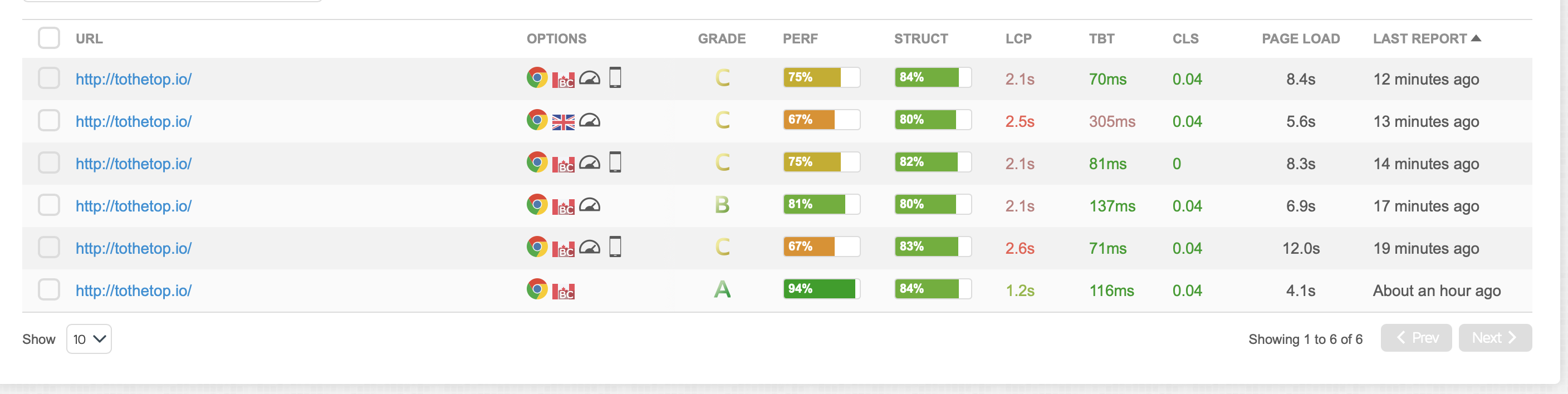
Here is a comparative of
- desktop through a standard broadband in North Amercia and Europe
- mobile phone through 4G (the most common) in North Amercia and Europe
Please not that the latest Apple have been selected but I've run test on Galaxy and it's the same
https://gtmetrix.com/compare/wrOJNoQW/gpODD0bs/FRMT2tl1/SxieOvxE
As you can see the rating is not A but C in most cases.Could you fix that
thanks
Olivier
0 -
also comparative in short
 0
0 -
Hello Olivier,
I am afraid we can't improve the performance on a standard broadband in North America and Europe.
33 of the 70 HTTP requests your website makes, go to these different service providers.
- https://www.googletagmanager.com/ 4
- https://www.google.com/ - 3
- https://www.google.co.uk - 1
- https://match.prod.bidr.io - 3
- https://px.ads.linkedin.com - 3
- https://r2.leadsy.ai/tag.js - 1
- https://snap.licdn.com - 1
- https://tag.trovo-tag.com - 2
- https://a.remarketstats.com - 1
- https://a.usbrowserspeed.com - 1
- https://api.instantly.ai/ - 2
- https://conversations-widget.brevo.com -4
- https://d13sozod7hpim.cloudfront.net - 2
- https://googleads.g.doubleclick.net - 5
As a result, your website's performance is the combined performance of 37 requests from Brizy Cloud and 33 from the different third-party vendors.
0 -
Hi George,
Interesting insight, I guess we could gain here since we don't use all those services
Could you tell which tool you use to track that?
Regarding the optimization, I'll come back with a suggestion when I have more time to prepare.
Thanks
Olivier
PS: where is the main hosting?
0 -
Hello Olivier,
I am using the GT Metrix performance report we have added above to analyze the HTTP requests your website make. At screen recording at https://jmp.sh/tl8IrYQq, I explain how you can analyze the different HTTP requests going to different service providers.
Brizy Cloud is hosted on AWS servers located in the US.
0 -
Thanks
I need to do a little bit of cleanup of scripts we don't use anymore before coming back.
Thanks for leaving that ticket open
Best
Olivier
0
Please sign in to leave a comment.
Comments
9 comments