SEO optimisation of website - indexed & not coming up on Google search

Hi Brizy,
I hope you're well.
I was wondering if you could offer some additional guidance around SEO optimisation. I’ve used Brizy’s built-in tools and also confirmed that the site is indexed via Google Search Console — it does appear when using site:dentalsleep.co.uk, so it seems to be indexed correctly.
However, the website doesn’t seem to appear in search results for relevant terms like “Dental Sleep”, “South Wales Dental Sleep”, or “SWDS”, which is a concern.
I’d be really grateful for any advice or suggestions you might have to help improve visibility in search rankings.
Thank you very much,
Yusuf
-

Hi Yusuf,
Thank you for reaching out.
Since your site is indexed but not appearing in search results for specific terms, this may be due to keyword competition or optimization. I recommend reviewing your titles, meta descriptions, and content to ensure they naturally include relevant keywords. Adding valuable content, such as blog posts related to dental sleep, can also help improve visibility. Additionally, building backlinks from relevant sites can further boost your site’s authority.
For guidance on optimizing SEO in Brizy Cloud, you may find these resources helpful:
https://www.youtube.com/watch?v=cWKWoohZFF8&t=2s
https://www.youtube.com/watch?v=Hg-qnLkbJBY&t=15sI hope this helps.
Best regards,
Ariel H.0 -
Hi Brizy Support,
I hope you're well.
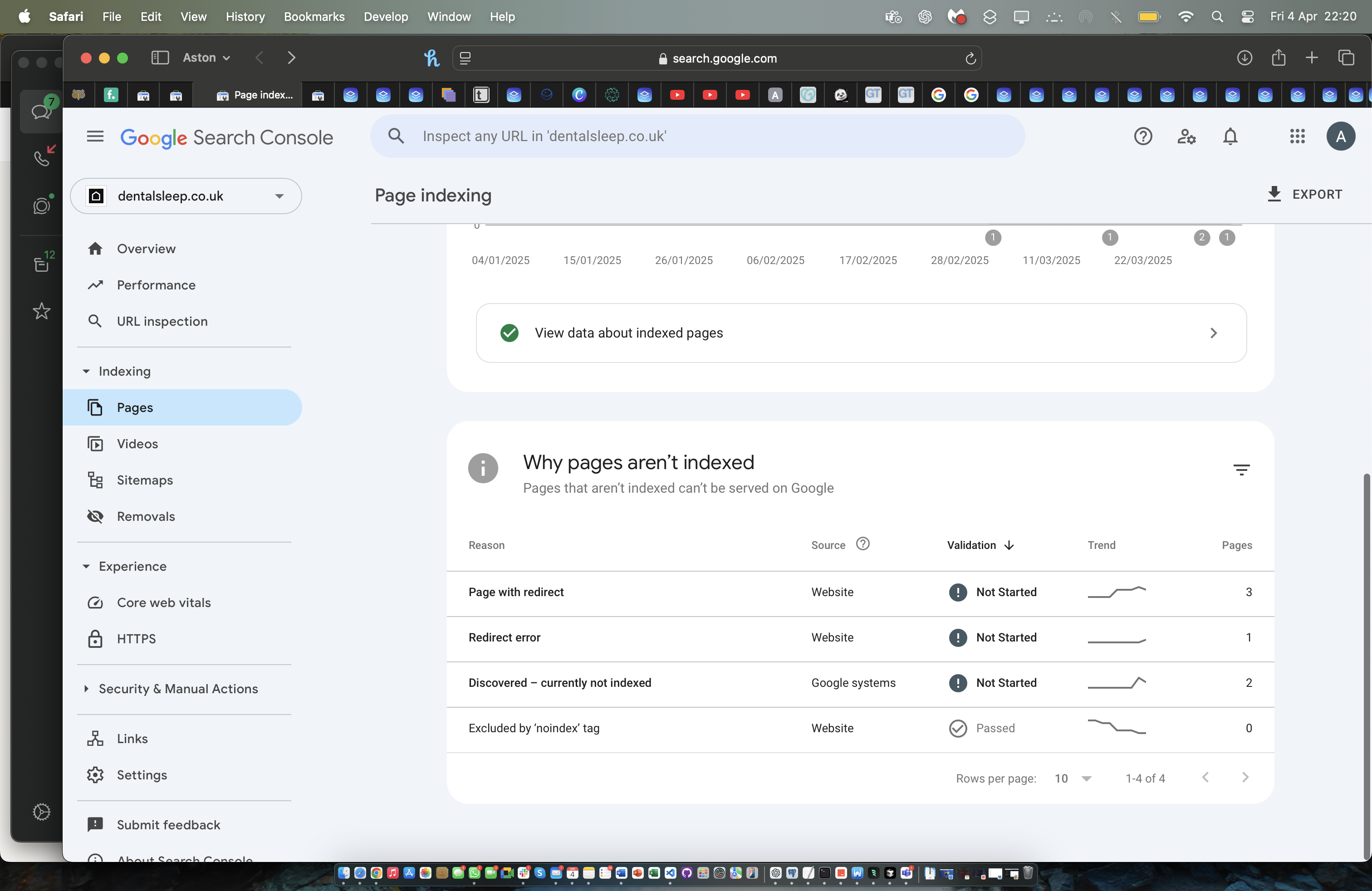
I'm reaching out as I’ve been having ongoing issues with getting my site properly indexed by Google. I’ve submitted it for indexing multiple times, but errors keep coming up and the pages still aren’t appearing as expected in search results.
I’ve also followed the SEO setup instructions provided, and used Brizy’s built-in SEO options to apply keywords to each page. I initially configured all of this when I built the site over a month ago, but even now, only two of the pages are showing up on Google when I search using those keywords.
Could you please look into this or advise on anything I might have missed?
Appreciate your help.
Best regards,
Yusuf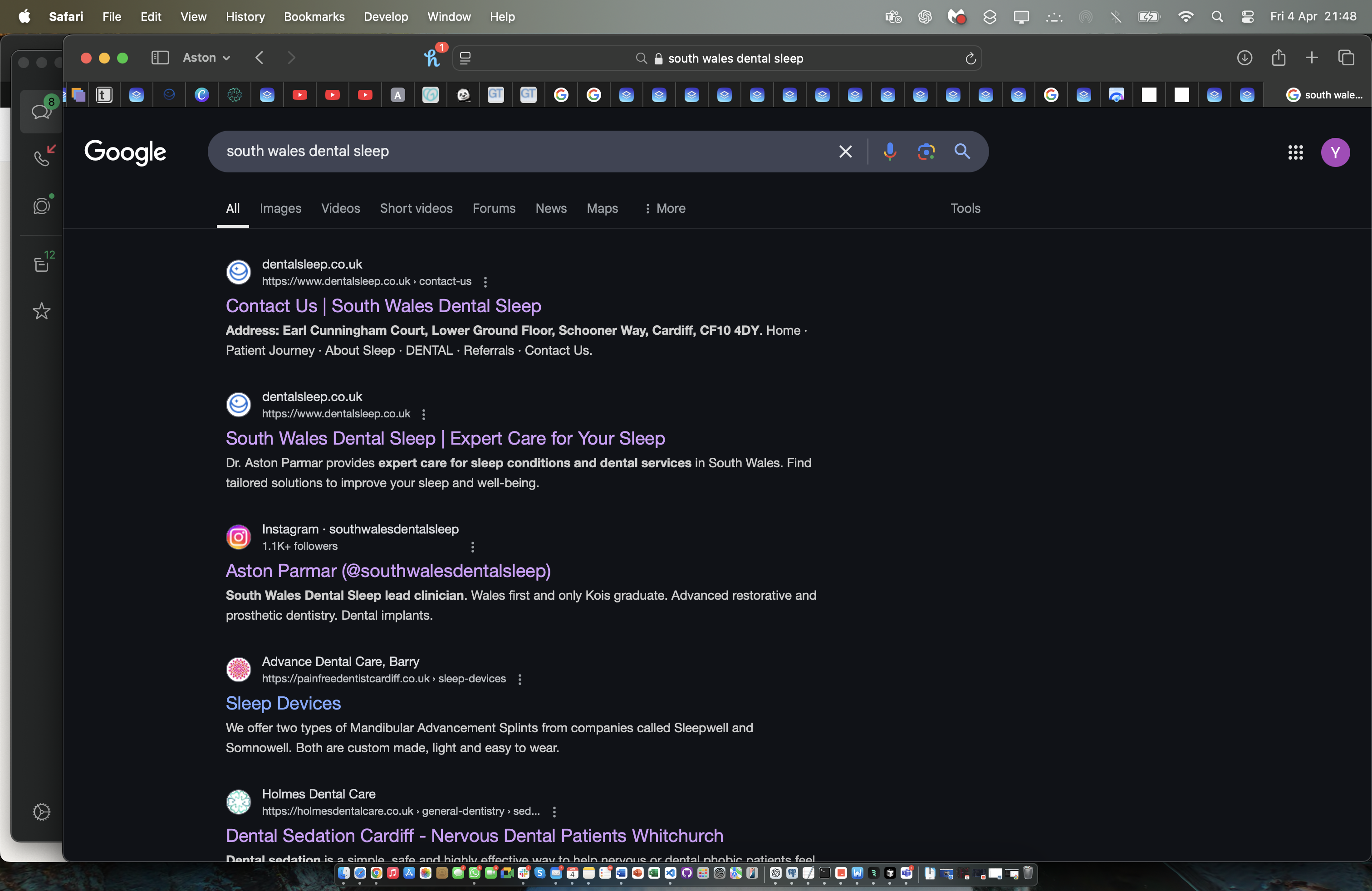
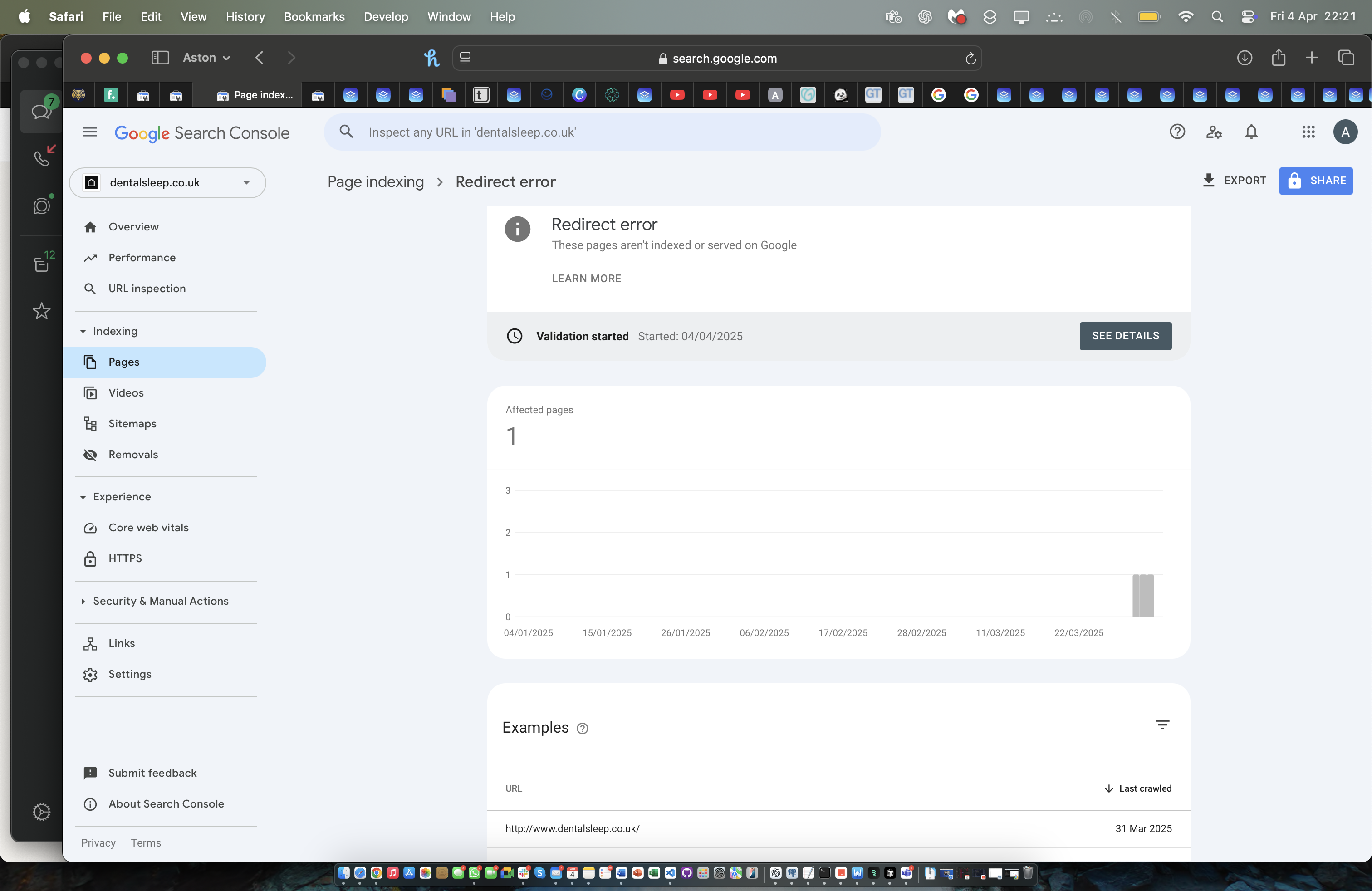 0
0 -

Hello Yusuf,
Currently 10 pages of your website are indexed by Google. Kindly see the screenshot at https://jmp.sh/Xz1BnaIl
When searching for the keyword "South Wales Dental Sleep" your website is at the first position. At second position, your "Contact" page is displayed. When you say "pages still aren’t appearing as expected in search results" what do you mean? How do you expect Google to rank your website?
You said "even now, only two of the pages are showing up on Google when I search using those keywords". Do you expect that when you search for this keyword, Google will show all results from https://www.dentalsleep.co.uk/? Google search will not usually show all results from a single website, as Google's algorithm prioritizes relevance and user experience, often displaying a mix of results from various sources, including the one you might be interested in. While Google may show multiple results from a single domain, all pages from a domain appearing in the first page of search results could be extremely rare. Have you comes across Google displaying results from a single domain in any search you have carried out so far?
0 -
Hi George,
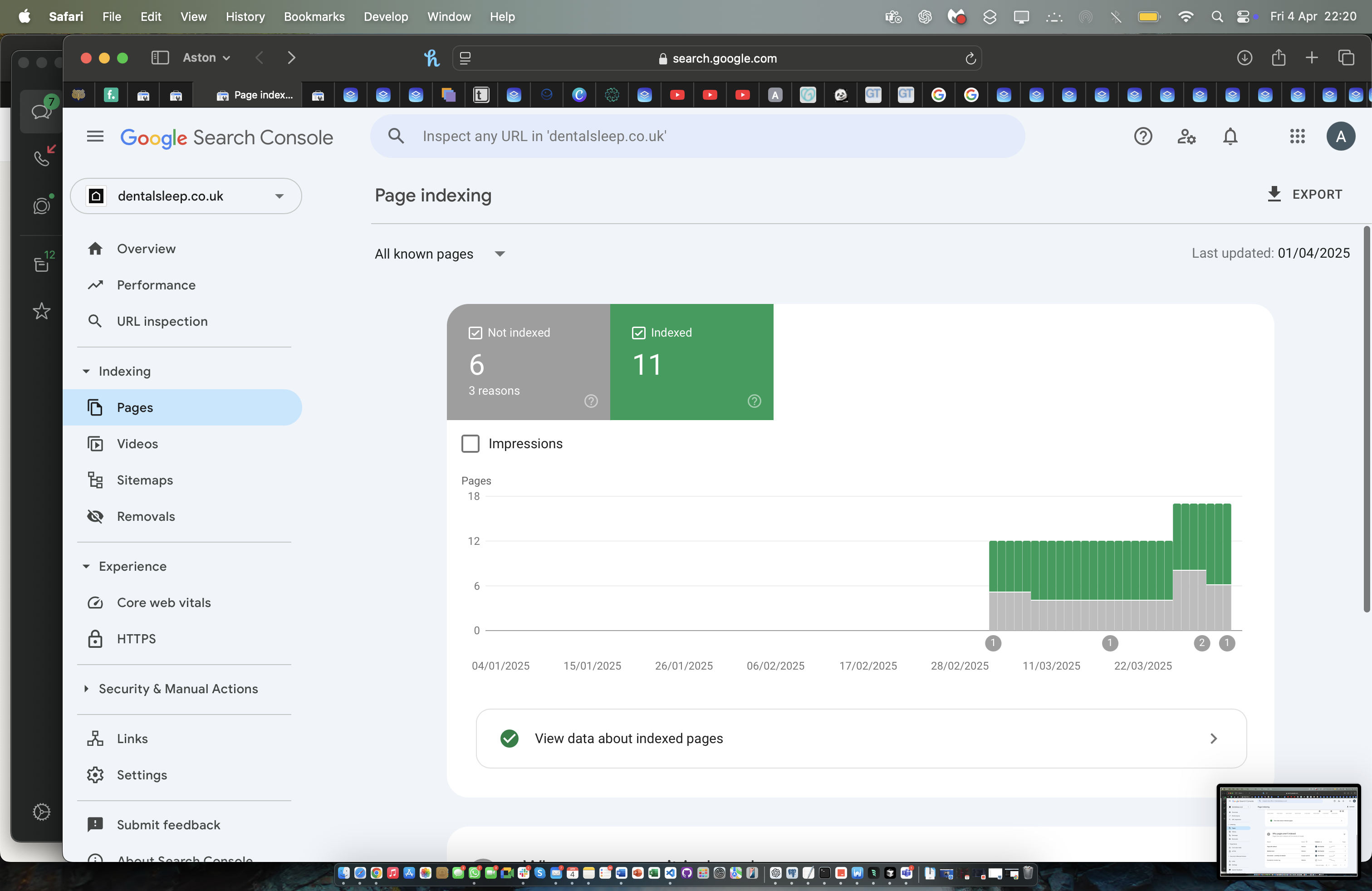
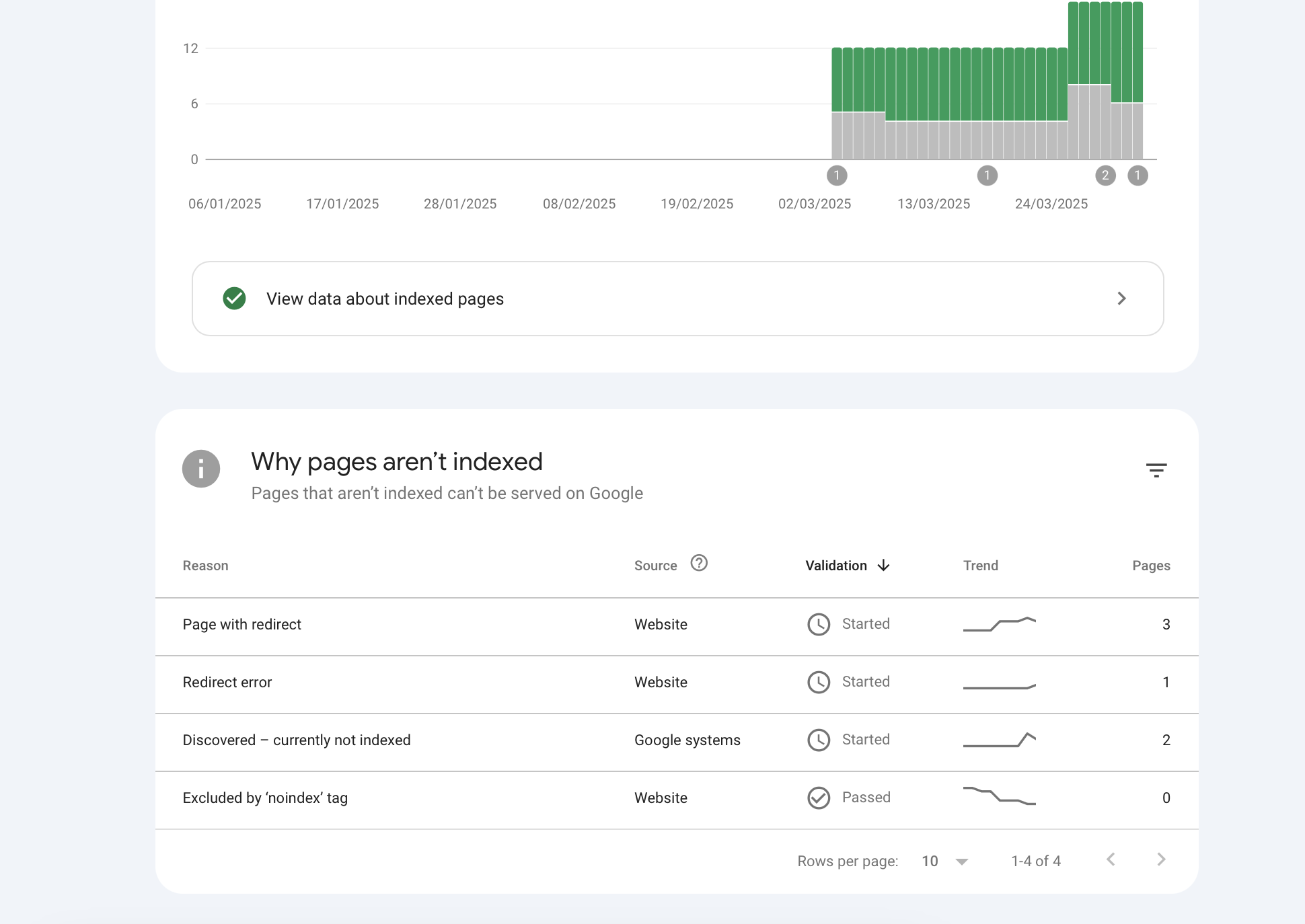
I was expecting all the pages to be indexed there are still 6 pages that haven't been indexed due to things such as redirect errors. Please can you help me address this.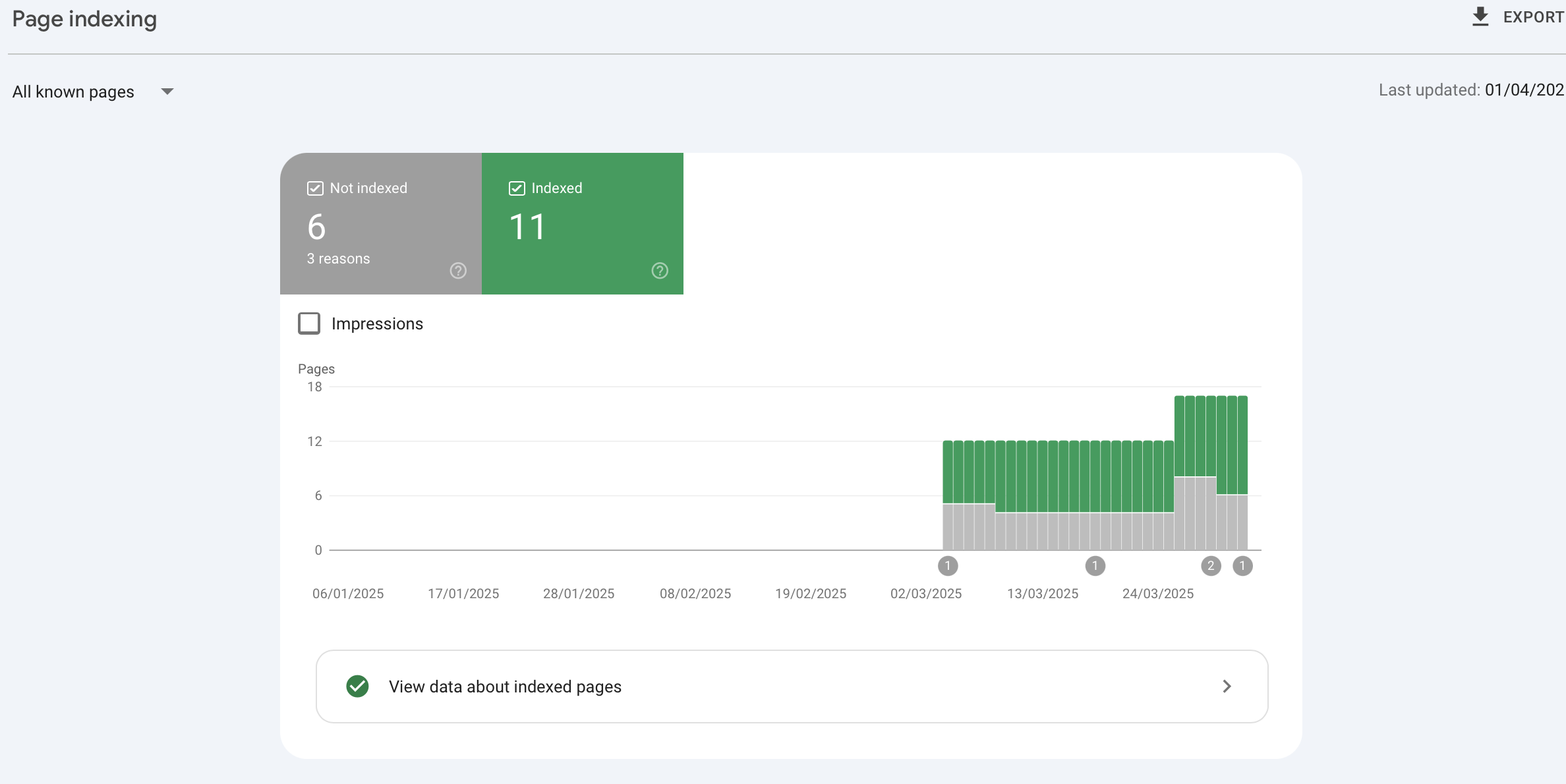
Also, whenever I type in South Wales dental sleep even though these keywords are on all pages of the SCO only these two pages are shown, now I wasn't expecting many pages to come up but I was expecting at least a few. Is there a way where the website and links can be presented well like below for this website: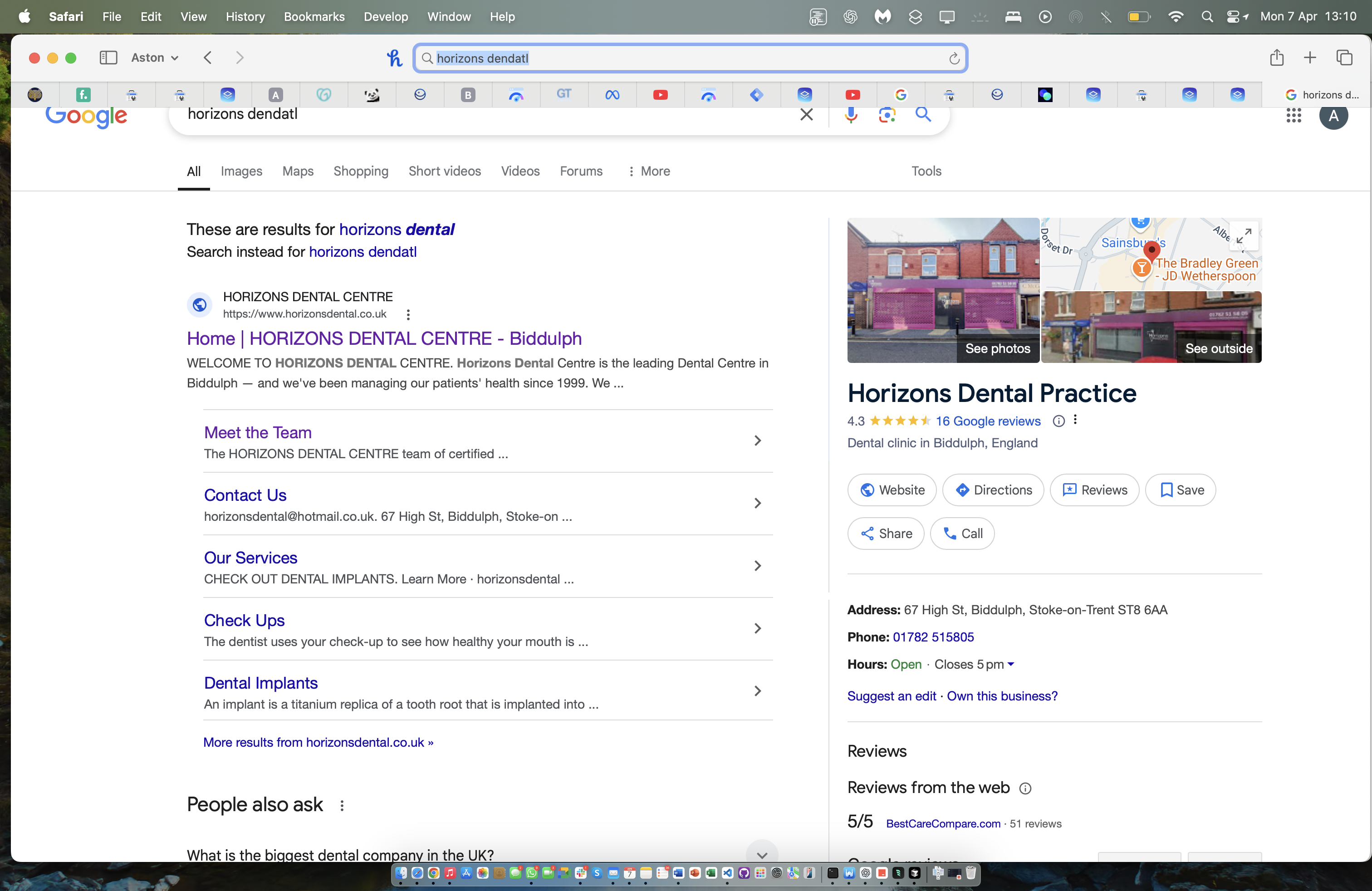
You can see that "Horizons Dental" has many sub-pages listed - for this website dental sleep.co.uk it doesn't do this.
Additionally, I have tried to address this so that the business name comes up in search results as apposed to just dentalsleep.co.uk - (in the two images below) I set this up via appling a Markup Schema to the all the pages using injection code for the header and footer - this was applied through Google Tags .
Here is the Schema I used below:<script type="application/ld+json"> { "@context": "https://schema.org", "@type": "Dentist", "name": "South Wales Dental Sleep", "image": "https://cloud-1de12d.b-cdn.net/media/iW=312&iH=92&oX=0&oY=16&cW=312&cH=72/9f5c5820076d618f683d053b1a6046e0/Dental-Sleep-Horizontal-Blue.png", "@id": "https://www.dentalsleep.co.uk", "url": "https://www.dentalsleep.co.uk", "telephone": "02922 648458", "address": { "@type": "PostalAddress", "streetAddress": "Schooner Way", "addressLocality": "Cardiff", "postalCode": "CF10", "addressCountry": "GB" }, "geo": { "@type": "GeoCoordinates", "latitude": 51.4723757, "longitude": -3.1658841 }, "openingHoursSpecification": { "@type": "OpeningHoursSpecification", "dayOfWeek": [ "Monday", "Tuesday", "Wednesday", "Thursday", "Friday" ], "opens": "09:00", "closes": "17:00" } } </script>And, if you look at the images below:


You can see that for the first website, the website/company name is coming up and then the URL is underneath for the dental sleep website the link is coming up at the top and the bottom next to the icon.
Please could you advise on this - I very much appreciate your help :)0 -
Hello Yusuf,
Let me go over your questions one by one.
Non indexed pages
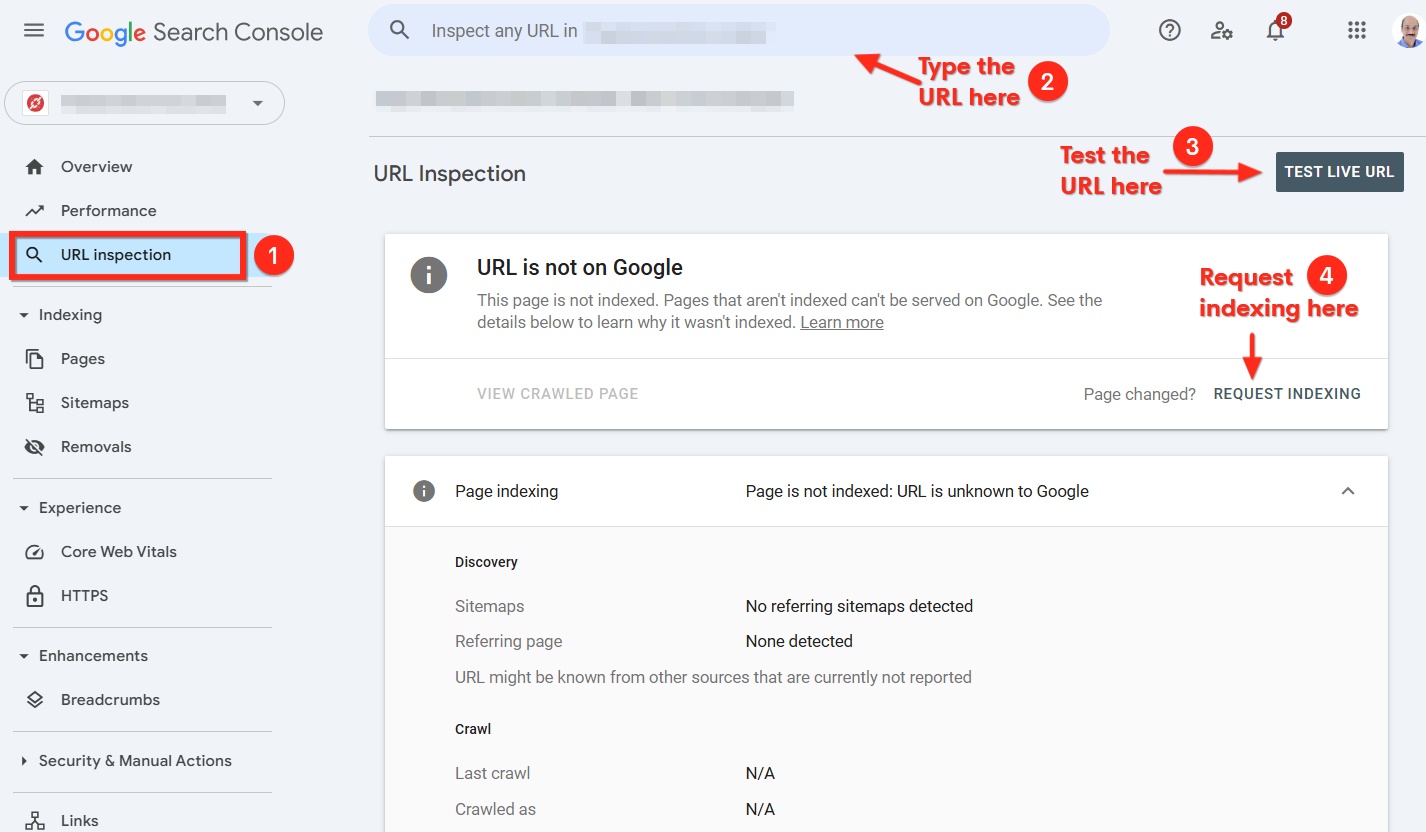
Kindly make a list of the non indexed pages and use the "URL Inspection" tool in Google Search Console to request indexing of the non indexed pages following these steps.
- Select the "URL inspection" tool on the left sidebar
- Paste the URL of a non indexed page at the top of the page
- Click on the "Test Live URL" button and check how the page appears to Google Inspection Tool
- Click "Request Indexing" option to request Google to index your page
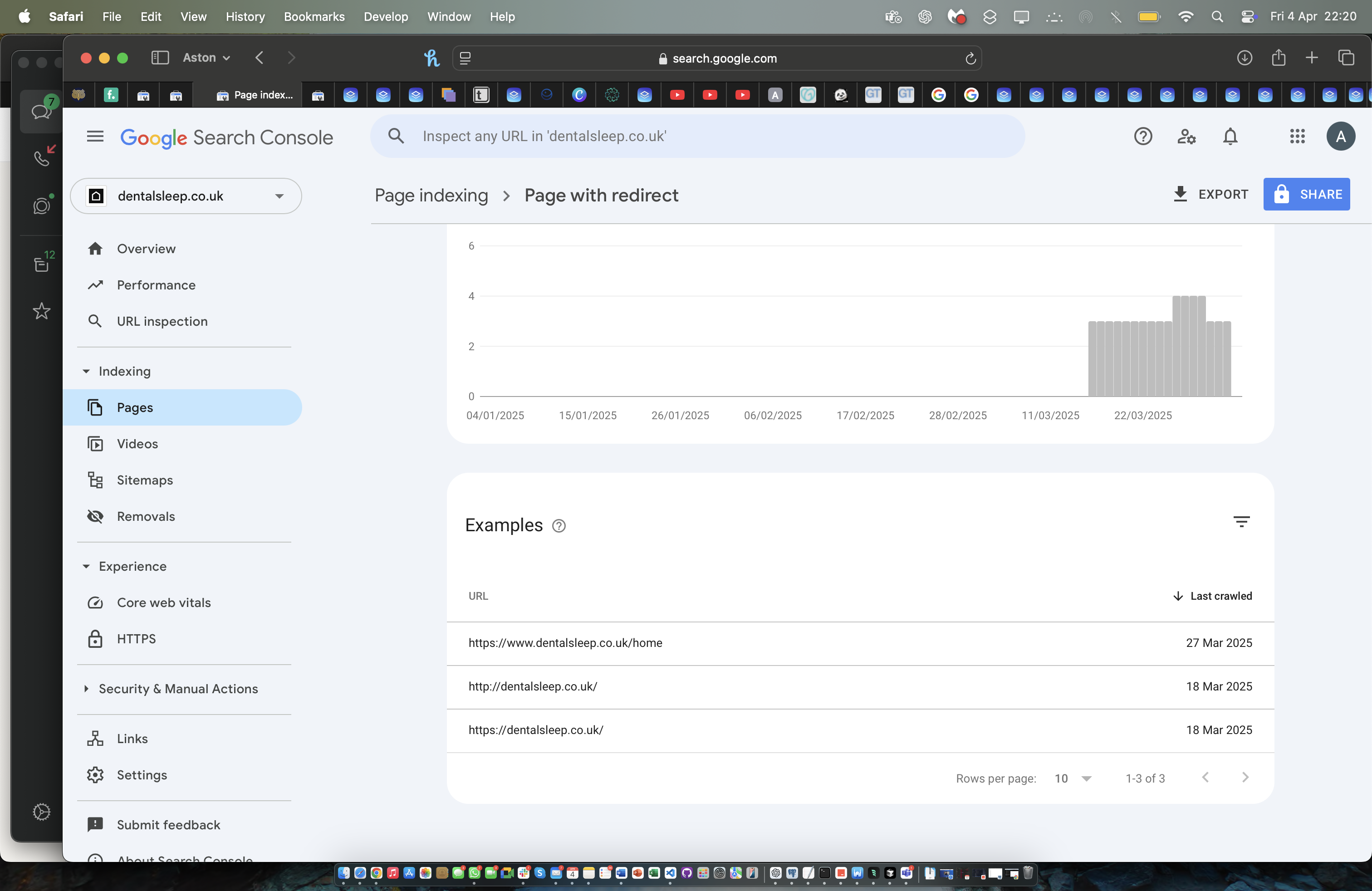
Redirected URLs are not indexed
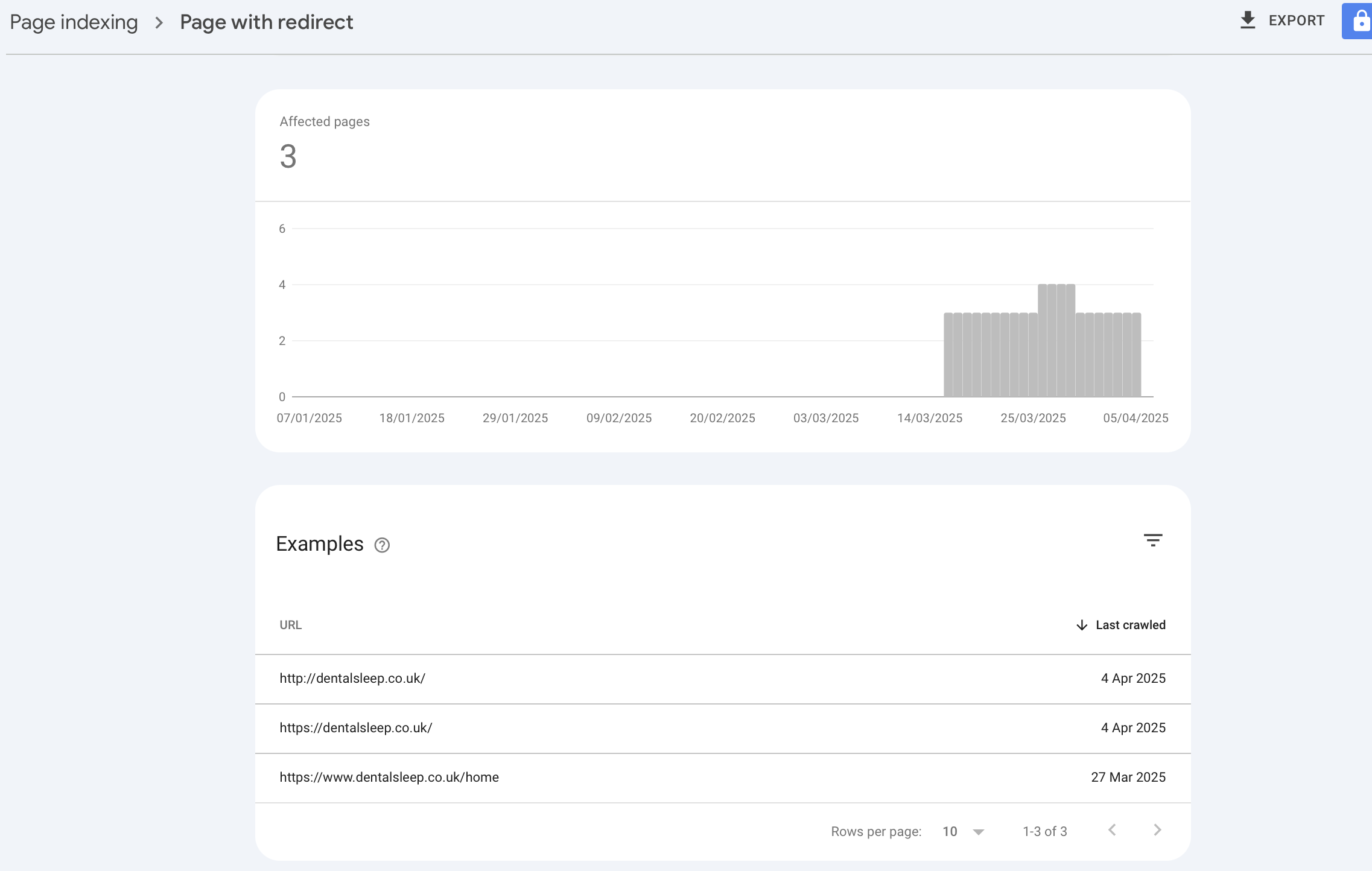
When URL 1 redirects to URL 2, Google will index only URL 2 and not URL 1. Let's look at the reason why the three URLs in the attached screenshot will not be indexed
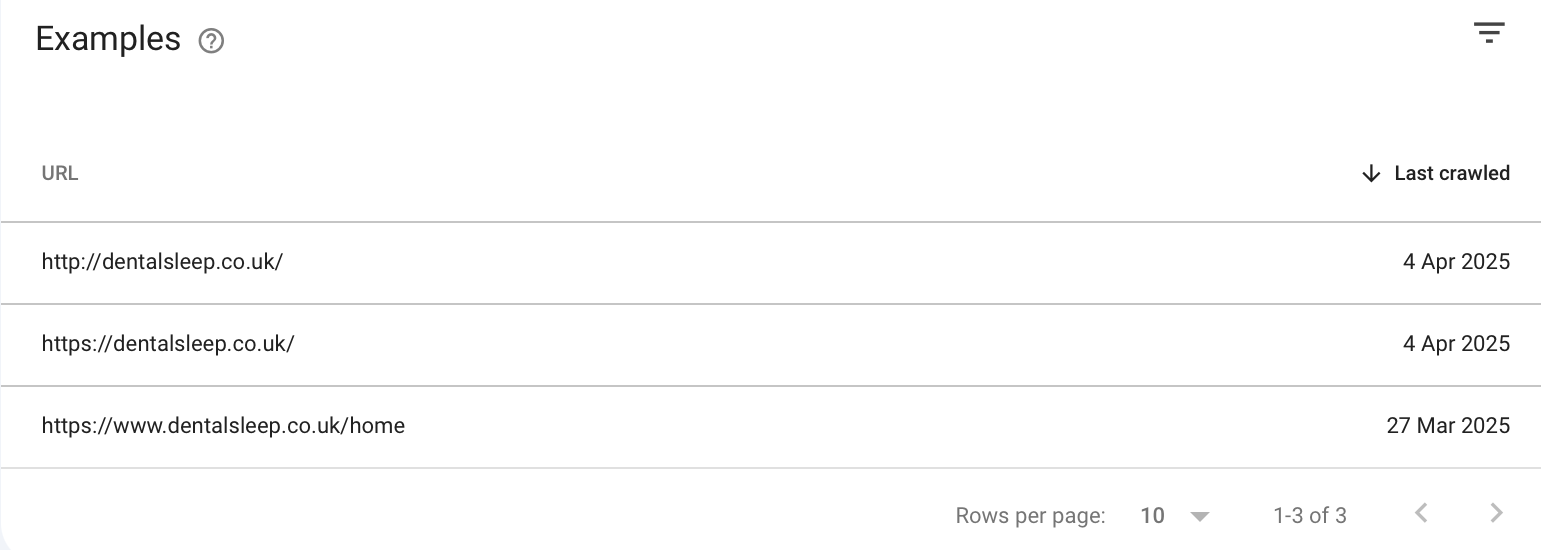
- http://dentalsleep.co.uk/ redirects to https://dentalsleep.co.uk/. Hence Google will not index the first URL
- https://dentalsleep.co.uk/ redirects to https://www.dentalsleep.co.uk/ Hence Google will not index the first URL
- https://www.dentalsleep.co.uk/home redirects to https://www.dentalsleep.co.uk/. Hence Google will not index the first URL
Suggest a "Site Name"
To suggest the site name "South Wales Dental Sleep" to Google, kindly add the "WebSite Structured Data" to your home page following the procedure at https://jmp.sh/xnCvWjYh These lines must be present in your structured data.
<script type="application/ld+json">
    {
      "@context" : "https://schema.org",
      "@type" : "WebSite",
      "name" : "South Wales Dental Sleep",
      "url" : "https://www.dentalsleep.co.uk"
    }
  </script>
Sitelinks
In the example of Horizons Dental, the listed sub pages are called "Sitelinks". Sitelinks are links from the same domain that are clustered together under a search result. Google will show sitelinks in search results when it is deemed useful to the user. If the website structure doesn't allow Google to find good sitelinks, or if Google bot does not think that the sitelinks for your site are relevant for the user's query, it won't be displayed. Sitelinks are auto generated by Google and there is no option to suggest sitelinks to Google. If you follow these best practices, you can improve the chances of Google including sitelinks along with your website's listing.
- Make sure that the text you use as your page titles and in your headings is informative, relevant, and compact.
- Create a logical site structure that is easy for users to navigate, and make sure you link to your important pages from other relevant pages.
- Ensure that your internal links' anchor text is concise and relevant to the page they're pointing to.
- Avoid repetitions in your content.
0
Please sign in to leave a comment.
Comments
5 comments