Every page shows homepage

Hello,
Every page on my website shows as my homepage when I visit it, despite looking unique in the Brizy editor and having a unique URL.
For instance, /page/ is supposed to show a location-specific page, but it just shows the homepage again. /blog also takes me to the homepage, even though I have a published post archive template.
Please advise how I can solve this issue
-

Hi,
Thank you for contacting us.
This issue is likely caused by a plugin or theme conflict. To troubleshoot, try disabling all plugins except Brizy and Brizy Pro and see if that resolves the issue. Additionally, switch to a different theme temporarily to check if the problem persists. If you have any custom code embedded in your pages, remove it temporarily and see if that helps.
If disabling third-party plugins fixes the issue, re-enable them one by one while testing your pages to identify the conflicting plugin. If switching themes resolves the problem, consider using a more compatible theme like Blocksy or Astra.
Please try this and let me know how it goes.
Best regards,
Ariel H.0 -
Thanks for the quick response. I disabled every plugin besides Brizy and Brizy Pro and then switched to Blocksy theme but the issue is still occuring.
If I remove my homepage from the static page under Reading Settings in Wordpress then every page will be replaced with my blog instead. If I remove my blog, every page is replaced with the default theme blog.
0 -
Hi,
Thank you for the update.
Could you also check if you have a template under Brizy → Templates? If so, try setting it to Draft, then go back to your pages and see if that makes a difference.
If the issue persists, could you provide temporary access to the second website so we can take a closer look? Please add us as an Admin user in your WordPress Dashboard and send the details tocommunitysupport@brizy.io:
Community Post link: https://support.brizy.io/hc/en-us/community/posts/25584346899218
WordPress Admin URL:
Username:
Password:Best regards,
Ariel H.0 -
I had an archive template for the blog, set it to draft but nothing changed. Emailing the info now.
0 -
Hi,
Thank you for your cooperation.
The issue was caused by the Permalink settings in WordPress. It looks like your site was using the Plain permalink structure, which can sometimes cause all pages to redirect to the homepage.
To fix this, I updated the Permalink settings to Post Name (/sample-post/) under Settings > Permalinks in your WordPress dashboard. This ensures that each page and post has a proper URL, allowing them to display correctly instead of redirecting to the homepage.
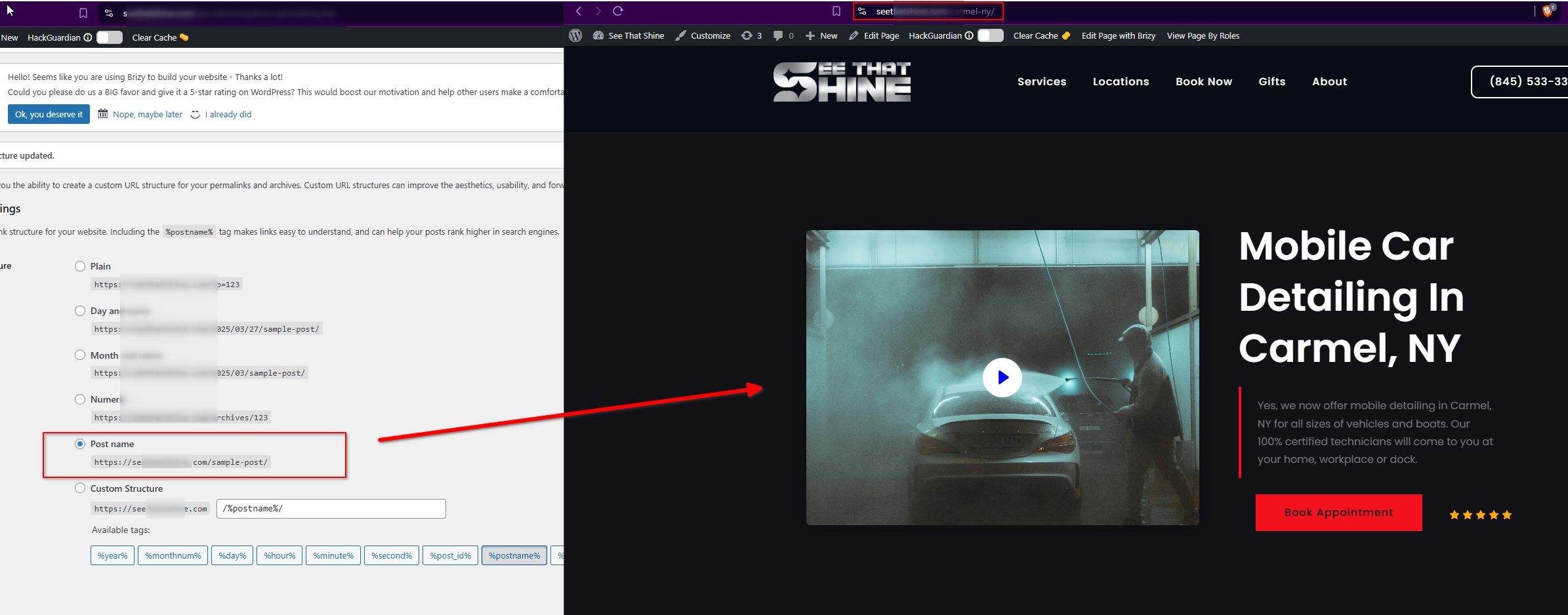
Everything should be working fine now, but if you run into any other issues, feel free to let us know.
Best regards,
Ariel H.0 -
Thanks so much for fixing my problem and explaining it to me, and for your fast replies to my ticket. Have a great day
0
Please sign in to leave a comment.
Comments
6 comments