Remove Arrows from Mobile Menu

Hello, I hope you're doing well.
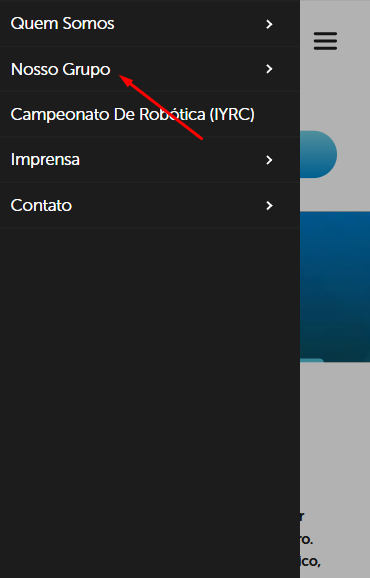
I need some help removing the arrows that appear in the mobile menu of the website (as shown in the attached image). Even though there are no submenus, these arrows are still visible, and I’d like to get rid of them. How can I do this?
Thank you in advance for your help!
https://mkrgrupo.com/
-

Hi,
Thank you for contacting us.
The menu seems to be working correctly, as shown in this screencast: https://youtube.com/shorts/HPbEPYEoCxA
Please note that the arrow is only visible in the editor view. When you preview the site, it won’t appear.
Let us know if you have any other questions.
Best regards,
Ariel H.0 -
I hadn't noticed, thanks.
Another question: when I click on "our group", for example, is it possible to show the submenu without necessarily having to click on the arrow next to it to make it appear?
 0
0 -
Hi,
Thank you for the update.
Currently, users need to tap or click on the arrow to expand the submenu. However, we appreciate your feedback and will keep this in mind for future improvements. If you'd like, you can submit your suggestion as a feature request at https://www.brizy.io/ideas-and-roadmap. This platform helps us better track suggestions and prioritize feature requests based on user needs.
Best regards,
Ariel H.0
Please sign in to leave a comment.
Comments
3 comments