Custom Assets - Global Sections not Deleting and Query about Categories

Hi
I have a couple questions about Custom Collections (Custom Assets).
I'm setting up a project gallery for a construction company and it's going well so far! I love how flexible the layouts are for both project listings and the actual detail page template.
1) I added a section to the project template while setting up my design and made it a global block and applied it to ALL for the specific collection - worked great. However a bit later, I decided I didn't need one of the sections any more as I totally redesigned it a different way and I deleted it on the template and also removed it from Global Blocks but it remained on all of the individual listing pages. Luckily I only had 3 projects set up so far so I manually removed each one. My question is how do delete a global section so it removes it across all the pages? I can see in the future this would be a problem after many items are set up. Is there a procedure to follow so this removes them all in one hit? PS I also had the same issue with normal web pages and global content blocks too, not just custom assets. I deleted it but it remained on all the other pages. Sorry I have no live site URL to demonstrate as I deleted them individually but just after the correct process.
2) With categories, can I have two groups? Eg a set of categories for Projects and then a different set of categories for Team Section? It seems there is only one set of categories so you'd have to mix them altogether? Do they share all the same categories as shown in the Blog area? Are there any instructions regarding how categories work with multiple custom assets?
Thanks
Eva
-

Hello Eva,
Going over your questions.
- Let's say you have added a global block with the following Display Condition
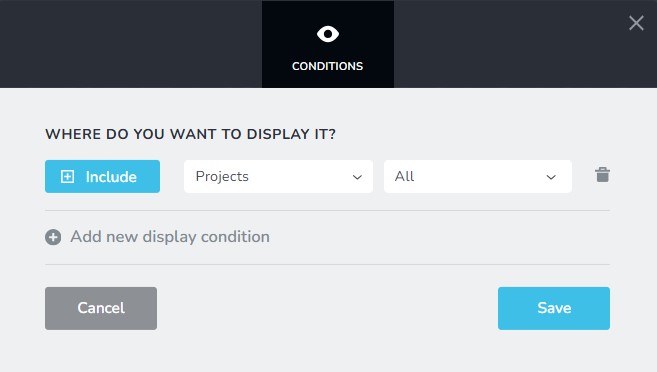
To remove the above global block from all projects, kindly delete the Display Condition
Include > Project > All and click on the "Save" button.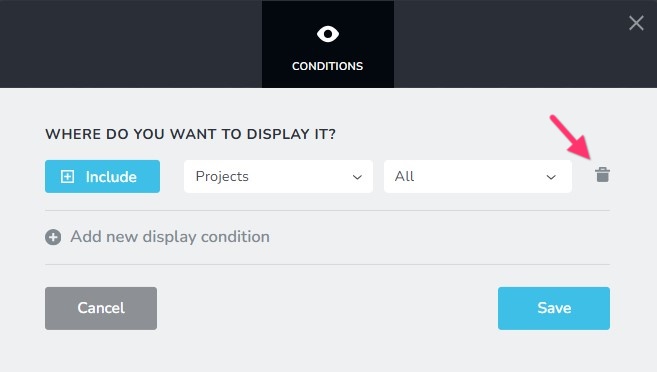
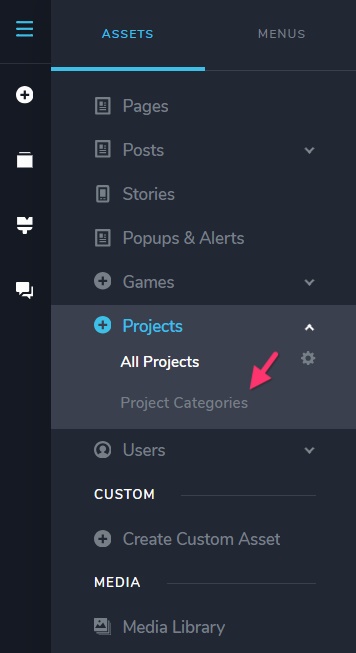
- You can not have categories taxonomy for both "Projects" and "Teams" custom assets. Consider renaming them as "Project Categories" and "Team Categories" respectively.
0 - Let's say you have added a global block with the following Display Condition
-
Hi KC George
Thanks for the instructions for deleting Global sections, I'll give that a go next time!
I was a bit confused at first on how to get the categories to sit underneath the Asset Heading in the menu bar, but worked it out. When you link it up using the reference field, it then automatically adds it underneath in the dashboard menu. Very cool !!
0
Please sign in to leave a comment.
Comments
2 comments