Import entire Brizy site from another provider to Brizy Cloud

Greetings all. Am I able to copy or download an entire Brizy site from Godaddy, and import it into my Brizy Cloud account? What would be most simple way if so?
0
-

Hello Gary,
There isn't an automated procedure to migrate a Brizy WordPress project to Brizy Cloud. You can recreate the project following a manual process- Save each page as a layout in the Brizy WordPress project
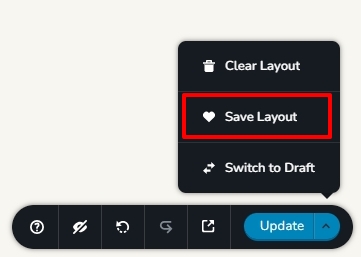
- In your Brizy Cloud project, add pages one by one and import the page layouts saved in step 1 to different pages
- Copy paste the global styles and typography from Brizy WordPress project to the Brizy Cloud project
- Recreate menu in Brizy Cloud, setup global blocks and add its display conditions
- Configure email notifications for Brizy forms in the Cloud project
0 - Save each page as a layout in the Brizy WordPress project
Please sign in to leave a comment.
Comments
1 comment