Full page mega menu close button missing

I want to create a full page mega menu in order to cover the full page in desktop view. But there is no option or workaround to create a close button. I don't want to use a button pointing to an anchor link to a specific block, because the user could be at any part of the page, and I want the user after closing the menu to remain at the place he/she was before closing the menu. Can you suggest a solution?
-

Hello!
Thank you for contacting us.
You can try using the button popup feature to create your mega menu. This is demonstrated on this screencast - https://youtu.be/yAlC2JOunDc
While the example here shows a photo gallery, you can fully customize the popup to design your own mega menu layout and manually add your links. Since it's a popup, it will overlay the entire page without affecting the user's scroll position.
Let me know if you need further guidance.
Best regards,
Ariel H.0 -
Hello! Thank you for your recommendation. I am familiar with the popup feature. I honestly prefer to use the built in mega menu feature for various reasons. That is why I am searching for a solution which I would expect to be there from start for the built in mega menu. Otherwise I consider it a half baked feature.
0 -

Hello Konstantinos,
Currently the mega menu is designed to get triggered when the user hovers over the specific menu text and the menu to close when the mouse pointer moves away from the menu text. On a full width and full height mega menu this approach will not work. Hence what Ariel suggested above is the only solution for you.
0 -

How come on the "Mega Menu" we can't control left and right position so that the modal can be directly center of our Menu Item?? In the image, the modal is under ABOUT when set to center alignment, but the modal is for the "instructors" menu item. We have NO WAY of centering it under the actual menu element.
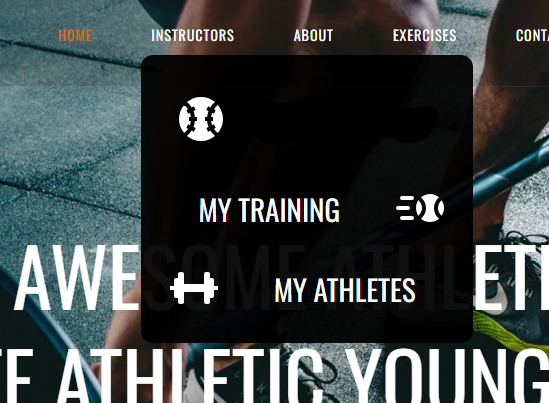 0
0 -
Hello Aj Pfeil,
The menu container will initially be skewed towards one side of the selected menu when you increase the mega menu's width. The mega menu container will align itself evenly on both sides of the selected menu when you click outside and then click on the mega menu a second time.
You can increase the width of the menu container by selecting the top left corner and then the Cog icon. You can set a width percentage more than 100 if you like (example: 150% or 200%)
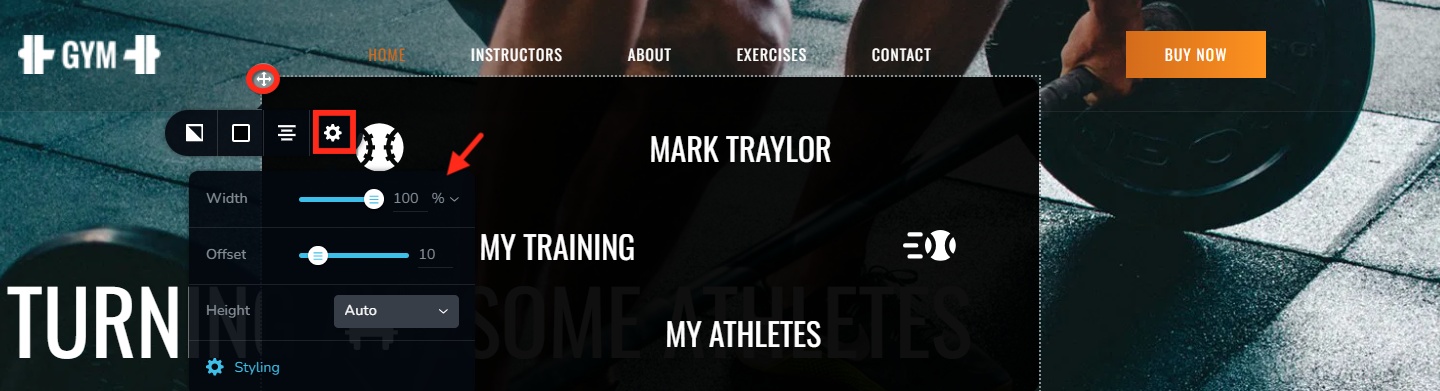 0
0
Please sign in to leave a comment.
Comments
5 comments