Icons in Floating Editing Bar are Dark

Hi,
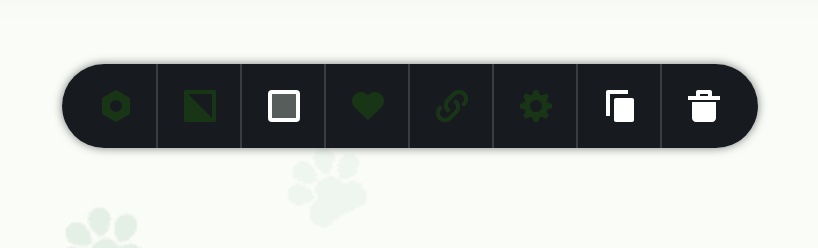
Several of the icons in the editing bar within my site are darkened. They are the same color as my site's number one color. I've tried adjusting the installed WP theme. I'm running Twenty Twenty because I need the "menu" item to appear under "appearances" --another Brizy problem I had to recently fix.
But I can't seem to fix the darkened areas of the edit bar. I was trying to show the client around her site today, and I encountered this--really troublesome and made Brizy look bad, unfortunately. Please help. See image:
-

Hi Kristen,
Thank you for contacting us.
Could you check if the issue persists when all other plugins are disabled, leaving only Brizy and Brizy Pro active?
Also, if you’ve added any custom code to your site, please try temporarily removing it to see if that resolves the issue.
If the issue continues, please provide temporary access to your WP Admin so we can take a closer look at your site? Kindly add us as an Admin user in your WordPress Dashboard and send the details to communitysupport@brizy.io:
Community Post link: https://support.brizy.io/hc/en-us/community/posts/25312270628754
WordPress Admin URL:
Username:
Password:Best regards,
Ariel H.0 -
Hi Kristen,
Thank you for your cooperation.
Could you also provide your website’s URL or WordPress login URL if you’ve changed the default login page? This will help us access your site for investigation. We receive multiple WordPress credentials via this email, and since your last message didn’t specify the site, it’s a bit difficult for us to find it.
Looking forward to your response.
Best regards,
Ariel H.0
Please sign in to leave a comment.
Comments
2 comments